
What Is Azure Monitor Agent?
Azure Monitor Agent (AMA) collects monitoring data from the guest operating system of Azure and hybrid virtual machines. It delivers this data to Azure Monitor for use by features, insights, and other services such as Microsoft Sentinel and Microsoft Defender for Cloud.
The agent installs on VMs running in Azure, in other clouds, or on-premises, where it has access to local logs and performance data. Without the agent, you can collect data only from the host machine because you would have no access to the client operating system and running processes.
Azure Monitor Agent replaces the legacy Log Analytics agent for Azure Monitor. The Log Analytics agent is deprecated and isn't supported as of August 31, 2024. The shift to AMA consolidates what previously required multiple agents into a single solution, simplifying deployment and management at scale.
AMA consolidates what previously required multiple agents (Log Analytics agent, Azure Diagnostics extension, and Telegraf agent) into a single solution. It introduces Data Collection Rules for centralized configuration management, making it easier to manage monitoring at scale and adjust data collection without touching individual systems.
Installation and Availability
AMA can be installed using different methods depending on your deployment scenario. You can install the agent on a single machine through the Azure portal or using standard virtual machine extension installation methods. For larger deployments, Azure Policy enables automated installation at scale, ensuring consistent coverage across your environment.
In some cases, the agent is automatically installed when you enable a feature that requires it, such as Microsoft Sentinel. The automatic installation only occurs when the feature is first enabled. For continued automated installation as new VMs are deployed, a policy should be created and enabled to maintain coverage.
How Data Collection Works
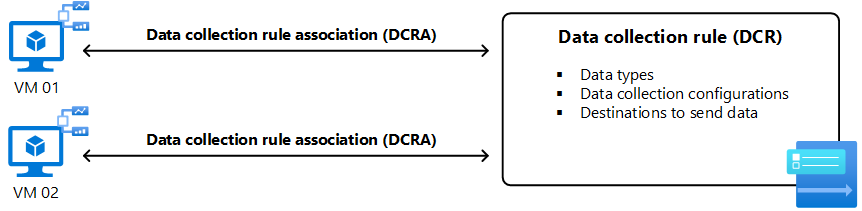
Azure Monitor Agent collects all data using data collection rules (DCRs) . In a DCR, you define the data type that's collected, how to transform the data including filtering and aggregating, and the destination for collected data.
A single DCR can contain multiple data sources of different types. You can include several data sources in a few DCRs or create separate DCRs for each data source. Creating separate DCRs allows you to centrally define logic for different collection scenarios and apply them to different sets of machines.
A DCR is applied to an agent by creating a data collection rule association (DCRA). One DCR can be associated with multiple agents, and each agent can be associated with multiple DCRs. When an agent is installed, it connects to Azure Monitor to retrieve any DCRs associated with it. The agent periodically checks back to determine if there are changes to existing DCRs or associations with new ones.
Supported Environments and Data Sources
Azure Monitor Agent works across Azure virtual machines, other clouds through Azure Arc, and on-premises through Azure Arc. For Windows environments, the agent also supports Windows Client operating systems.
Windows agents collect Event Logs, performance counters, file-based logs, and Internet Information Services logs. Linux agents collect Syslog messages, performance counters, and file-based logs. All collected data is sent to Azure Monitor Logs for analysis and alerting.
Installation Requirements
Virtual Machine Extension Details
Azure Monitor Agent is implemented as an Azure VM extension. For Windows systems, the publisher is Microsoft.Azure.Monitor with type Azure Monitor Windows Agent. Linux systems use the same publisher with type AzureMonitorLinuxAgent.
Permissions
For deployment, you need the Virtual Machine Contributor or Azure Connected Machine Resource Administrator role on target machines. Any role with permissions to create Azure deployments, such as Log Analytics Contributor, is needed at the subscription or resource group level to deploy via Azure Resource Manager templates, which are also used by Azure Policy.
Managed Identity Requirements
Managed identity must be enabled on Azure virtual machines. Both user-assigned and system-assigned managed identities are supported.
User-assigned managed identity should be used for large-scale deployments. You can create one user-assigned managed identity and share it across multiple VMs, making it more scalable than system-assigned. If you use a user-assigned managed identity, you must pass the managed identity details to the Azure Monitor Agent via extension settings:
System-assigned managed identity is suited for initial testing and small deployments. When used at scale, it results in substantial identity churn in Microsoft Entra ID. For Azure Arc-enabled servers, system-assigned managed identity is the only supported authentication and is enabled automatically when you install the Azure Arc agent.
Disk Space Requirements
Azure Monitor Agent caches and logs data to local filesystems. Windows systems need approximately 500 MB for packages, 100 MB for extension logs, and 10.5 GB for agent cache. Linux systems require 700 MB for packages, 100 MB for extension logs, 500 MB for agent cache, and 10 GB for event cache.
Deployment Methods
Azure Monitor supports multiple methods to install the Azure Monitor Agent as an extension. The agent is required if you want to monitor the operating system and workloads using VM insights, analyze and alert using Azure Monitor, perform security monitoring with Microsoft Defender for Cloud or Microsoft Sentinel, or collect inventory and track changes.
Azure Monitor Agent logs are stored locally and are updated after temporary disconnection of an Arc-enabled machine.
Deploy the Extension Individually on Each Machine
This method supports managing the installation, management, and removal of the Azure Monitor Agent extension from the Azure portal, using PowerShell, the Azure CLI, or an Azure Resource Manager template. You can enable automatic extension upgrade, which automatically updates the extension to the latest version when available.
This approach can be useful for testing purposes or if you have a few machines to manage. It provides immediate deployment of the extension. However, it offers limited automation and doesn't scale well to many servers.
This method doesn't create a Data Collection Rule automatically, so you must create a DCR separately and associate it with the agent before data collection begins.
Use Azure Policy
You can use Azure Policy to deploy the Azure Monitor Agent extension at scale to machines in your environment and maintain configuration compliance. Policy-based deployment reinstalls the extension if removed after policy evaluation and identifies and installs the extension when a new Azure Arc-enabled server is registered with Azure.
The Configure operating system for Arc-enabled machines to run Azure Monitor Agent policy installs the Azure Monitor Agent extension and configures the agent to report to a specified Log Analytics workspace. However, the standard compliance evaluation cycle runs once every 24 hours. An evaluation scan for a subscription or resource group can be started with Azure CLI, Azure PowerShell, a call to the REST API, or by using the Azure Policy Compliance Scan GitHub Action.
Use Azure Automation
The process automation environment in Azure Automation and its support for PowerShell and Python runbooks can help automate the deployment of the Azure Monitor Agent extension at scale to machines in your environment.
This approach allows you to use a scripted method to automate deployment and configuration using scripting languages you're familiar with. Runbooks run on a schedule that you define and control, and can authenticate securely to Arc-enabled servers from the Automation account using a managed identity.
This method requires an Azure Automation account and authoring and managing runbooks in Azure Automation. You must create a runbook based on PowerShell or Python, depending on the target operating system.
Automatic Installation with Services
The agent is automatically installed when you enable certain features that require it, such as Microsoft Sentinel. The automatic installation only occurs when the feature is first enabled. For continued automated installation for new VM deployments, a policy should be created and enabled.
Azure Monitor Agent in Defender for Cloud
Microsoft Defender for Cloud uses Azure Monitor Agent to protect databases in the Defender for SQL Servers on Machines plan and provide free data ingestion benefits in Defender for Servers Plan 2.
Defender for SQL Server on Machines uses AMA to collect machine information for posture assessment, detect misconfigurations, and prevent attacks. Auto provisioning for AMA is turned on by default when you enable the database protection plan. You can turn automatic provisioning off and on as needed.
What's Next
Deploying Azure Monitor Agent requires aligning data collection requirements with your monitoring strategy and operational processes. As a Microsoft solutions partner, Precio Fishbone helps organizations design and implement Microsoft solutions tailored to their infrastructure needs.
Contact our expert to discuss how monitoring capabilities can be optimized for your company.
Share this on

Jerry Johansson
Works in IT and digital services, turning complex ideas into clear, engaging messages — and giving simple ideas the impact they deserve. With a background in journalism, Jerry connects technology and people through strategic communication, data-driven marketing, and well-crafted content. Driven by curiosity, clarity, and a strong cup of coffee.