Overview of Microsoft Agent Framework
Microsoft Agent Framework combines the orchestration patterns of AutoGen (such as facilitator/worker and group collaboration models) with the enterprise-grade capabilities of Semantic Kernel, including connectors, telemetry, and compliance features. This integration eliminates the traditional choice between rapid experimentation and production readiness, allowing organizations to build, deploy, and scale agentic solutions on a unified platform.
At its core, it offers two primary capabilities:
- AI agents: individual agents powered by LLMs that process user inputs, call tools and MCP servers, and generate responses, with support for providers such as Azure OpenAI, OpenAI, and Azure AI.
- Workflows: graph‑based workflows that connect multiple agents and deterministic functions to handle complex, multi‑step tasks, including type‑based routing, nesting, checkpointing, streaming, and human‑in‑the‑loop patterns.
Under the hood, the framework ships foundational building blocks such as model clients (for chat completions and responses), an agent thread for stateful multi‑turn conversations, context providers for agent memory, middleware to intercept and control agent behavior, and MCP clients for integrating external tools and data services. These components give teams the flexibility to design interactive, robust, and safe agentic applications.
Beyond the core runtime, Agent Framework embraces open standards and interoperability: it implements MCP for tool and data servers, A2A for cross‑runtime agent‑to‑agent collaboration, and OpenAPI for REST tool integration. It supports both agent‑driven orchestration (where LLMs decide the next step) and workflow‑driven orchestration (deterministic, graph‑based flows with checkpointing and human review), and includes OpenTelemetry tracing for debugging and benchmarking quality, cost, and latency.
Microsoft positions Agent Framework as the convergence point for its agentic AI ecosystem: a path from local development to hosting on Azure AI–based agent services, aligned with the Microsoft 365 agent capabilities so the same agent logic can power Copilot, Teams, and web experiences without rewrites, signaling a strategic move toward a single modern stack for agentic applications.
Note: Microsoft Agent Framework is compatible with all currently supported releases of .NET, aligning with Microsoft’s official support policy. For development and running samples, using the .NET 8 SDK or a newer version is recommended to take advantage of the latest features and improvements.
The interrelation between Agent Framework, Azure AI Foundry, and Copilot Studio
Microsoft Agent Framework, Azure AI Foundry, and Copilot Studio are designed as a single, tightly integrated ecosystem for enterprise AI solutions, covering the full lifecycle from development to deployment and adoption.
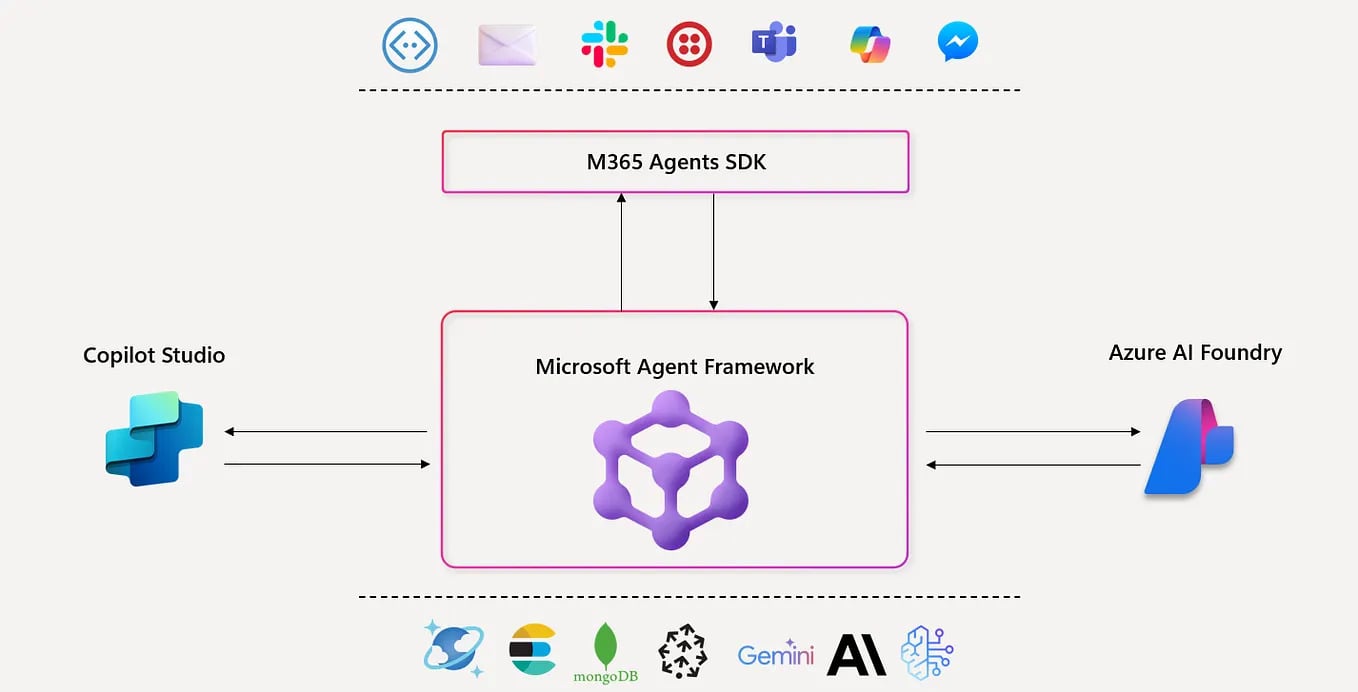
At the foundation is Microsoft Agent Framework, which serves as the open-source SDK and runtime for building and orchestrating multi agent systems. It supports both professional code and low code approaches, allowing teams to define agent logic, orchestration patterns, and tool integrations using open standards such as MCP, A2A, and OpenAPI. Agent Framework is where the core intelligence and behavior of agents are designed and maintained.
Azure AI Foundry provides the enterprise execution and operations layer for these agents. It delivers the hosting environment, scalability, governance, security, and compliance capabilities required for production deployments. Agents built with Agent Framework can be deployed to Azure AI Foundry without code rewrites, while preserving telemetry, monitoring, and operational controls. This enables a clean transition from local prototyping to enterprise scale operation.
Copilot Studio focuses on composition and experience creation. It enables low code makers to rapidly build conversational and workflow-based solutions by reusing the same agent logic, connectors, and integrations defined in Agent Framework. Rather than duplicating logic, Copilot Studio acts as an experience layer that exposes agents through user-friendly interfaces while relying on the shared runtime and governance model.
The integration of these platforms delivers several strategic benefits.
Seamless development and deployment
Developers can prototype agents locally using Agent Framework and deploy them directly to Azure AI Foundry for scalable, production ready execution without losing telemetry, governance, or operational visibility.
Unified runtime and governance
Both low code solutions built in Copilot Studio and professional code agents built with Agent Framework share a common runtime and governance model. This ensures consistent compliance, monitoring, and operational controls across all deployment endpoints.
Maximized reach and adoption
Through the Microsoft 365 Agents SDK, agent logic created in Agent Framework can be surfaced in Copilot, Teams, and other Microsoft 365 experiences. This allows organizations to deliver agent-powered capabilities directly within the tools users already work with.
Accelerated innovation
Low code makers can quickly compose solutions in Copilot Studio, while more complex tasks and advanced orchestration patterns can be implemented as professional code agents. All of these solutions are managed under Azure AI Foundry enterprise controls.
Together, Agent Framework, Azure AI Foundry, and Copilot Studio form a continuous path from rapid experimentation to enterprise scale deployment. This integration enables organizations to innovate faster, apply consistent governance, and deliver AI-powered experiences across their digital workplace.
Enterprise Business Benefits
From a business perspective, Microsoft Agent Framework and its integration with Azure AI Foundry and Copilot Studio provide a structured path to adopt agentic AI at scale without compromising governance, flexibility, or long-term viability.
Standardization Without Vendor Lock In
By relying on open protocols such as MCP, A2A, and OpenAPI, organizations can integrate agents with existing APIs, data platforms, and internal tools without building custom glue code. This standards-based approach ensures portability of agent logic across environments and reduces dependency on proprietary runtimes, helping businesses avoid vendor locking in while still benefiting from a first-class Microsoft ecosystem.
Built In Governance, Risk, and Compliance
Governance, risk management, and compliance are treated as core platform capabilities rather than afterthoughts. Observability, approval flows, and durability are designed into the runtime from the start. With Open Telemetry and native Azure integrations, organizations can monitor reliability, cost, and response quality, which is critical for audit readiness, regulatory compliance, and meeting production service level agreements.
Seamless Transition from Prototype to Production
A unified abstraction across local development and cloud deployment allows teams to prototype agents locally and deploy them to Azure AI Foundry Agent Service without architectural changes. Telemetry, security boundaries, and enterprise controls are preserved across environments, significantly reducing operational risk and shortening the path from experimentation to business value.
Enterprise Reach Through Familiar Work Surfaces
Alignment with the Microsoft 365 Agents SDK enables the same agent logic to power experiences in Copilot, Teams, and other Microsoft 365 applications. By embedding AI capabilities directly into tools employees already use, organizations can accelerate adoption, reduce change management overhead, and maximize return on AI investments.
Run quickly with a basic agent using Agent Framework and Azure OpenAI
Step 1: Create a project
Step 2: Install Packages
To get started, install the required NuGet packages in your application by running the following commands.
Sample Code: Run a Basic Agent
Be sure to substitute this with the actual endpoint of your Azure OpenAI resource.
Conclusion
The Microsoft Agent Framework, together with Azure AI Foundry and Copilot Studio, enables businesses to move from rapid prototyping to large-scale multi-agent AI deployment while maintaining governance, security, and scalability.
Discover how this platform can accelerate innovation and deliver seamless AI experiences across your digital workplace.
Share this on

Jerry Johansson
Works in IT and digital services, turning complex ideas into clear, engaging messages — and giving simple ideas the impact they deserve. With a background in journalism, Jerry connects technology and people through strategic communication, data-driven marketing, and well-crafted content. Driven by curiosity, clarity, and a strong cup of coffee.