
There are two key Microsoft 365 licensing changes organizations need to understand.
- First, Microsoft changed the packaging and pricing of suites with Teams and without Teams on November 1, 2025.
- Second, Microsoft will apply updated pricing and added capabilities to selected Microsoft 365 plans from July 1, 2026.
If you mix those together, the whole topic becomes harder than it needs to be. This guide separates the two changes, shows where the real budget impact sits, and helps IT, procurement, and finance teams decide what to review first
What changed in November 2025
Microsoft brought enterprise suites with Teams back
From November 1, 2025, Microsoft made enterprise suites that include Teams available worldwide again for both new and existing customers. That reversed the earlier situation where many net-new enterprise customers had to buy a suite without Teams and then add Teams separately.
If Teams is your standard collaboration tool, you can again choose the bundled route instead of managing a more awkward two-SKU purchase model for large groups of users. That makes quoting, budgeting, and renewals easier to explain internally.
Without Teams suites became cheaper
Microsoft also reduced list prices for many without Teams suites on the same date. This was done to preserve a defined price difference between versions that include Teams and versions that do not.
Microsoft lowered the price of the without Teams versions across a wide range of plans, including Office 365, Microsoft 365 enterprise, frontline, and business subscriptions. In the plans shown below, the reductions range from 4.86% to 30.36%, depending on the SKU.
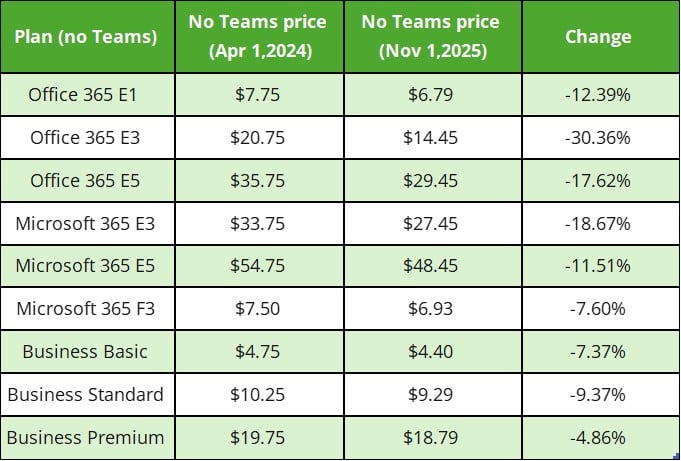
This matters because it makes the no Teams option more financially distinct than before. Organizations that have user groups who do not need Teams can now see a clearer cost difference between buying suites with Teams and buying suites without Teams.
Standalone Teams Enterprise became more expensive
Microsoft also raised the price of Microsoft Teams Enterprise / Teams EEA to $8.55 as of November 1, 2025. That change helps maintain the intended price gap, so the route of buying a no-Teams enterprise suite plus standalone Teams does not undercut the bundled enterprise suite.
Microsoft is trying to make the choice more neutral, buy with Teams if Teams is part of the standard role, or buy without Teams if that user group really does not need it. The model is no longer supposed to reward buyers for assembling a cheaper workaround.
July 2026, Prices change for selected suites and standalones
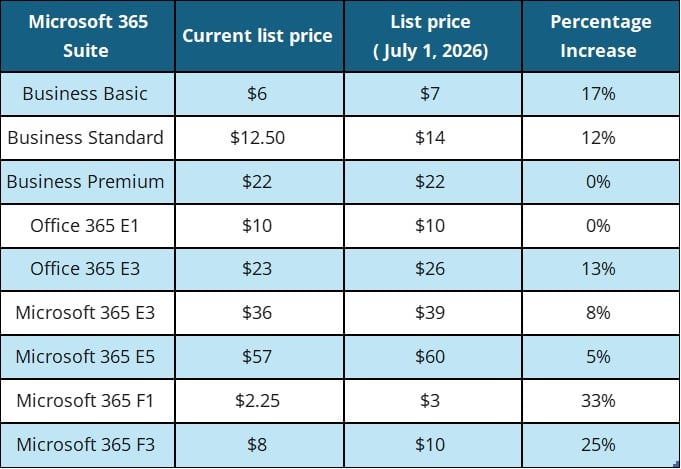
Microsoft’s second update starts on July 1, 2026 and covers selected commercial Microsoft 365 suites and standalone components. The new pricing applies to both new and renewing customers globally, while existing customers see the new prices at their next renewal after July 1, 2026. Below are examples from Microsoft’s published USD list prices.
How to Tell Whether Your Organization Is Affected
The fastest way to assess the impact is to check three things: when your agreement renews, which Microsoft 365 SKUs you currently use, and which user groups actually need Teams.
If your renewal is before July 1, 2026
If your subscription renews before July 1, 2026, you can renew or upgrade under the current pricing, and the new pricing would not apply until your next renewal after that date. For many organizations, this is the most important budget detail because it affects when the higher cost actually appears in the contract.
If your renewal is after July 1, 2026
If your renewal happens on or after July 1, 2026, the new commercial pricing applies at that renewal. That means two organizations using the same licenses may feel the impact at different times depending on their agreement cycle.
If some users need Teams and others do not
Your organization will continue to have the flexibility to choose suites with Teams or without Teams. In practice, that gives organizations a stronger case for role-based licensing.
Knowledge workers, customer-facing teams, and managers may still need Teams as a standard part of daily work, while some task-based or limited-access roles may not.
If you are waiting for the new capabilities
Another point to keep in mind is that pricing timing and feature timing are not exactly the same. Pricing updates take effect on July 1, 2026, while packaging updates begin rolling out in June 2026, and customers will receive at least 30 days’ notice in Message Center before packaging changes become available in their tenant.
What leaders should review now
Start by check when each agreement renews, which Microsoft 365 plans you currently use, and which changes are most likely to affect your next quote. That gives you a clearer view of timing and budget impact.
Next, review your user groups more carefully. Not every employee needs the same license setup, and not every role needs Teams bundled into the suite. This is a good time to separate users who rely on Teams every day from those who mainly need email, files, Office apps, or security features.
Finally, look at the total cost per role rather than only the suite price. A lower-priced plan may not save money if you later need to add separate tools, security features, or Teams licenses.
Action Steps: How Precio Fishbone Can Help
We help you simplify Microsoft 365 licensing changes into a clear plan:
- We’ll audit your current environment to see who really uses Teams and where “no Teams” makes sense.
- Then we design role-based licensing and compare bundled vs. unbundled costs (including the price delta effect).
- If Copilot or other AI add-ons are on your roadmap, we’ll help you plan the right pilot and rollout.
- Finally, we support renewals so you negotiate with options, not surprises.
Ready for clarity? Contact us to book a short call and get a licensing plan you can defend to both IT and Finance.
Contact usFrequently Asked Questions
What should we expect to change on our next Microsoft quote?
Expect your quote to look different because Microsoft now offers more than one “valid” way to license collaboration. Your reseller or Microsoft may present both bundle and unbundled options, and the price differences are more structured than before.
Why does Microsoft keep talking about “pricing structure” instead of just publishing one price?
Because Microsoft is trying to keep two choices available at the same time, one path for organizations that want Teams by default and another for those that don’t, while keeping the relationship between those choices consistent across regions and channels.
How do we avoid disruption if we move some users to “no Teams”?
Decide upfront which roles must join meetings or collaborate across departments, and keep Teams for them. For everyone else, set a clear fallback for communication (manager-led updates, email, or your existing frontline tool) and document it so support teams aren’t handling one-off exceptions.
Share this on

Pär Johansson
Pär works with international business at Precio Fishbone, project delivery & digital services, helping turn complexity into progress and strategy into long-term value. With many years of experience in international business, He is known for building strong relationships and turning plans into meaningful progress. Driven by people, trust and sustainable growth.