What Security Copilot Actually Is
Microsoft Security Copilot is not just another chatbot interface; it is a security-specific generative AI solution. It is designed specifically for defenders, integrating directly with the Microsoft Security stack (Defender, Sentinel, Intune, Purview, and Entra) to process over 78 trillion daily threat signals.
Unlike broad AI models, Security Copilot is accessible in two ways:
-
Standalone Experience: A dedicated portal for complex investigations and cross-product analysis.
-
Embedded Experience: Native integration within tools like Microsoft Defender XDR, allowing analysts to summarize incidents or generate KQL queries without leaving their primary workflow.
Eligibility and Access Requirements for Security Copilot
At Ignite 2025, Microsoft announced that Security Copilot agents will be embedded into daily security workflows to support more proactive, agentic defense.
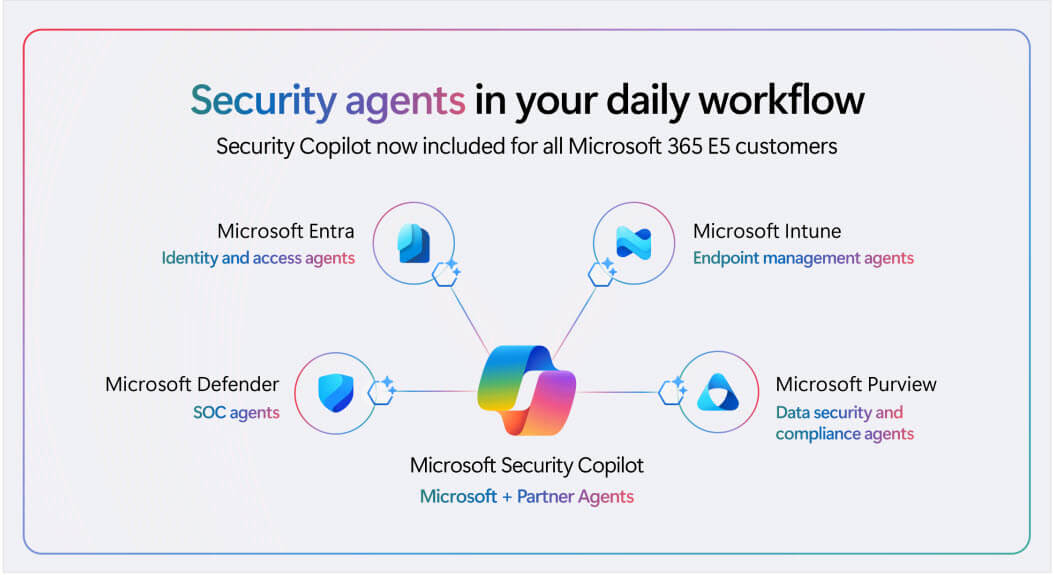
For many organizations, Microsoft 365 E5 is the main access path. Microsoft is rolling out Security Copilot to all Microsoft 365 E5 customers in phases, starting November 18, 2025 for existing Security Copilot customers with E5, and expanding in the following months to all E5 customers. There is no minimum E5 license count or consumption requirement.
Security Copilot is not limited to E5 customers. Organizations without Microsoft 365 E5 can still use it through the existing pricing model. For Microsoft Sentinel users, the included SCU allocation can be applied to Sentinel scenarios once the tenant receives the E5 benefit.
Microsoft positions Security Copilot for a broad range of security and IT roles, including SOC analysts, compliance analysts, IT admins, data security admins, identity admins, and CISOs.
For organizations building a wider agent strategy, it is important to align agent lifecycle, ownership, and policy controls across the environment.
How Security Copilot Works
Security Copilot works either as a standalone tool or inside Microsoft security products like Defender XDR, Sentinel, and Intune, so analysts can investigate and act directly in context.
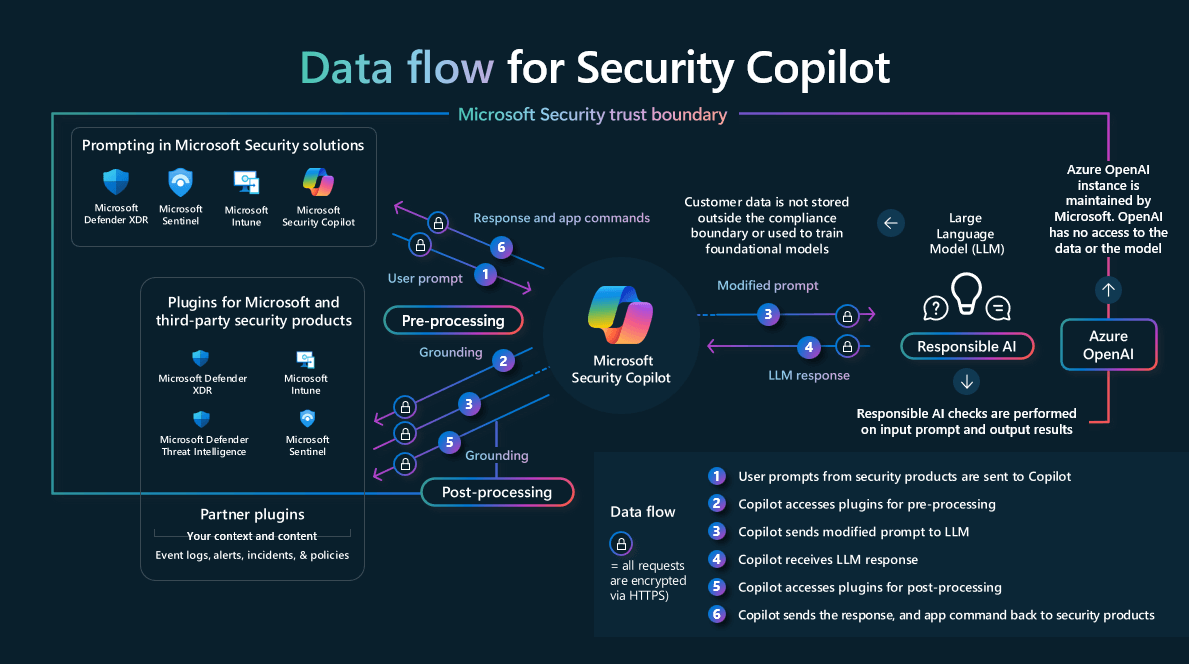
Security Copilot is not just a chat interface to a language model.” Conceptually, Security Copilot grounds your request using the security context and plugins you have access to, generates an answer, and returns it with supporting security signals for analyst review.
- User prompts from security products are sent to Security Copilot.
- Security Copilot preprocesses the prompt using grounding to improve specificity and actionability, leveraging plugins during preprocessing.
- The modified prompt is sent to the language model, then the response is post-processed, again using plugins for context.
- The response is returned for the user to review and assess, and the system iterates to produce results based on organizational data.
Security Copilot Primary Use Cases
Security Copilot is most valuable when it reduces the time analysts spend translating raw security signals into decisions, actions, and clear communication. In practice, the highest-impact use cases for SOC and security teams typically fall into several categories:
- Incident triage and investigation acceleration, including phishing triage and alert triage at scale.
- Threat hunting support through faster KQL query building and suspicious script analysis.
- Security posture and exposure prioritization to help teams focus on remediation on the highest-risk issues.
- Identity and access governance workflows, such as Conditional Access optimization and access review automation.
- Reporting and policy support, including tailored reporting for stakeholders and policy definition or summarization.
Explore Microsoft’s Use cases for Security Copilot to learn how different security roles, including CISOs, threat intelligence analysts, and IT admins, can benefit from each of the featured scenarios. If you are exploring agents, strong prompting standards are one of the simplest ways to improve consistency across investigations and reports.
How Much Does Security Copilot Cost?
Security Copilot cost is capacity-based, not per-user usage-based in the traditional sense. The unit you need to understand is the Security Compute Unit (SCU).
Licensing and SCUs explained simply
Security Copilot is priced using Security Compute Units (SCUs), which are the compute resources used to run workloads. There are two main models.
With Microsoft 365 E5 inclusion, eligible tenants receive a monthly SCU allowance based on license count. This allowance resets every month, does not roll over, and is shared across the whole tenant.
If usage goes beyond the included amount, Microsoft may throttle usage in the future, with pay-as-you-go expansion available when supported.
Without the E5 inclusion model, organizations use purchased SCUs. In this setup, you provision SCU capacity directly, with at least one SCU required to enable a workspace.
Billing is calculated in hourly blocks, so even partial use within an hour is charged as a full provisioned hour. To keep costs predictable, use Microsoft’s usage monitoring dashboard to understand how capacity is being consumed and by which initiators, noting that the dashboard provides up to 90 days of data.
SCU scaling and cost-saving tips
SCU costs often rise for a few common reasons: keeping provisioned capacity too high during low-demand hours, leaving overage unlimited, and rerunning broad prompts or workflows too often.
To control costs, scale SCUs based on demand during the day instead of keeping peak capacity active all the time. Set limits on overage so incident spikes do not create unpredictable spending. It also helps to reduce unnecessary reruns by using more specific prompts and standardized workflows for repetitive SOC tasks.
Is Security Copilot Fit for SMBs?
SMBs can start small because Microsoft’s purchased capacity model requires a minimum of one SCU to enable at least one workspace, then scale as usage proves value.
If your business is eligible for Microsoft 365 E5 inclusion, Security Copilot may also be automatically provisioned, which can simplify getting started.
If you want help deciding whether Security Copilot makes sense for your environment, contact us. We can assess readiness, define the first high-value SOC use cases, and put the right governance and cost controls in place from day one.
Frequently Asked Questions
Does Microsoft Security Copilot support natural language prompts?
Yes. Microsoft documents natural language prompting in both the standalone experience and embedded security workflows, including natural language to KQL scenarios in Microsoft Sentinel and Microsoft Defender.
Is Security Copilot safer than ChatGPT?
For security operations, it is usually a better fit than consumer ChatGPT because it works within Microsoft security tooling and user permissions. But it still depends on strong access control, governance, and validation. ChatGPT Business and Enterprise are separate offerings with stronger admin and privacy controls than consumer plans.
How much does Security Copilot cost?
Provisioned SCUs are billed at $4 per SCU per hour, and overage SCUs are billed at $6 per SCU in Microsoft’s pricing example. Microsoft 365 E5 customers also receive included monthly SCU capacity based on paid user count.
Share this on

Pär Johansson
Pär works with international business at Precio Fishbone, project delivery & digital services, helping turn complexity into progress and strategy into long-term value. With many years of experience in international business, He is known for building strong relationships and turning plans into meaningful progress. Driven by people, trust and sustainable growth.