
What is Dataverse?
Microsoft Dataverse is a cloud-based, managed data service built on Azure that organizes business data and low-code logic in a structured, secure, and compliant way. It sits in the Microsoft cloud, not on your own servers, so you access it over the internet rather than installing it locally. Microsoft runs and maintains Dataverse in the cloud, with regional deployment options to support data residency and compliance.
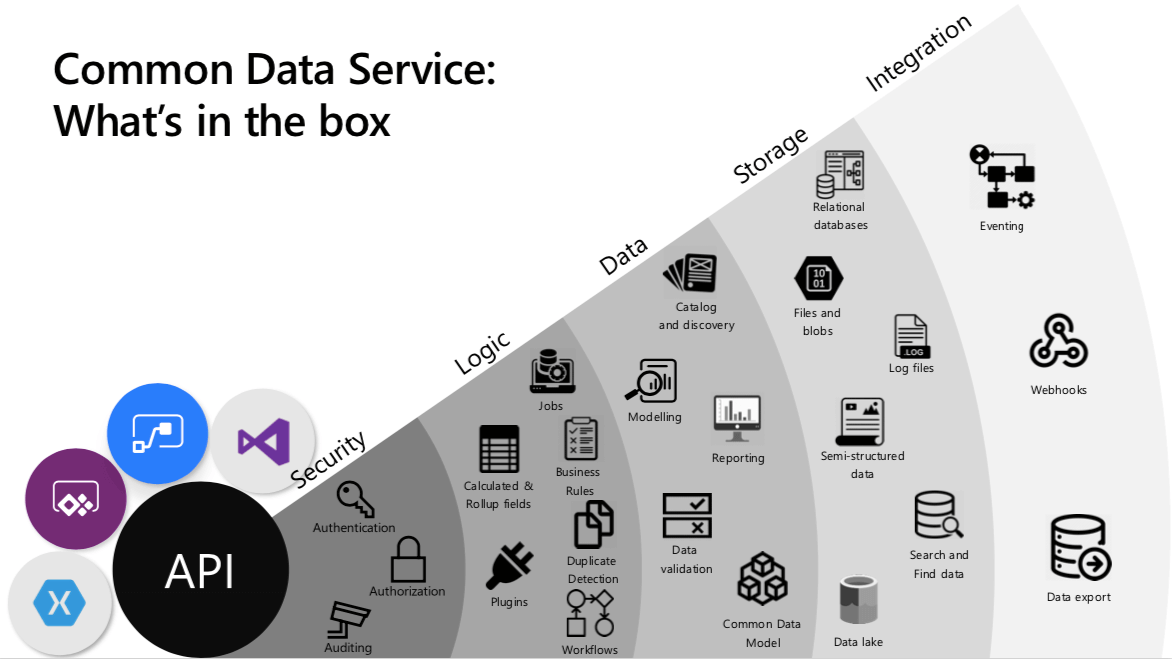
At the heart of Dataverse is the concept of an environment. An environment is a single Dataverse instance that contains tables, relationships, and business logic, along with supporting assets such as files and images.
Within an environment, data is stored in tables. Each table is made up of rows and columns. A row represents an individual record, and each column holds a specific type of value, such as a person’s name, an age, a date, or an amount. Dataverse includes a rich set of standard tables that cover common business scenarios, and you can define relationships between them.
You can have one or many Dataverse environments, for example separate ones for a pilot environment and a production environment. Every environment starts with a common base set of Dataverse tables and security capabilities. Your model then expands as you add solutions (and optionally Dynamics 365 apps), plus any custom tables and business logic your business needs.
This consistency means that solutions built on standard Dataverse tables can be shared across teams, regions, or even other organizations that are also using Dataverse, without having to redesign the underlying data structure each time.
Once your data is in Dataverse, it can be accessed and updated in several ways. You can work directly through Power Apps, Power Automate, and other Power Platform tools, or you can connect to Dataverse from external applications through connectors and APIs.
Dataverse is the governed data layer behind the Power Platform and many Dynamics 365 applications. That means you can start with a single operational use case and expand without rebuilding your data model each time.
Table in Dataverse
A Dataverse table defines the information you want to track in the form of rows and columns. Each row represents a single business instance, for example, one customer, one invoice, or one service case. Each column represents a specific attribute such as company name, phone number, amount, status, or due date.
A Dataverse table does three practical things: it stores the records, standardizes the fields so reporting stays consistent, and enforces rules and security so teams cannot bypass policy.
For leadership, the table type decision is about governance and cost. Use standard or custom tables for core operational records, use virtual tables when another system must remain the source of truth, and use elastic tables only when volume demands it and you can accept feature trade-offs.
Table ownership is a governance decision because it determines who can access records and how accountability works. Choose user or team-owned tables for work that has an accountable owner, and choose organization-owned tables for shared reference data where access is consistent across the business.
Elastic tables are designed for very high volume data, but they trade off some governance and relational features, so they are best for event style data rather than core business records. Check Appendix A.1 for elastic tables limitations.
Standard and custom tables in the Dataverse database typically hold the structured operational data for your business. Activity tables are ideal when you need a chronological history of interactions around a record. Virtual and elastic tables are used in more specialized scenarios where you either keep data in external systems or work with very large data sets.
Columns in Dataverse
Columns are where data quality and compliance become enforceable. Choosing the right field types reduces cleanup in reporting, and column-level security keeps sensitive attributes visible only to the right roles.
Every table consists of a set of columns, and each column has a name, a data type, and optional behavior that Dataverse applies. Each table includes a primary key (unique ID) and a primary column (the human-friendly label shown in lists and lookups).
Dataverse also provides system columns such as created/modified dates, created by/modified by, owner, and status to support auditing, security, and lifecycle tracking.
On top of that, you define business columns that match your real-world attributes. When you add a column, you choose a data type, for example:
- Text or multiline text for names and descriptions
- Number, decimal, or currency for quantities and financial values
- Date and time for due dates and timestamps
- Choice or Yes/No for controlled lists and flags
- Lookup to connect a record to another table, for example linking an order to a customer
- File or Image to attach supporting documents or pictures to a record
In practice, leaders should care that Dataverse supports structured fields (text, numbers, dates), controlled choices, and secure links between records, so reporting stays consistent and sensitive fields stay protected.
Dataverse stores these values in a typed way in the underlying database and file storage. This means it can validate input, index and query data efficiently, and ensure that inappropriate values cannot be entered into a field.
Columns can also carry logic. Calculated columns derive their value from other columns in the same row, such as a full name or a margin calculation. Because these are defined on the column itself and executed by Dataverse, the same logic applies consistently across all apps and processes that use the table.
Finally, columns participate in security and governance. For sensitive fields, you can enable column-level security so only specific roles can view or edit that attribute, even if they can see the rest of the record. You can also enable auditing on selected columns to track changes to critical data over time.
Relationships & Business Logic in Dataverse
Table Relationships in Dataverse
How Relationships work in Dataverse?
Relationships are how Dataverse builds a connected view of the business, such as linking customers to orders and cases. The business benefit is better reporting, clearer accountability, and fewer reconciliation cycles across teams.
In Dataverse, relationships define how rows in one table are associated with rows in another table, or even rows in the same table. In most day-to-day data modeling, this is implemented through a lookup column.
Adding a lookup column creates a 1:N relationship and allows makers to place that lookup on forms so users can link a child record to a parent record during data entry. Relationships are intended for formal, repeatable associations that are important for navigation, reporting, and consistent app behavior.
For less formal, ad hoc links that you don’t need to model consistently, Dataverse also supports connections as a lighter option.
Table Relationship types
In the maker experience you may see 1:N (One-to-many), N:1 (Many-to-one), and N:N (Many-to-many), but Dataverse has two table relationship types in the data model: one-to-many and many-to-many. “N:1” appears in the UI because it is the related-table view of a 1:N relationship.
- One-to-many relationships: one parent row can be related to many child rows, enabled by a lookup column on the child table.
- Many-to-many relationships: many rows in one table can be associated with many rows in another; Dataverse uses an intersect table behind the scenes.
A practical modeling rule is to default to 1:N when you can clearly explain ownership and reporting (“these records belong to that parent”), and reserve N:N for true membership relationships where both sides need multiple associations. For Many-to-many relationship implementation, check Appendix A.2
Dataverse does not have a native 1:1 relationship type. One-to-one scenarios are usually implemented as 1:N with a unique constraint to enforce cardinality.
Table Relationship behavior
Relationship behavior defines what Dataverse should do to related “child” records when something changes on a “parent” record in a 1:N relationship.
Executive takeaway: Relationship behavior determines whether your system preserves evidence, prevents accidental deletion, and keeps ownership changes manageable at scale. If your organization is moving off spreadsheets into governed operations, these settings are one of the reasons Dataverse behaves like a real business system rather than a collection of linked lists.
| Behavior type | What it means | What happens on parent delete |
|---|---|---|
| Referential, Remove Link | Parent changes do not affect the child; relationships can be removed without deleting records | Child records remain; the link is removed |
| Referential, Restrict Delete | Prevents deletion of a parent if dependent child records exist | Parent cannot be deleted until children are removed |
| Parental | Child records are treated as dependent on the parent | Child records are deleted with the parent |
| Custom | You choose outcomes per action | Mixed, based on your policy |
In practice, this comes down to three decisions: what happens on deletion, what happens when ownership changes, and whether access should inherit to related records. You do not need to configure every action in a complex way, but you should explicitly decide your “default posture,” especially for deletion and access inheritance.
Practical guardrails that matter to leadership:
- Default to safety on deletion. Cascade delete should be reserved for truly dependent operational details. For anything with audit or contractual value, blocking deletion (Restrict Delete) is often the safer posture.
- Use cascading assignment to reduce operational drag. When ownership changes (team moves, territory changes), cascading assignment can reduce manual cleanup, especially if you limit it to active work items rather than historical records.
- Treat cascading sharing as a governance decision. When access to a parent automatically grants access to children, permissions scale efficiently, but it also increases the need for discipline in role design and ongoing access reviews.
Relationship behavior is one of the mechanisms that makes Dataverse reliable at scale. It converts “record links” into enforceable rules about deletion, ownership, and access. When set deliberately, it reduces avoidable risk (accidental deletion, orphaned records, overexposed access) while keeping operations efficient as teams and processes grow.
What types of data should not be stored in Dataverse?
Business Logic in Dataverse
What is Business Logic?
For leaders, business logic is how policy becomes consistent execution. It reduces rework because teams cannot ‘work around’ the process in different apps, and it improves audit readiness because the same rules apply regardless of how data is entered.
Relationships describe structure: how records connect. Business logic describes behavior: what must be true when data is created or changed, and what should happen next in a process.
In Dataverse, the goal is to keep that behavior consistent even when the same table is touched by different entry points, such as canvas apps, model-driven apps, flows, and APIs.
Business rules: low-code tool for logic
Business rules are the primary low-code tool for enforcing logic and validations without writing code or creating custom code extensions (when required). When defined for a table, they can apply across all forms and at the server level, and they apply to both canvas apps and model-driven apps if the table is used in the app.
This makes them a good fit for “data correctness” requirements, such as required fields, conditional validation, or setting defaults.
One limitation is that not all business rule actions are available for canvas apps. Business rules are a great baseline, but you still validate the final behavior in the specific app types you plan to deploy.
Process logic & automating outcomes
When your need is not only validation but also process execution, Dataverse offers two common patterns.
Business process flows guide people through the stages your organization defines, providing a streamlined experience that moves work toward a conclusion and can be tailored by security role. This is best when you want consistent steps and data capture inside the user experience.
For event-driven automation and cross-system orchestration, Power Automate flows are typically used alongside Dataverse. At this layer, the “business logic” is the sequence of actions that runs when a record changes, such as routing, notifications, escalation, synchronization, or approvals.
Recommendation: Start with business rules for correctness, add business process flows or Power Automate for process movement, and use plug-ins only when you must enforce complex logic centrally and reliably. This keeps the solution maintainable while still giving you a path to handle advanced requirements.
Dataverse Data Types & Storage Considerations
When people say “data types in Dataverse,” they often mean two different things. The first is column data types (the field types you pick when modeling a table). The second is data categories (the kind of business data Dataverse is best suited to store and govern).
Dataverse includes a broad set of column types you’ll use repeatedly in apps for small and midsize businesses (SMBs), such as text, numbers, dates, choices, lookups, and richer types like files and images. They drive validation, search behavior, relational integrity, and what Power Apps and Power Automate can do with your data without custom code.
Dataverse can store images and files in dedicated column types. Images are optimized for common app scenarios and have their own constraints. Dataverse also supports file columns, but it works best for documents attached to a specific record rather than a full document library. Capacity is tracked as database, file, and log; see Storage and licensing for details.
Types of data Dataverse manages well
Dataverse is strongest when it acts as an operational system of record for business processes. The best fit is data that needs structure, relationships, and consistent behavior across apps, flows, and integrations.
| Data category Dataverse manages well | Example | Why it fits Dataverse |
|---|---|---|
| Operational business records | Customers, cases, work orders, invoices | Easy to organize, connect, and control with role-based permissions |
| Reference and controlled values | Status, category, region, service type | Keeps choices consistent and reduces messy data |
| Process context data | Status, stage, owner, due dates, SLA KPI fields | Keeps workflow state and routing data secured, audited, and consistent |
| Relational link data | Lookups (Account–Case, Order–Customer) | Builds a connected “full picture” across records and processes |
| Record-level attachments in context | Photos, signed forms, PDFs per record | Good for “files tied to one record,” not large document libraries |
| High-volume events (select cases) | Event logs via elastic tables | Works when you need to store high volumes of event-style data in Dataverse |
What should not be stored in Dataverse
Dataverse is not intended to be a general-purpose warehouse for every kind of data. A practical rule is to keep Dataverse focused on governed operational data and move large-scale unstructured or analytics-first datasets to platforms built for those workloads.
Very large raw datasets such as telemetry, clickstream, IoT data, or system logs are usually a poor fit for standard Dataverse tables. These datasets are append-heavy and queried at scale, which is better handled by analytics-oriented services.
Heavy document libraries and long-term file repositories belong in SharePoint. In Dataverse, store the business record plus document metadata or links. For large media libraries or bulk binaries, object storage (for example, Azure Blob Storage) is typically the more appropriate choice.
In cases where another system must remain the source of truth, migrating data into Dataverse can introduce duplication and synchronization overhead. Instead, virtual tables can be used to surface external data in Dataverse without copying it, with the understanding that virtual tables come with trade-offs and do not support all Dataverse capabilities.
If your goal is enterprise analytics storage rather than day-to-day operational app data, a lakehouse or data lake is usually a better foundation. A common pattern is to keep Dataverse as the operational system of record, then land selected data into an analytics platform for reporting, long-term retention, and cross-domain analysis.
The core decision is whether the data is needed to run day-to-day operations or whether it is primarily for analytics, archive, or large-scale file storage. Keeping Dataverse focused on operational records protects performance and avoids surprise capacity costs. To make this decision practical, the table below acts as a quick guide.
| Data need | Dataverse fit | Better alternative |
|---|---|---|
| Document libraries and collaboration | Limited | SharePoint |
| Massive unstructured files/media | Weak | Azure Blob Storage |
| Telemetry, logs, time-series at scale | Weak | Azure Data Explorer |
| Analytics-first storage | Weak | Fabric OneLake / ADLS |
| External system remains source of truth | Often avoid copy | Dataverse virtual tables |
Security in Dataverse
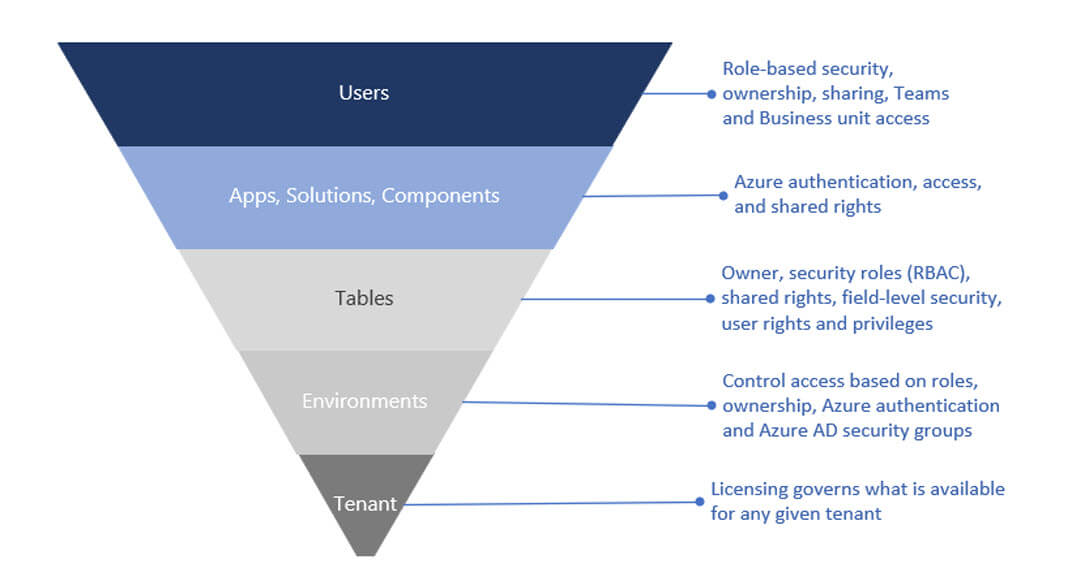
Dataverse security is multi-layered. It starts with tenant identity and licensing, is constrained by environment boundaries, and then becomes granular at the data layer through role-based permissions, ownership, sharing, and, when required, column-level security.
This matters because many low-code security failures do not come from table permissions alone. They happen when teams secure the data but overlook upstream access, app sharing, or connector-driven pathways that move data outside the intended boundary.
Users authenticate through Microsoft Entra ID, and environments can be restricted to specific security groups so only approved, licensed users can enter. From there, apps and flows still require governance: the identities behind connections, and the entitlements granted to those identities, determine what external systems an app or automation can reach.
Direct Dataverse access vs connector-based access
Dataverse is a first-party data source in the Power Platform. Power Apps connects to Dataverse using the signed-in user’s Microsoft Entra ID identity, and Power Automate typically uses the Dataverse connector with managed connections and connection references.
The practical difference is that Dataverse permissions are enforced by Dataverse roles and table security, while external systems reached through connectors add another risk layer tied to connector governance and credential scope.
This distinction separates two governance concerns:
- Dataverse data security: roles, privileges, access levels, and table security control what users can view, create, update, and delete inside Dataverse.
- Connector-based access: connection ownership, credential scope, and connector governance control what data can move to or from external systems.
For cross-system risk control, Power Platform data loss prevention (DLP) policies act as guardrails by restricting which connectors can be used in an environment and which connectors can be used together. Microsoft Purview DLP provides broader, enterprise-wide DLP capabilities beyond the Power Platform.
Role-based Access Control in Dataverse
Dataverse authorization is built on role-based security. Security roles bundle privileges, and those roles can be assigned to users, owner teams, or group teams. A combination of access levels and permissions in a role determines which apps and data users can view and how they can interact with them.
Access accumulates across roles. If a user has multiple roles, they get the combined access of all of them. This is why fewer, well-designed roles are safer than layering new roles over time. This is one reason Dataverse security design benefits from deliberate role design early.
Dataverse also includes predefined security roles that follow a least-privilege philosophy, providing minimal required access for common user tasks. This can be a practical baseline for organizations that want a secure starting point instead of building every role from scratch.
Business units, teams, and scalable administration
Business units are a core security modeling building block in Dataverse. They work with security roles to determine effective access and define a security boundary inside a Dataverse database. Every Dataverse database has a single root business unit, and you can create child business units to segment users and the data they can access.
In practice, business units are not always a 1:1 reflection of an org chart. They are often defined as security boundaries that make it easier to apply consistent access rules at scale. When a user is associated with a business unit, that association influences ownership.
Records created by the user are owned within that business unit context, and security roles can be scoped so the user can access records owned by that business unit.
For example, users in different business units can be limited to records owned within their unit, which helps compartmentalize access by organizational boundary.
User A is associated with Division A and assigned a role scoped to that business unit, which allows access to records owned in Division A (Contact #1 and Contact #2). User B is associated with Division B and, despite holding a similar role, cannot access Division A’s contacts and instead can access records owned in Division B (Contact #3).
In that model, users belong to one business unit, and access is typically scaled using security roles, teams, and hierarchy security. Use sharing selectively for exceptions, not as the primary access model.
Teams are the administration layer that makes this scalable. Instead of assigning roles user-by-user, you assign security roles to teams and manage membership through Microsoft Entra ID.
A Microsoft Entra group team can have security roles assigned and can own records, while membership is derived from Entra group membership as users access the environment. This pattern centralizes identity lifecycle management in Entra ID and keeps role assignment consistent as people join, move between groups, or leave.
How does Dataverse measure storage?
Record ownership & sharing
Record access in Dataverse is shaped by several inputs working together within Microsoft Dataverse's security concept:
- The user’s security roles and access levels
- The user’s business unit context
- Team memberships (including group teams and default teams)
- Records shared directly with the user or a team
The resulting access remains additive within the environment. Sharing exists to enable collaboration when role-based and ownership-based access is not sufficient, but it should remain an exception mechanism rather than the main access strategy.
Heavy sharing increases administrative overhead and makes access analysis harder at scale. When the requirement is predictable managerial visibility rather than ad-hoc collaboration, hierarchy security is often a better fit than large-scale sharing.
Practical Risk Mitigation Scenarios
Security becomes easier to understand when it maps to real moments: an overshared spreadsheet, an automation that moves data to the wrong place, or a late-night change no one can explain. The scenarios below show how Dataverse reduces those risks through tenant identity, environment boundaries, role-based access, connector governance, and auditing.
Scenario 1: Limiting access to sensitive customer and financial data
A common pattern is billing and customer data living in shared spreadsheets. Finance exports a list to chase overdue invoices, adds payment notes, and emails it back. Over time, copies multiply, the “latest version” becomes unclear, and access becomes too broad because the file needs to be easy to share. Eventually, sensitive fields like bank details or credit limits become visible to people who do not need them.
With Dataverse, access is controlled before users even reach the data: environments can be limited to approved users, and roles define what each job function can view or edit. Sensitive fields can be protected with column-level security, so users can work on the same records without seeing restricted data.
Business impact: fewer accidental exposures and a clearer compliance posture because access is policy-driven, not file-driven.
Scenario 2: Preventing accidental or malicious data leakage
A team builds a canvas app and adds a few flows for confirmations and reporting. Over time, more flows appear across departments. One flow sends data to a personal storage connector for convenience. Another posts customer details into chat. None of this is malicious, but business data is now leaving controlled systems through pathways that are hard to track.
Dataverse reduces this risk by shifting control to the platform level. Power Platform Data Loss Prevention policies can restrict which connectors are allowed in an environment and which connectors can be used together. That blocks risky data movement patterns before they become part of day-to-day operations. Role-based access control further limits what any user or service account can extract.
Business impact: fewer leakage routes by default, and governance that scales because admins set policies once instead of reviewing every automation.
Scenario 3: Detecting and responding to suspicious changes
A finance team notices invoice records look inconsistent, or a key field such as a credit limit changes unexpectedly. In file-based processes, investigation is slow: you check spreadsheet versions, search emails, and rely on memory, but you still cannot prove what happened.
With Dataverse auditing enabled on critical tables, the team can review change history to confirm what changed, when, and which identity made the update. They can correlate that with tenant sign-in logs for the same window. If activity looks suspicious, admins can quickly disable access in the environment, revoke access in Entra ID if needed, and escalate response.
Business impact: faster investigations and faster containment because evidence and controls are built into the platform.
Dataverse Storage & Licensing Explained
What drives storage growth?
Dataverse storage growth is usually driven less by row data and more by operational habits. The most common sources of unexpected growth are attachments and auditing.
- Attachments stored in Dataverse (files and images tied to records) can expand quickly when teams treat Dataverse like a document repository.
- Audit logs and platform logs can grow quietly when auditing is enabled broadly without a retention plan.
- High-volume event data (for example, telemetry-style records) can inflate storage if it is kept in operational tables instead of being routed to analytics platforms, or to elastic table scenarios when appropriate.
The business takeaway is simple: storage growth is predictable when you make clear decisions about what belongs in Dataverse and enforce them consistently.
How does Dataverse measure storage?
Dataverse tracks storage in three capacity pools, and each pool behaves differently.
- Database capacity covers structured operational data stored in tables, including relationships and row values.
- File capacity covers attachments tied to records, such as documents, images, PDFs, and videos.
- Log capacity covers auditing and other operational logs generated by Dataverse usage.
These pools are tracked at the organization level (your Microsoft tenant), and consumption can be monitored across environments. Because the pools are separate, an organization can be fine on database capacity but still experience cost pressure from file or log growth.
How licensing contributes capacity?
Licensing contributes Dataverse capacity through three mechanisms: a one-time baseline, ongoing accrual, and add-ons when you exceed entitlement.
| Mechanism | What it means | When it matters most |
|---|---|---|
| Default tenant entitlement | Initial baseline capacity from the first qualifying subscription | When starting adoption or moving off spreadsheets |
| Accrued capacity | Additional capacity added as you purchase more licenses | When scaling apps across teams and departments |
| Capacity add-ons | Purchased capacity for database, file, or log pools | When growth exceeds entitlement due to attachments, audits, or high-volume use |
A separate model can apply in pay-as-you-go environments, where capacity and overage are handled at the environment level rather than drawing from pooled tenant entitlement. See Appendix B for the technical note on capacity accrual and an example calculation.
How to manage cost and avoid overages?
Treat Dataverse capacity like a managed business resource
Cost control in Dataverse is primarily an operating discipline. The most predictable organizations treat storage as a measurable resource, set clear governance rules for what belongs in Dataverse, and review usage routinely instead of reacting after overages appear.
Keep Dataverse focused on operational records, not everything
Dataverse works best as the operational system of record for governed processes. Use it for structured business records and workflow states that require security, auditing, and consistent logic across apps and automation. When teams use Dataverse as a general file repository or a long-term analytics archive, costs become harder to forecast and performance can degrade.
Attachments and auditing are the usual cost surprise
Most unplanned growth comes from file capacity and log capacity. Attachments tied to records can expand quickly when users store large documents directly in Dataverse. Auditing and platform logs can also grow quietly when enabled broadly without retention planning.
A practical approach is to store only record-level documents that truly need to live with the transaction, and to enable auditing deliberately with a defined retention policy.
Review storage monthly so problems surface early
One-time sizing is rarely enough. A lightweight monthly review is usually more effective: check database, file, and log consumption by environment, identify what grew and why, and assign an owner to address the root cause. This turns storage from a technical issue into an operating metric that leadership can govern.
Offload by design to keep costs predictable
Use established offload patterns instead of letting storage sprawl. As noted earlier, use SharePoint for document libraries and keep Dataverse focused on the operational record plus links.
For long-horizon analytics and large-scale event data, move selected data into an analytics platform rather than keeping everything in the transactional store. When offloading is intentional, Dataverse stays lean and cost forecasting becomes more reliable as adoption grows.
Is Dataverse Right for Your Business?
Dataverse is a strong fit when the problem is no longer “we need another tool,” but “we need one trusted place for operational data.”
Dataverse is likely worth it if most of these are true:
- Your teams rely on spreadsheets, shared files, and email to track work, and the “latest version” is often unclear.
- You plan to build internal apps or automate workflows, and you need consistent data and permissions behind them.
- You are already invested in Microsoft 365, or you are considering Dynamics 365 and want a data model that can scale with it.
It’s time to move beyond spreadsheets.
Spreadsheets stop working when they become systems: multiple owners, constant exports, duplicate copies, approvals in email, and processes that break when one person is away. If that describes your reality, a governed data platform is usually the next step.
If you plan to adopt AI experiences in Microsoft tools, clean and permissioned operational data is one of the most effective ways to reduce risk and improve the quality of answers and automation.
Getting Started with Dataverse
Begin with a short discovery to define the process, the core tables, the security model, and any integrations that matter. Then choose one focused pilot use case where success is easy to observe. Involve both business and IT stakeholders early so the data model and access design are correct from the start.
Measure success in business outcomes: fewer manual handoffs, less duplicate entry, faster cycle times, and better visibility in reporting. If the pilot reduces rework and provides a single source of truth, you have a clear signal to scale.
If you want help selecting the right pilot and designing a rollout that balances quick wins with governance, Precio Fishbone can run a focused Dataverse readiness assessment and recommend a practical starting plan based on your current tools, data, and processes.
Appendix
Appendix A: Technical notes for implementers
A.1 Elastic tables limitations
Important limitations for elastic tables: Elastic tables are backed by Azure Cosmos DB and consume Dataverse capacity as described in Microsoft documentation. Some Dataverse features are not supported, so validate current limitations before using elastic tables for any governed operational record.
A.2 Many-to-many relationship implementation
Relational databases typically represent many-to-many relationships using a join (intersect) table. Dataverse manages this automatically for many-to-many relationships by creating an intersect table behind the scenes.
If you need extra attributes on the relationship (for example, “Role” or “Start date”), model it explicitly using a custom join table with two lookups, instead of relying on the system-managed many-to-many relationship. For more information, see Create many-to-many table relationships overview.
Appendix B: Licensing and sizing reference
B.1 Capacity accrual per license
Dataverse capacity is accrued based on Power Platform licensing. The values below are commonly referenced for planning and are provided as a baseline.
- Power Apps Premium (accrued per license): 250 MB Dataverse database + 2 GB Dataverse file
- Power Apps per app (accrued per license): 50 MB Dataverse database + 400 MB Dataverse file
Note: Capacity entitlements can change over time. Use the latest Power Platform Licensing Guide as the source of truth for your tenant.
B.2 Example sizing calculation
This example illustrates how accrued capacity scales with user count. Scenario: An SMB has 25 Power Apps Premium users who run operational apps daily.
- Accrued database capacity: 25 × 250 MB = 6,250 MB (about 6.1 GB)
- Accrued file capacity: 25 × 2 GB = 50 GB
This type of estimate is useful for early sizing, but real usage is often driven by attachments (file capacity) and auditing (log capacity). Monitor storage growth by environment and enforce policies for file storage and retention to avoid unplanned overages.
Share this on

Pär Johansson
Pär works with international business at Precio Fishbone, project delivery & digital services, helping turn complexity into progress and strategy into long-term value. With many years of experience in international business, He is known for building strong relationships and turning plans into meaningful progress. Driven by people, trust and sustainable growth.