
What is Microsoft Defender?
Microsoft Defender is Microsoft’s built-in security suite, providing real‑time defense against viruses, malware, spyware, and other malicious code on Windows devices. It delivers a strong security baseline out of the box, reducing the need for third‑party tools in many environments, while still allowing organizations to layer on additional controls where their risk profile or compliance requirements demand it.
How do the key features work?
Microsoft Defender uses a layered security approach rather than relying on a single detection method. It combines machine learning, AI-driven behavior analysis, and continuously updated cloud intelligence to spot and stop threats before they cause damage. In practice, this means it can detect known malware via signatures, flag suspicious activity in real time, and leverage Microsoft’s cloud threat database to respond quickly to emerging attacks.
Microsoft Defender is built straight into Windows 11, so you don’t need to install anything extra to start using it. It runs in the background by default and keeps an eye on your device in real time while you browse the web, work with documents, or install apps, helping block threats as you go.
Real-Time Protection
Microsoft Defender provides continuous, real-time inspection of activity on corporate devices, scanning web traffic, downloads, and email attachments in the background. Potentially risky actions are identified and addressed automatically, without requiring user intervention.
When malicious content is detected, Defender blocks execution and isolates the file in quarantine, whether it originated from the internet or email.
Alongside signature-based detection, Defender applies real-time behavioral analysis, enabling it to identify and stop new or evolving threats that have not yet been recorded in traditional malware databases.
Cloud-Powered Intelligence
Traditional antivirus tools depend heavily on static malware signatures, while attackers constantly develop new variants. To keep pace, Microsoft Defender augments signatures with cloud-powered intelligence.
By using AI and machine learning at cloud scale, Defender analyses millions of signals from endpoints worldwide, spotting emerging and zero‑day threats in near real time. New malware families can be identified and blocked long before they are fully catalogued in traditional definition databases.
Because this intelligence is delivered from the cloud, protections and threat data are updated automatically, without manual effort from end users or IT. This enables a genuinely multi-layered defense model in which devices are continuously monitored and protected with up‑to‑date insights.
In practice, this approach provides background protection with minimal performance impact, automatic alignment with the latest threat landscape, and very little need for user involvement, as most threats are handled silently in the background.
App & Browser Control
Many modern threats originate not from files, but from malicious sites, untrusted applications, and even harmful ads. Microsoft Defender’s App & Browser Control is designed to reduce this risk at the point of access.
Using SmartScreen technology, it evaluates websites, downloads, and apps before they are opened, blocking dangerous links and warning users when a site or application appears fraudulent or unsafe. This helps prevent phishing attempts and drive‑by malware installations.
The protection operates quietly in the background, so routine activities like checking email or browsing corporate resources are screened for risk without interrupting normal work.
Ransomware Protection
Ransomware is designed to encrypt data and demand payment to restore access, often disrupting entire systems. Microsoft Defender addresses this threat through several complementary layers of protection.
Controlled Folder Access helps safeguard critical data by blocking unauthorized applications from modifying files in protected locations. Even if ransomware is present, it cannot change or encrypt content in these folders without explicit permission.
In addition, Defender applies behavior-based detection to spot ransomware-like activity early in an attack and trigger alerts. Where OneDrive is in use, cloud backup provides an additional safety net, allowing affected files to be restored even if encryption has occurred.
Firewall & Network Protection
In a constantly connected environment, devices and networks are exposed to ongoing probing and attack attempts. Microsoft Defender’s built-in firewall helps shield systems by controlling how traffic flows in and out of the network.
It inspects both inbound and outbound connections, allowing trusted communication while blocking suspicious or unauthorized access. When unusual remote access attempts occur or when a network appears unsafe, alerts and protective actions are triggered to reduce risk.
This protection applies across scenarios from corporate offices to home networks and public Wi‑Fi, which helps prevent interference with devices and data.
Microsoft Defender Versions
Microsoft Defender XDR
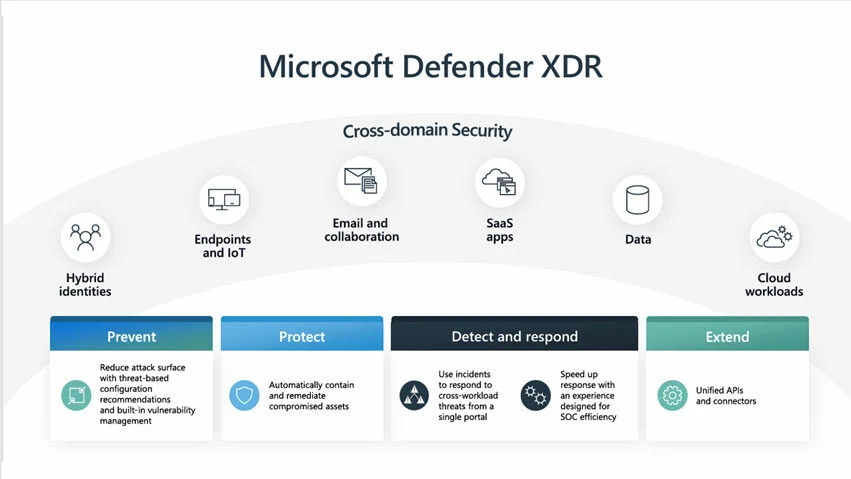
What Microsoft Defender XDR Protects
Microsoft Defender XDR unifies several security services to protect the key parts of an organisation’s environment. Defender for Endpoint secures devices with prevention, detection, automated investigation, and response. Defender Vulnerability Management discovers assets, assesses risk from vulnerabilities and misconfigurations, and helps teams prioritise what to fix.
By aggregating and correlating signals from other Microsoft security products, Defender XDR helps security teams spot threats earlier, understand their full impact, and respond more quickly. This integration allows defenders to work from a consolidated view of risk and activity across the Microsoft security stack, instead of pivoting between multiple, separate tools. Including:
- Microsoft Defender for Endpoint
- Microsoft Defender for Office 365
- Microsoft Defender for Identity
- Microsoft Defender for Cloud Apps
- Microsoft Defender Vulnerability Management
- Microsoft Defender for Cloud
- Microsoft Entra ID Protection
- Microsoft Data Loss Prevention
- App Governance
- Microsoft Purview Insider Risk Management
Microsoft Defender for Endpoint
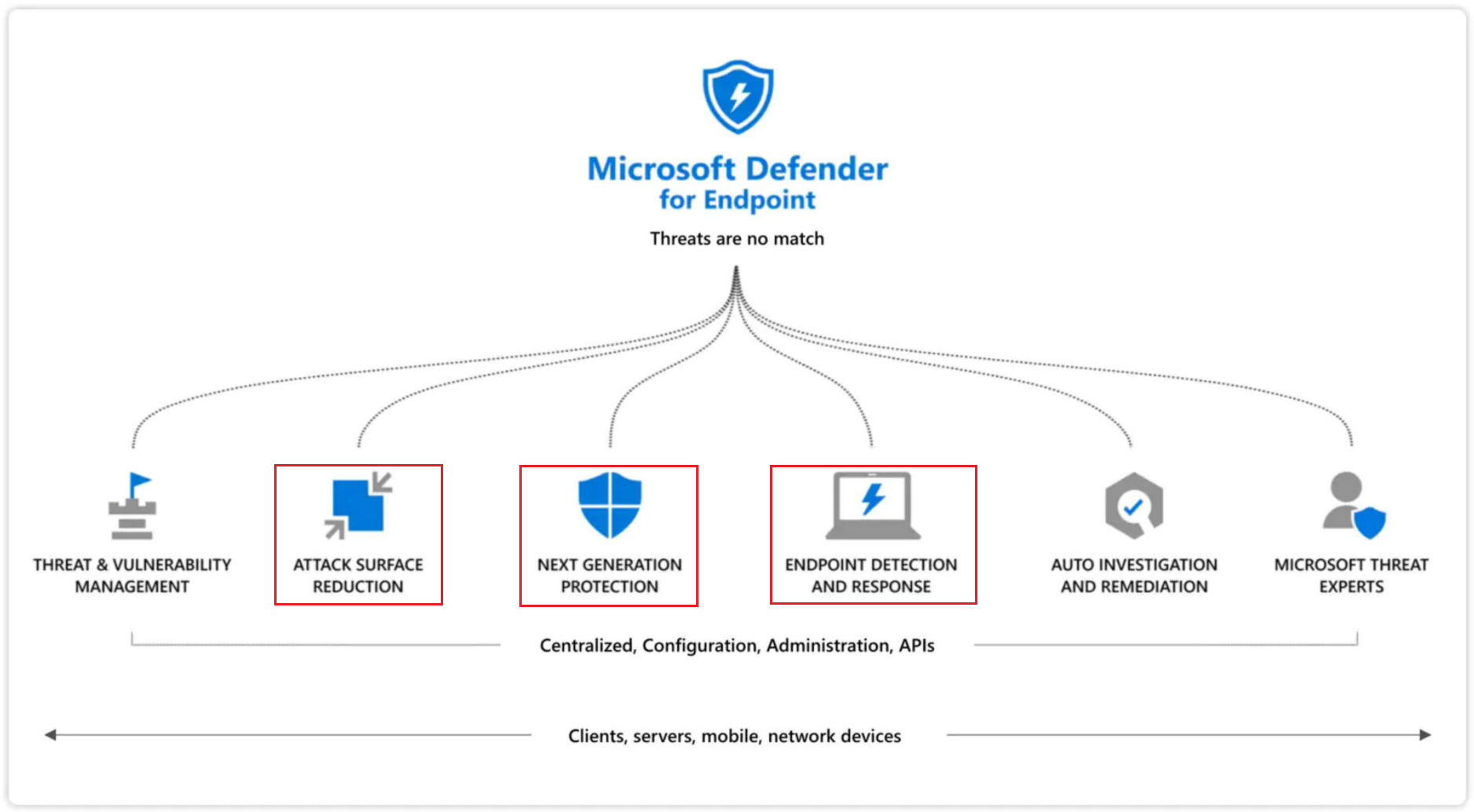
Microsoft Defender for Endpoint is an enterprise-grade security platform that helps organizations prevent, detect, investigate, and respond to advanced threats targeting their devices. In this context, endpoints span laptops, PCs, mobile devices, tablets, and network equipment such as access points, routers, and firewalls.
As a core component of Microsoft Defender XDR, Defender for Endpoint is designed to work seamlessly with the wider Microsoft security ecosystem. It can be integrated with Intune for device management, Defender for Cloud and Defender for Cloud Apps for cloud and SaaS protection, Defender for Identity and Defender for Office 365 for identity and email security, Defender Vulnerability Management for exposure reduction, and Microsoft Sentinel for SIEM and advanced security operations.
Microsoft Defender Antivirus
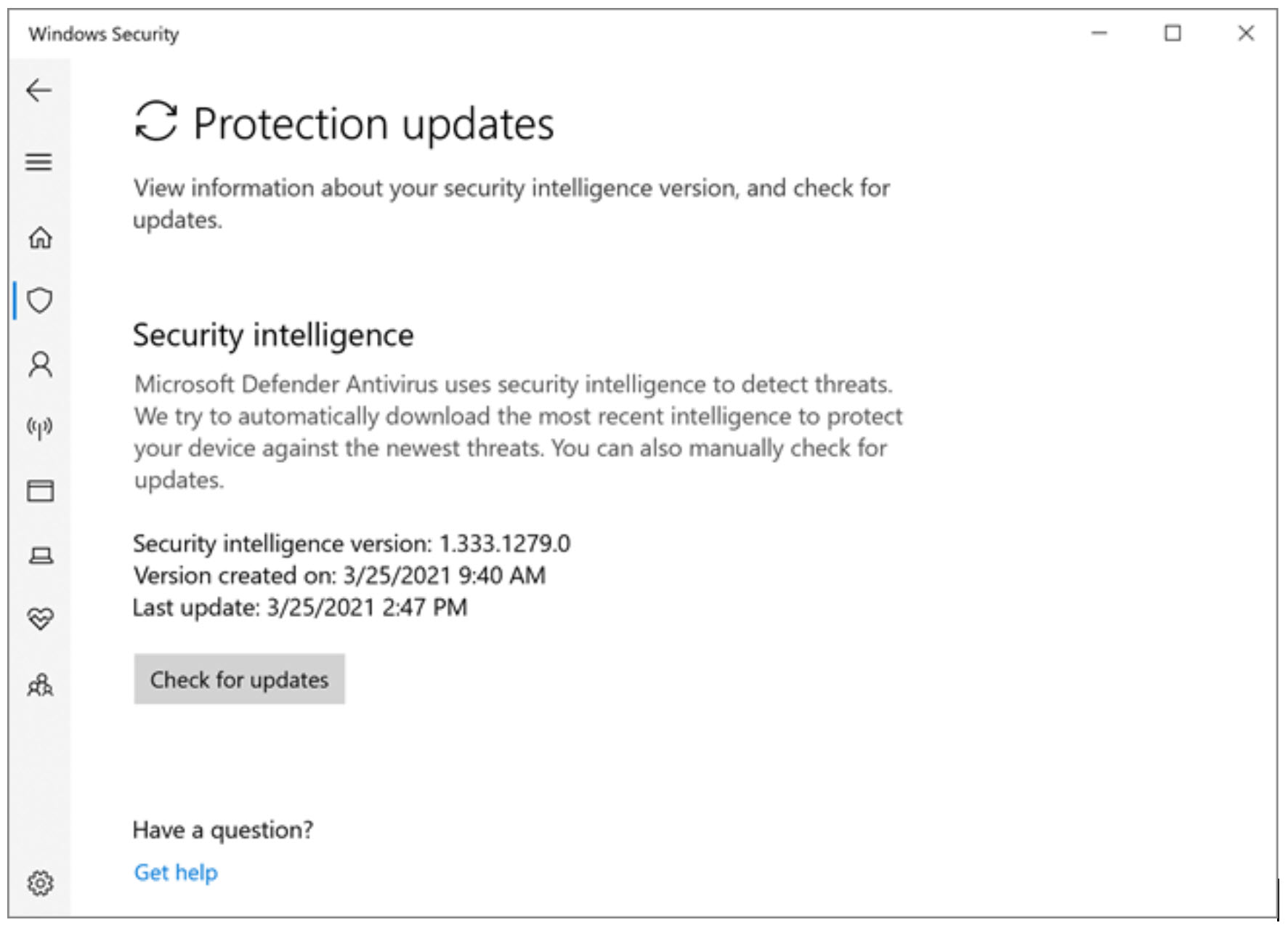
Microsoft Defender Antivirus is a core part of the next‑generation protection capabilities in Microsoft Defender for Endpoint. It combines machine learning, large‑scale data analysis, advanced threat research, and Microsoft’s cloud infrastructure to defend organizational devices against modern attacks.
Built directly into Windows, Microsoft Defender Antivirus works hand in hand with Microsoft Defender for Endpoint, delivering protection both on the device itself and through cloud‑based intelligence to strengthen overall security.
Microsoft Defender for Office 365
Microsoft Defender for Office 365 helps protect organization's from phishing attempts, email‑delivered malware, and business email compromise. It combines filtering, threat hunting, remediation, and investigation capabilities to secure email and collaboration channels.
The service supports multiple deployment models. In on‑premises environments, it can be used primarily as a filtering layer to protect SMTP email solutions such as Microsoft Exchange Server. For cloud‑hosted mailboxes, it secures Microsoft Exchange Online. In hybrid setups, it can be configured to protect both cloud and on‑premises mailboxes and to control how email is routed across the environment.
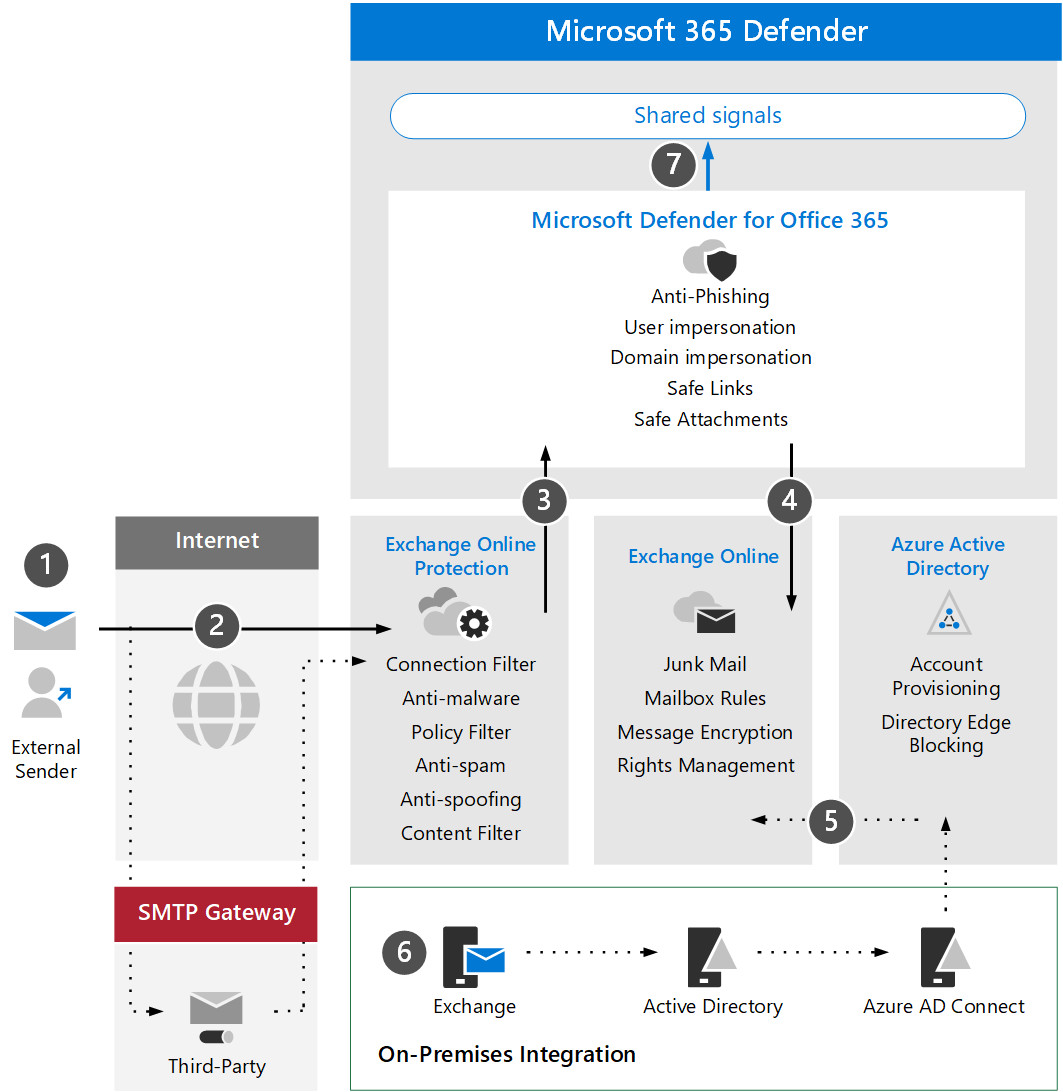
Protecting Inbound Email from Threats
Microsoft Defender for Identity
Microsoft Defender for Identity is a cloud-based security solution that strengthens identity monitoring across the organization. Fully integrated with Microsoft Defender XDR, it uses signals from both on‑premises Active Directory and cloud identities to help identify, detect, and investigate advanced identity‑driven threats. It was previously known as Azure Advanced Threat Protection (Azure ATP).
Role in Modern ITDR
Deployed as part of a modern Identity Threat Detection and Response (ITDR) strategy, Defender for Identity supports security operations teams across hybrid environments. It helps prevent breaches through proactive identity security posture assessments, detects threats using real‑time analytics and intelligence, supports investigations with clear, actionable incident details, and can automatically respond to attacks by acting on compromised identities.
Reducing Identity Attack Surface
Defender for Identity provides deep insight into identity configurations and highlights security best practices. Through security reports and user profile analytics, it helps reduce the organizational attack surface, making it harder for attackers to steal credentials and move laterally. The solution gives a clear view of identity security posture so misconfigurations and weaknesses can be fixed before they are exploited.
For example, Defender for Identity’s Lateral Movement Paths show how an attacker could move through the environment to reach sensitive accounts, allowing those paths to be mitigated in advance. In addition, Defender for Identity security assessments, available through Microsoft Secure Score, provide further guidance to improve identity policies and overall security posture.
Microsoft Defender for IoT
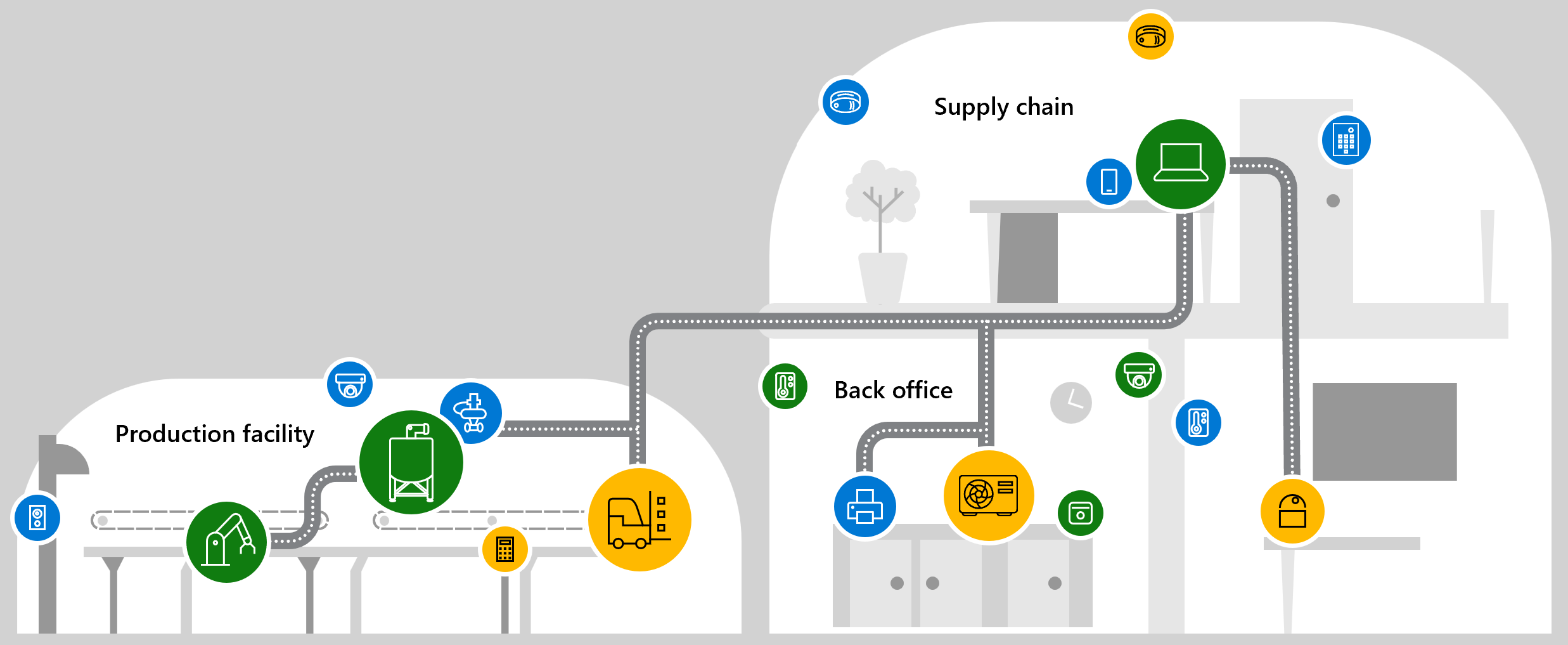
Microsoft Defender for IoT is a unified security solution designed specifically for IoT and OT environments. It discovers connected devices, uncovers vulnerabilities, and detects threats across industrial and operational networks, including legacy equipment that cannot run local security agents.
Agentless, Network-Level Monitoring
Defender for IoT uses agentless, network‑layer monitoring to gain visibility across the environment. It integrates with industrial equipment and SOC tooling, identifies specialized protocols and devices, and learns typical machine‑to‑machine (M2M) behavior to spot anomalies. Data is collected from network sensors, Microsoft Defender for Endpoint, and third‑party sources to build a comprehensive view.
Risk Assessment and Threat Detection
The solution assesses risk and manages vulnerabilities using machine learning, threat intelligence, and behavioral analytics. It can highlight unpatched devices, exposed ports, unauthorized applications or connections, and changes to configurations, PLC code, or firmware. Teams can search historical traffic across protocols, drill into full‑fidelity PCAPs, and detect sophisticated threats that evade static IOCs, such as zero‑day or fileless malware and living‑off‑the‑land techniques.
Response and Integration
Defender for IoT integrates with Microsoft Sentinel and other SIEM, SOAR, and XDR platforms to support coordinated response. Through these integrations and APIs, alerts and context can be fed into broader security workflows so SOC teams can act quickly across IT, IoT, and OT estates.
Centralized Visibility
A central experience in the Azure portal allows security and OT monitoring teams to view and manage all IT, IoT, and OT devices in one place, regardless of location. This unified view helps organizations monitor risk, investigate issues, and improve security posture across their entire operational environment.
Microsoft Defender for Cloud
Microsoft Defender for Cloud is a Cloud Native Application Protection Platform (CNAPP) that gives a unified view of security posture across cloud and on‑premises resources. It secures multicloud and hybrid environments and integrates security into DevOps workflows.
It is built on three main pillars: Cloud Security Posture Management (CSPM) to assess and improve cloud configurations, DevSecOps to manage code‑level security across multiple pipelines, and Cloud Workload Protection Platform (CWPP) to protect VMs, containers, storage, databases, and serverless workloads from threats.
Defender for Cloud embeds security early in the development lifecycle, helping teams find misconfigurations and fix risks before deployment. It integrates with the Defender XDR portal and the wider Microsoft Security ecosystem to provide a unified posture and SOC experience.
It also adds AI security and AI threat protection for generative AI workloads, helping discover AI apps, identify vulnerabilities, and detect attacks on AI systems. Foundational CSPM is included for free, with advanced capabilities available via the Defender CSPM plan.
What Microsoft Defender brings to Business
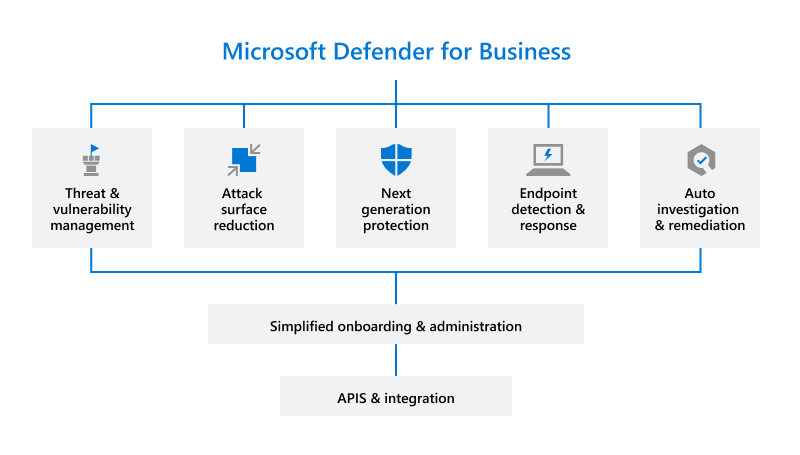
Microsoft Defender for Business is an endpoint security solution built specifically for small and medium-sized organizations of up to 300 employees. It helps protect company devices against ransomware, malware, phishing, and other common attacks, and is available both as a standalone subscription and as part of Microsoft 365 Business Premium.
Enterprise-Grade Protection for SMBs
Defender for Business brings enterprise‑grade capabilities from Microsoft Defender for Endpoint, but packages them in a way that is easier to operate for lean IT teams. This allows smaller businesses to use the same class of protection as large enterprises, reducing the risk of ransomware incidents, data breaches, and costly downtime without needing a dedicated security operations team.
Simple to Deploy and Manage
The solution is designed for ease of use. Wizard‑driven configuration, built‑in security policies, and clear recommendations guide administrators step by step. From day one, devices are protected with sensible defaults, while IT can later fine‑tune settings as needed. This lowers the barrier to adopting strong security and reduces time spent managing complex tools.
Flexible Across Devices and Environments
Defender for Business works with or without Microsoft Intune, uses components built into Windows, and supports Mac, iOS, and Android devices via dedicated apps. This lets businesses secure a mixed device fleet through a single solution, avoiding multiple point products and simplifying ongoing management.
Benefits for CSPs and MSPs
For cloud solution providers and managed service providers, Defender for Business integrates with Microsoft 365 Lighthouse as well as RMM and PSA tools. This enables multi‑tenant visibility over incidents and alerts, streamlines operations, and supports delivering security as a managed service to many customers at once.
What’s next?
Get more Microsoft solutions, reach out to our expert to explore what strategy could look like for your organization, and discuss tailored AI solutions for your business.
Discover the latest updates and new features for Microsoft Defender here
Is Microsoft Defender compatible with other devices?
Yes, it’s also available on Mac, Android, and iOS, so you can protect PCs, phones, and tablets with the same family of tools.
What happens to Microsoft Defender if another antivirus is installed?
When a third‑party antivirus is installed, Windows automatically disables Microsoft Defender’s real‑time protection to avoid conflicts and performance issues. However, Microsoft Defender can still be used for on‑demand manual scans without affecting the system.
How to run custom reports with Defender for Business?
Defender for Business uses the same APIs as Defender for Endpoint, so its data and capabilities can be integrated into reporting tools. For example, organisations can use these APIs with Power BI and scripts to automatically generate and email executive security summaries.
Share this on

Jerry Johansson
Works in IT and digital services, turning complex ideas into clear, engaging messages — and giving simple ideas the impact they deserve. With a background in journalism, Jerry connects technology and people through strategic communication, data-driven marketing, and well-crafted content. Driven by curiosity, clarity, and a strong cup of coffee.