
Why are many businesses taking more account of Insider Risks?
Insider risks are dangerous, any internal action can turn into a data breach, whether intentional or accidental. Employees need access to sensitive information to do their jobs, but the line between normal use and risky behavior is extremely thin. To stay protected, organizations must be able to tell everyday activity apart from true insider threats so they can address the risks without slowing people down or disrupting legitimate work.
An Annual Data Exposure report by Mimecast, based on a survey of 700 business and security leaders across U.S. organizations, revealed that:
Nearly 60% of all data breaches can be traced back to insiders, meaning more than half of security incidents actually starts from within the organization, not from external attackers.
An overwhelming 96% of companies admit they struggle to fully protect their sensitive information from insider-related risks, highlighting just how widespread and persistent this challenge has become.
Organizations are now allocating close to 10% of their entire security budgets solely to managing insider risks, a clear sign that the issue is no longer minor, but a major financial and operational priority.
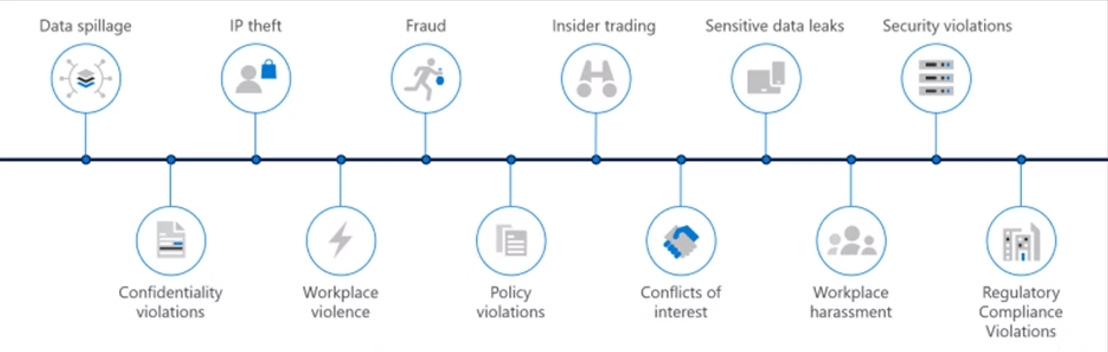
Common insider risks include:
What is Microsoft Purview Insider Risk Management?
Microsoft Purview Insider Risk Management is a compliance solution designed to reduce internal risk by helping you spot, investigate, and respond to both malicious and accidental user activity. Instead of passively logging behavior, it lets you define insider risk policies that specify which scenarios and behaviors you want to monitor and surface as potential issues.
You can also design clear workflows for how each case is handled, including when to escalate it into Microsoft eDiscovery (Premium) for deeper legal or forensic review. With this in place, risk analysts can move quickly from detection to action, enforcing your organization’s compliance standards and keeping user behavior aligned with policy.
Insider risk analytics let you assess where your organization might be most vulnerable, even before you set up any insider risk policies. Running an analytics scan helps you spot high-risk groups or activities so you can decide which policies and coverage you actually need. It can also highlight gaps where you might want to adjust your licensing or optimize your current setup for better insider risk protection.
How it works
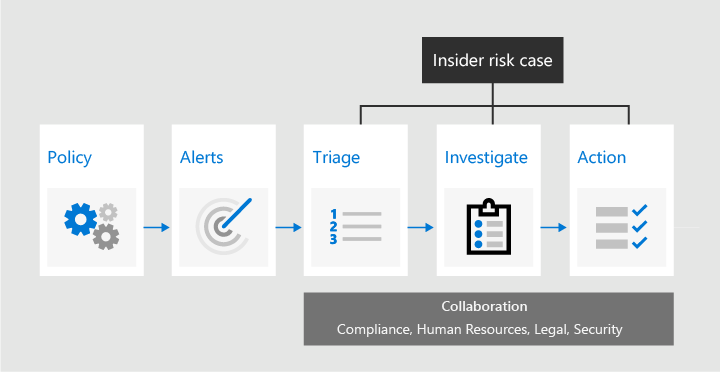
With targeted policy templates, rich activity signals from across Microsoft 365, and built‑in alert and case management, you get clear insights that make it easy to spot and respond to risky behavior quickly.
In practice, Insider Risk Management follows a simple flow: it detects potential issues, helps you review and investigate them, and then supports the actions you need to take to resolve internal risks and compliance problems.
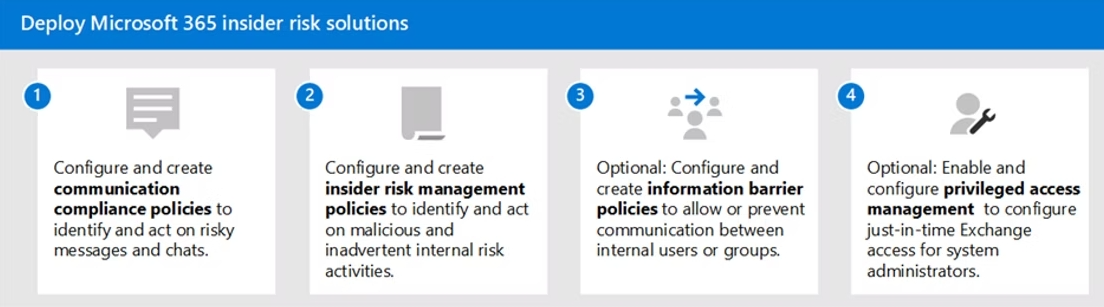
 How to apply Microsoft Purview Insider Risk Solutions
Insider risk management is included with several Microsoft 365 enterprise plans. You get it with Microsoft 365 E5/A5/F5/G5 (paid or trial).
It’s also available if you have Microsoft 365 E3/A3/F3/G3 and add either the Microsoft 365 E5/A5/F5/G5 Compliance add-on or the Microsoft 365 E5/A5/F5/G5 Insider Risk Management add-on.
Another option is Office 365 E3 combined with Enterprise Mobility & Security E3 plus the Microsoft 365 E5 Compliance add-on.
Microsoft Insider Risk Management key abilities
It looks at both intentional and unintentional activities that could put company data or compliance at risk. From there, it turns raw activity into alerts and cases that teams can actually act on. Including 4 key features:
Enabling detection and enforcement policies
A core strength of the solution is how it lets you model your own risk scenarios as policies. Instead of watching “everything”, you define which user activities you care about and when they should be treated as risky.
Each policy can describe the actions to monitor, the conditions that must be met, the users in scope, and which locations or types of content deserve closer attention, such as specific SharePoint sites or files with sensitive labels. These definitions tell Insider Risk Management exactly what to look for and how to react when something crosses the line.
Bringing HR context into risk decisions
Insider risk often spikes around key HR events, like when someone is about to leave the company or has gone through a tough performance review. Microsoft Insider Risk Management can ingest HR data, so those events become part of the risk picture.
Information such as termination dates, last working day, performance improvement plans, review outcomes, or changes in job level can all influence how a user’s activity is evaluated. With this context, policies are better at spotting behavior that is driven by grievance or the opportunity to profit in a new role, instead of treating every user the same way.
Adding user risk insight to Defender for Cloud Apps
Defender for Cloud Apps already monitors access, sharing, and data loss prevention across Microsoft 365 and other cloud services. The challenge, as always, is separating useful alerts from noise. Because Insider Risk Management assigns each user a risk level based on their recent activity, that signal can be passed into Defender to add another layer of context.
Analysts see not just what happened, but whether it came from someone whose behavior has already been trending in a risky direction. This makes it easier to prioritize which alerts to investigate first and reduces the chance that serious issues are lost in a long queue.
Extending coverage beyond Microsoft 365
Most organizations run far more than just Microsoft 365, and insider risk follows the data wherever it lives. While Microsoft Insider Risk Management focuses on the Microsoft stack, it can still play a useful role for other SaaS applications. It can work with services such as Box, Dropbox, Google Drive, or GitHub, and it can also consume detections that have been aggregated in a SIEM (Security information and event management) from a wider SaaS estate.
Those external signals are then evaluated alongside native Microsoft 365 activity, so security teams can build a single, coherent view of insider risk instead of chasing separate stories in separate tools.
Take a proactive approach to insider risk management
If you need broader default coverage or your sensitive data demands near real-time threat response, a more comprehensive insider risk management solution is worth exploring. The sooner you start, the safer your business is.
Share this on

Jerry Johansson
Works in IT and digital services, turning complex ideas into clear, engaging messages — and giving simple ideas the impact they deserve. With a background in journalism, Jerry connects technology and people through strategic communication, data-driven marketing, and well-crafted content. Driven by curiosity, clarity, and a strong cup of coffee.