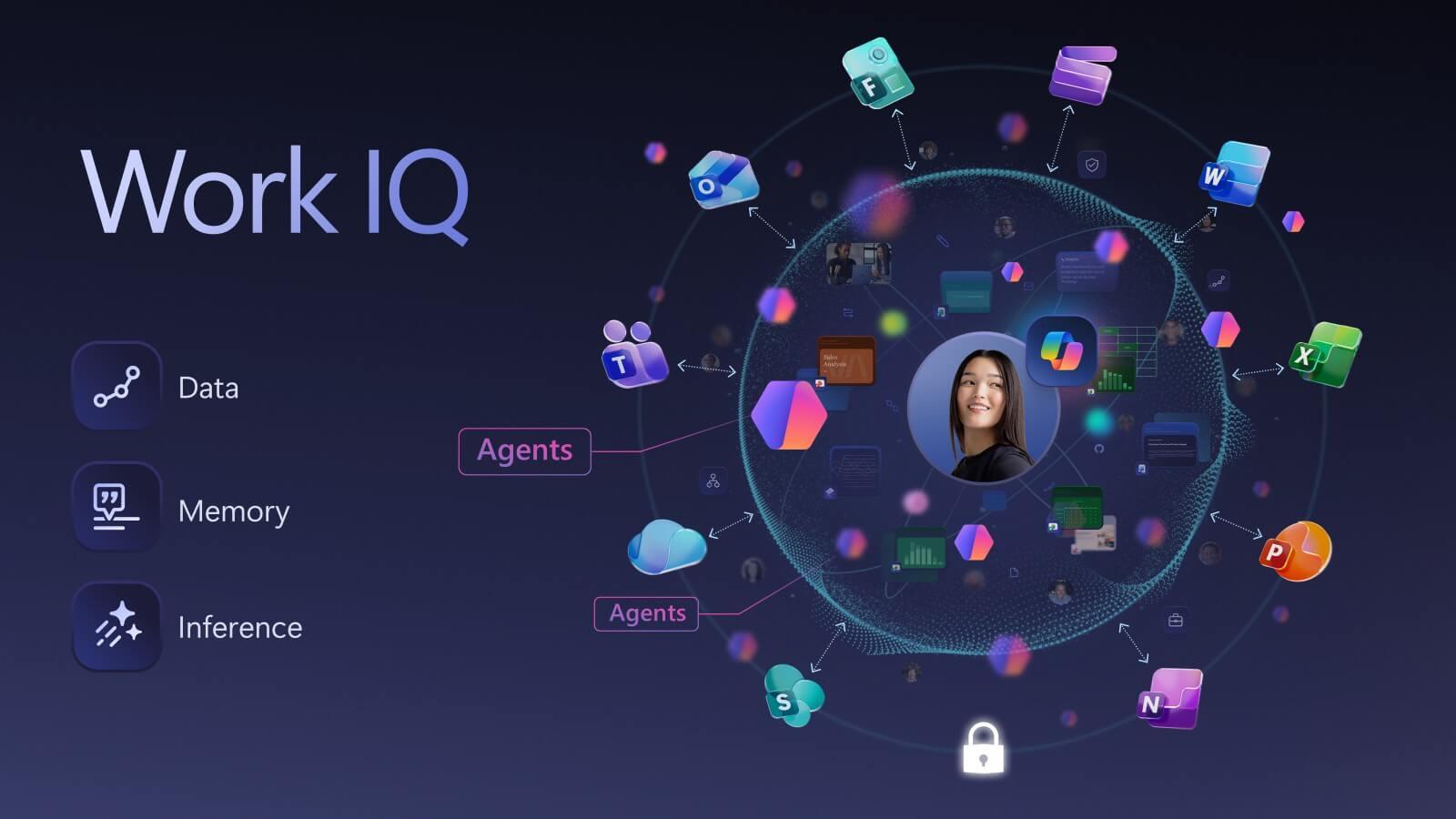
Work IQ: The Intelligence Layer That Helps Microsoft 365 Copilot Understand You
Work IQ is the new intelligence layer behind Microsoft 365 Copilot that helps it understand you, your job and your organization. This article explains what Work IQ is and how it powers three patterns of AI at work: assistants, teammates and operators, illustrated with real Ignite 2025 demos and customer scenarios.

Introduction
Ignite 2025 makes one thing clear: Microsoft 365 Copilot is moving beyond “smart drafting assistant” territory and into something deeper. At the center of that shift is Work IQ, a new intelligence layer that helps Copilot understand how work actually happens in your organization, and three patterns for how AI shows up in day-to-day work: AI as assistants, AI as teammates, and AI as operators.
If you want a broader view of everything announced around Copilot, Foundry and agents, you can read our separate Microsoft Ignite 2025 highlights blog and then come back here for the deeper dive on Work IQ.
What is Work IQ?
Work IQ is a new intelligence layer behind Microsoft 365 Copilot and its Agents. Microsoft describes it as the capability that lets Copilot “know you, your job, and your company inside and out.”In simpler terms, Work IQ helps Copilot understand how work actually happens in your organization, not just what is written in a document.
That changes Copilot’s role. Instead of behaving like a smart chatbot that waits for a prompt, Copilot starts to behave like a context-aware teammate. It can follow the thread of your work across apps, notice patterns, and use them to help you faster and with fewer instructions.
AI Build for Work
In the Ignite 2025 Copilot session, Microsoft positions Work IQ as the engine that powers Microsoft 365 Copilot. Instead of relying only on what sits in documents, it brings together live work signals, organizational memory and reasoning so Copilot can respond in the flow of work, not just to isolated prompts.
With that foundation in place, the session says Copilot and agents unlock three new patterns of work: AI as assistants, AI as teammates, and AI as operators.
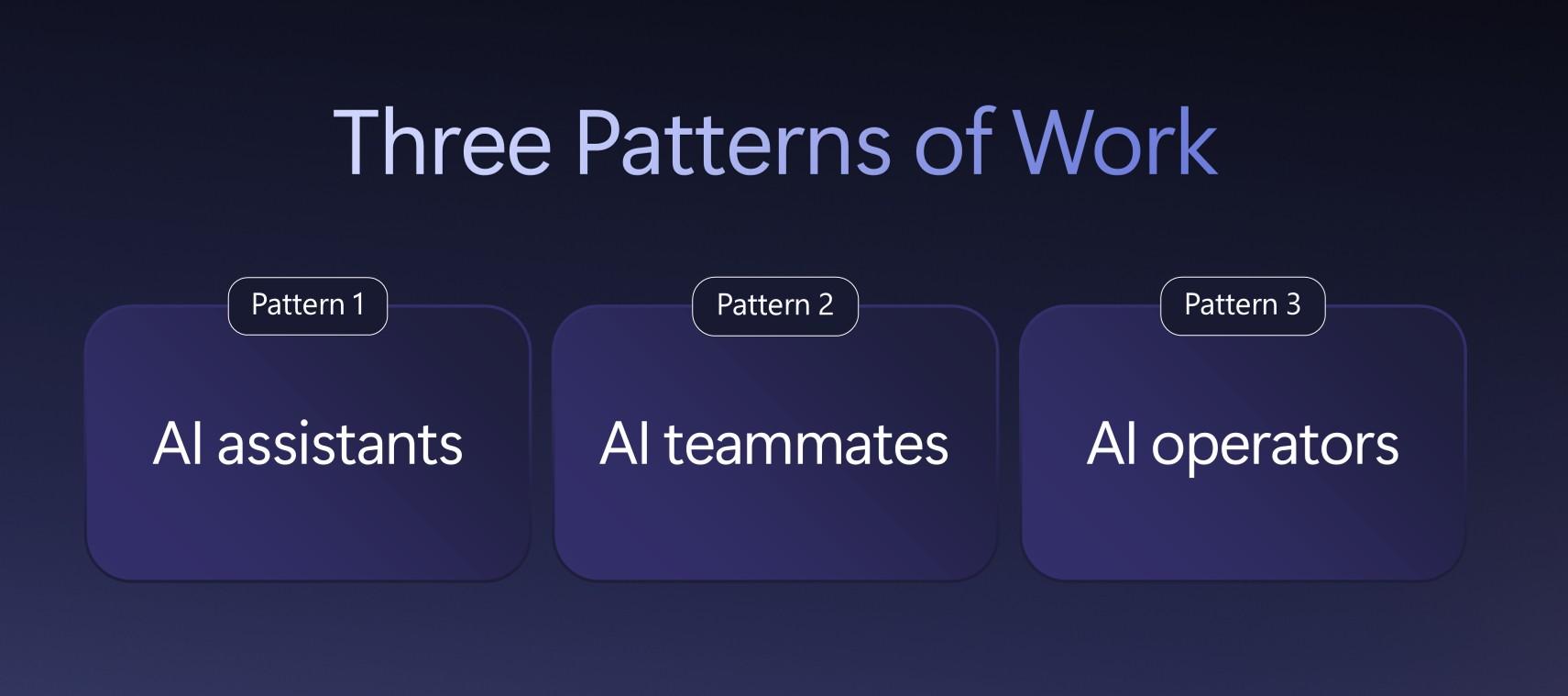
Source: Microsoft Ignite 2025
Pattern 1: AI as assistants
Most people already understand the basic idea of an AI assistant. You prompt, it responds. However, the Ignite script points out that work is not that simple. In real organizations, you need an assistant that understands your context, takes on tasks, and keeps up as your work changes over time.
Demo Situation 1 from Ignite event
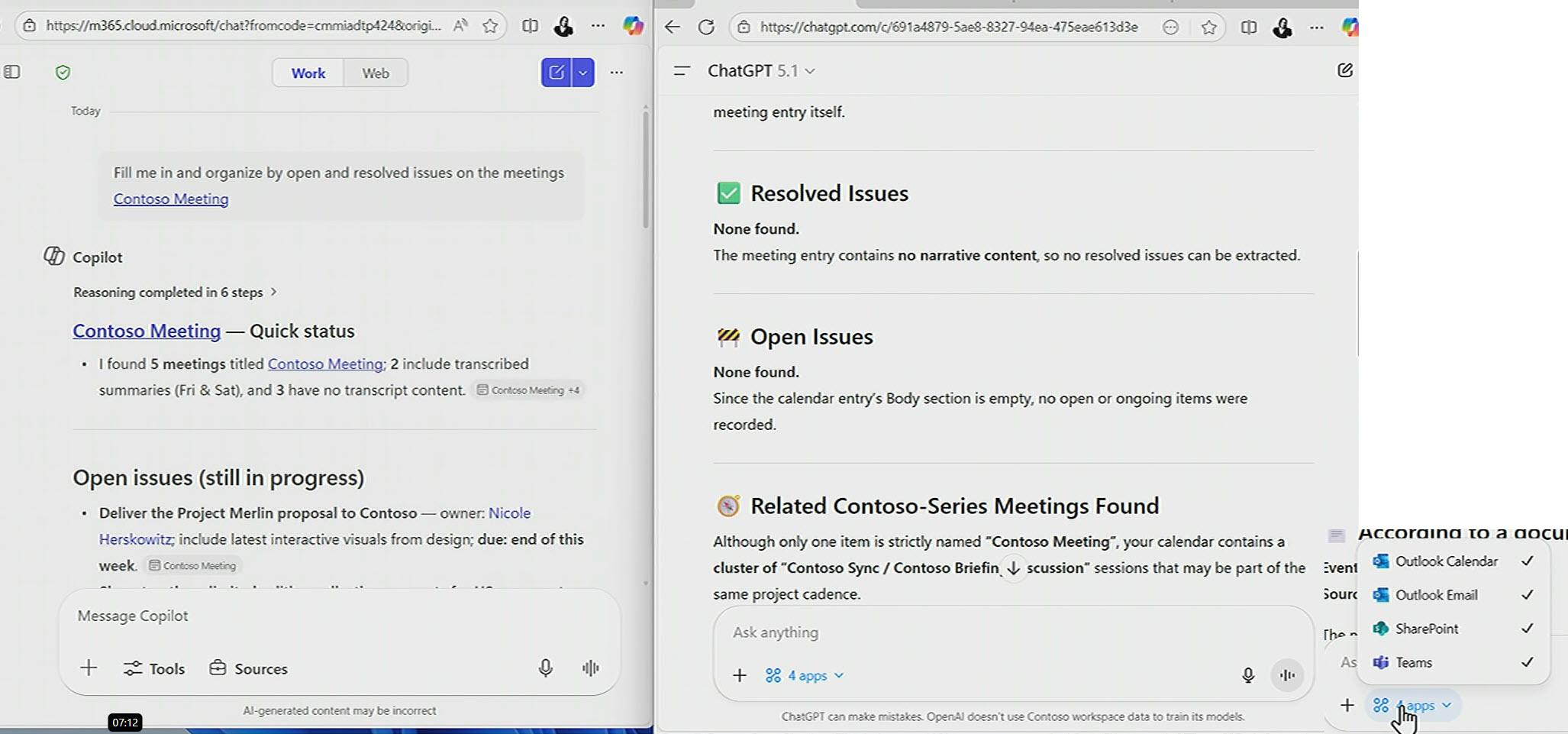
Nicole meets with her customer, Contoso, on a regular cadence and needs to be fully prepared before every call. Ahead of the next meeting, she wants to quickly review what topics are still open, what has been resolved, and who owns each action so she can walk in with a clear status view.
She types one simple request: “Fill me in and organize by open and resolved issues on the meetings Contoso meeting.”
GPT response (with Microsoft 365 connectors on)
The output says there are no resolved issues and no open issues. The reason becomes obvious when you look at what the model actually accessed. GPT only reads Outlook meeting events, meaning the calendar shells without the real meeting substance.
It did not pull in Teams meeting content, transcripts, screen shares, or chat. With hundreds of millions of Teams meetings happening every day, that missing layer is where most decisions and follow-ups live. So even with connectors on, GPT is working with a thin slice of context and produces an empty recap.
Copilot response
Copilot gives a much stronger and more useful answer. It reviews the Contoso meeting series and pulls together the full work trail: meeting transcripts, the materials shared on screen, and the Teams discussions that happened around those calls.
From that connected view, Copilot produces a structured update with clear open issues, resolved issues, and owners. It looks like the kind of prep a human account lead would create after reviewing every interaction, but done in seconds.
Source: Microsoft Ignite 2025
Demo Situation 2 from Ignite event
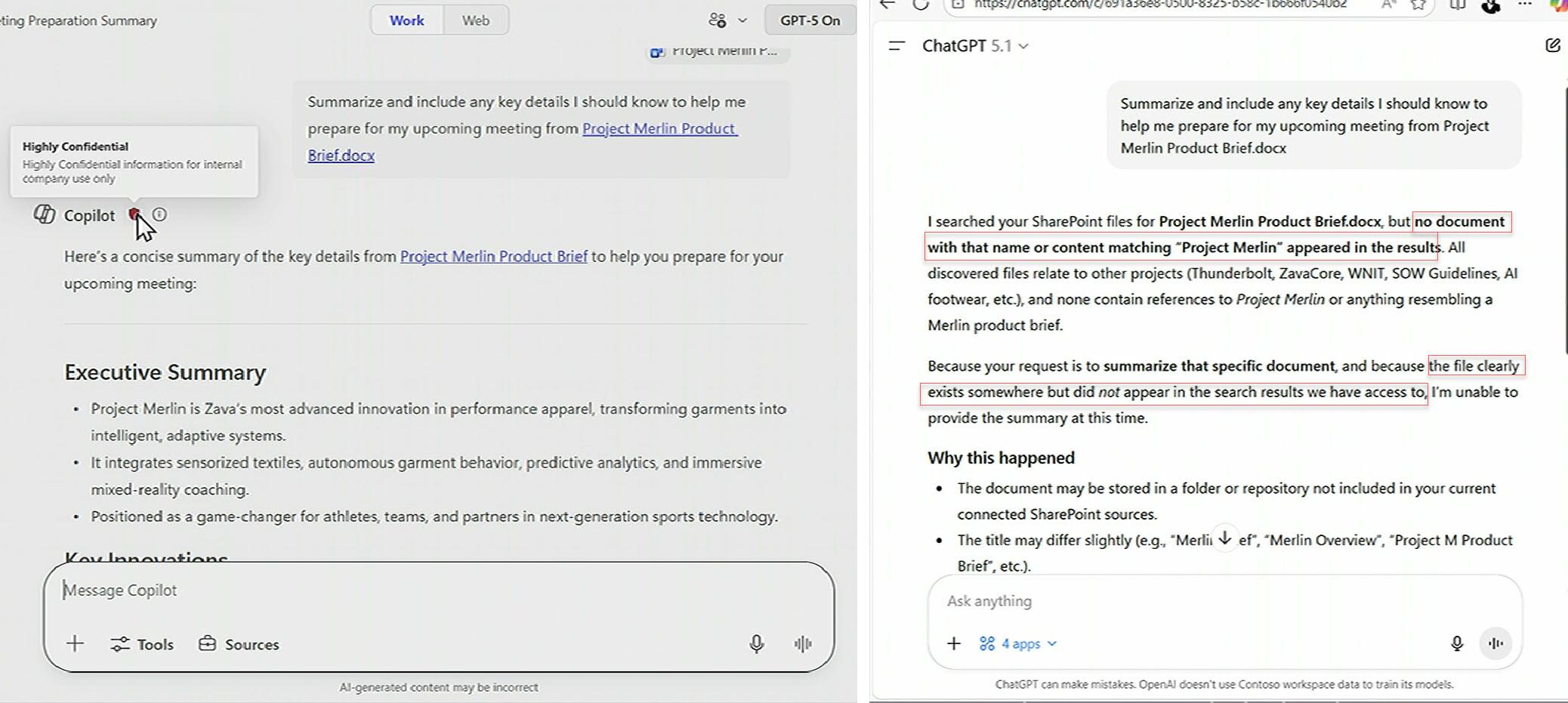
Nicole is running a super-secret pilot with Contoso called “Project Merlin.” The key brief is encrypted and marked Highly Confidential, so it cannot be shared widely. She still needs a quick summary before her next meeting.
She uses the same request in both tools: “Summarize and include key details I should know to help me prepare for my upcoming meeting from Project Merlin Product Brief.docx.”
GPT response (with connectors on)
ChatGPT, even with Outlook, SharePoint, and Teams connectors enabled, cannot find or read the brief. It says the file exists but does not show up in its search results, because the sensitivity labels block it.
Copilot response
Copilot summarizes the document normally because it can see that Nicole has permission to access it. Even though the file is encrypted and labeled, Copilot works on it safely inside her existing access rights. Anyone without access would not be able to use Copilot on that file.
Source: Microsoft Ignite 2025
How does Work IQ make Copilot a better assistant?
These two demos together show why Work IQ is different from using other AI tools with 365 connectors. Connectors only pull fragments of data with no real understanding of context and relationships. So they often miss critical information, give incomplete answers or worse, they may hallucinate.
Copilot does not rely on that kind of guesswork. Work IQ works across all your Microsoft 365 work data that Copilot is allowed to use in real time with richer context. In the Contoso example, Work IQ allows Copilot to look at the whole picture around the customer: the Teams meetings, the shared screens and the follow-up chats. Because it can connect those signals, it can answer the business question Nicole cares about: what is open, what is resolved and who is responsible.
In the Project Merlin example, Work IQ enables Copilot to work safely with the most sensitive content in the tenant. It understands encryption, sensitivity labels and role-based access, so it can summarize a confidential brief for the right person without exposing it to anyone else. Even with connectors switched on, GPT fails here because it cannot see that protected content at all.
Pattern 2: AI as teammate
If AI as assistants is about helping an individual, AI as teammates is about embedding agents into team workflows. The assistant can already draft, summarize, and prepare you. Agents do more, it takes a role in a shared process, contributes a first pass, and iterates with the group.
If you want to get more value from this pattern in practice, it pairs naturally with good prompting and instruction tips for Copilot agents, so teams give agents clearer roles and better context.
Work IQ enables this because it does not only learn user preferences. It learns collaboration patterns across a “work chart,” meaning who actually works together and how work flows, even when formal org structures are messy.
That is why the Ignite updates push Office agents into Copilot Chat and Agent Mode inside Word, Excel, and PowerPoint. Once those apps become agents, they can participate in the same context stream as the user and the team.
You can feel the difference here versus the earlier “one-shot Copilot.” A teammate does not stop after handing you a draft. It keeps working with you, keeping track of what has already been decided, what tone your team uses, and what the latest version of truth is.
Pattern 3: AI as operators
The third pattern is the most advanced. AI as operators means people set goals and guardrails, while agents carry out repeatable work from end to end.
This is where Copilot moves beyond individual productivity and into business execution. Ignite introduces process agents such as Sales Development Agent, Workflows Agent and App Builder Agent. These are built to run real operational loops: prospect research and outreach preparation, trigger-based automations across Microsoft 365, and rapid app creation from natural language.
Work IQ matters here because operators need more than access to data. They need a working model of how tasks connect, what the next step should be and when a signal is important enough to act on. The inference layer of Work IQ connects your data and Copilot’s memory of how you work, then recommends or takes the next action while staying inside your tenant’s security boundary.
If you are considering this level of automation, it is worth combining Work IQ with a clear Copilot 365 risk assessment approach so that operator-style agents are rolled out with governance, controls and monitoring from day one.
How Work IQ Powers Copilot
Copilot now knows your most important meetings, the files you're working on, the people you work for or the people you work with. Next, is memory; Copilot knows the way you work, your style, your preferences like how you handle important tasks. And finally, there's inference. It makes connections and it's secure.
If you are thinking about how to govern all of these agents as they spread across your tenant, the next step is to look at Agent 365. In our dedicated Agent 365 blog, we break down the control plane Microsoft is building for registering, securing and monitoring agents.
And if you are ready to explore what Work IQ and Copilot agents could look like in your own environment, contact us. We can help you translate these Ignite announcements into a concrete roadmap, from early pilots through to governed, production-grade use cases.
Share this on