Microsoft Ignite 2025 Introduces Agent 365
Microsoft Ignite 2025 highlights that: AI agents are moving from side experiments to a real part of how organizations run work. Microsoft introduced Agent 365 as the control plane for this shift, the number of agents is growing fast and most companies will not get beyond pilots without stronger governance.
Gartner predicted that over 40 percent of agentic AI projects could be canceled by 2027 when costs, risks, and value are not controlled. In other words, the market is about to see a wave of failed agent programs, not because agents are useless, but because organizations can't control and justify them.
Agent 365 is Microsoft’s answer to that gap. As Constellation Research notes, it acts as a control layer for both Microsoft-native and third-party agents, giving enterprises a way to manage identity, policy, and oversight before agents start to grow in an unmanaged way.
This blog explains what Agent 365 brings, why it became a headline Ignite announcement, and how it helps leaders turn agents into clear, trackable business outcomes.
Inside Agent 365: The Control Plane for All AI Agents
What Is Microsoft Agent 365?
Microsoft Agent 365 is the control plane for AI agents in your organization. It gives every agent its own Microsoft Entra Agent ID, so IT can manage identity, lifecycle and access for agents in the same structured way they do for users and workloads.
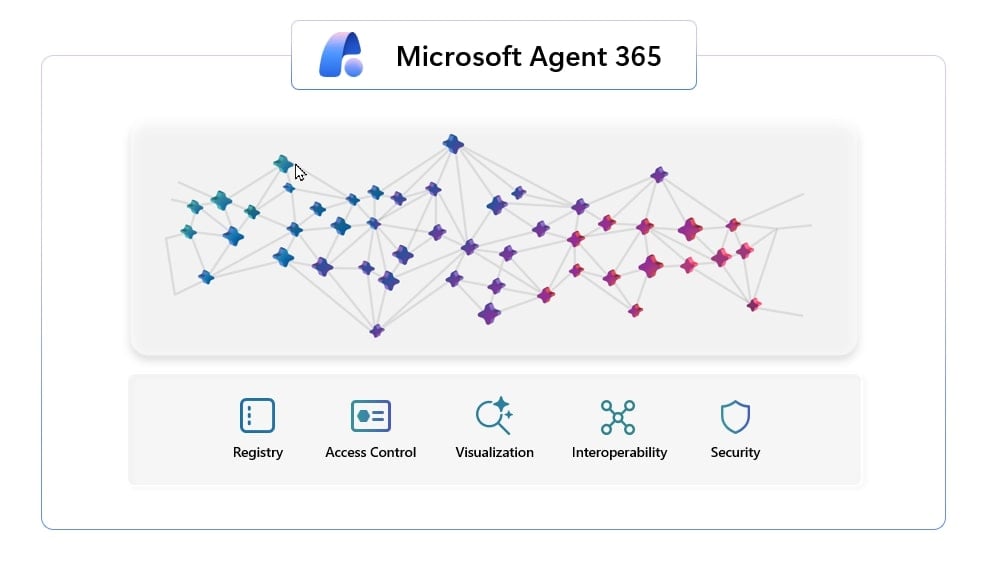
At a high level, Agent 365 lets you:
- Register agents from multiple places and get a single view of everything in use, including agents with Agent ID, agents you register yourself and “shadow AI” that appear outside normal processes.
- Control what each agent can reach, using risk-based conditional access and least privilege so agents only see the data and tools they genuinely need.
- Visualize how agents, people and data are connected, and monitor behavior and performance over time.
- Interoperate by equipping agents with apps and data, and connecting them to Work IQ so they can plug into real business processes instead of acting as one-off bots.
- Secure agents with integrated data protection and threat protection, including detection and remediation of risky or malicious agent activity.
You still build agents on your preferred stack. Agent 365 does not replace your orchestration framework. Instead, it wraps existing agents with enterprise-grade identity, observability and governance so they can run safely at scale.
Where Does Agent 365 Run in Your Tenant?
Agent 365 is a cloud service that is managed through the Microsoft 365 admin center and operates within your Microsoft 365 service boundary, using your existing tenant identity and security controls. A few practical points:
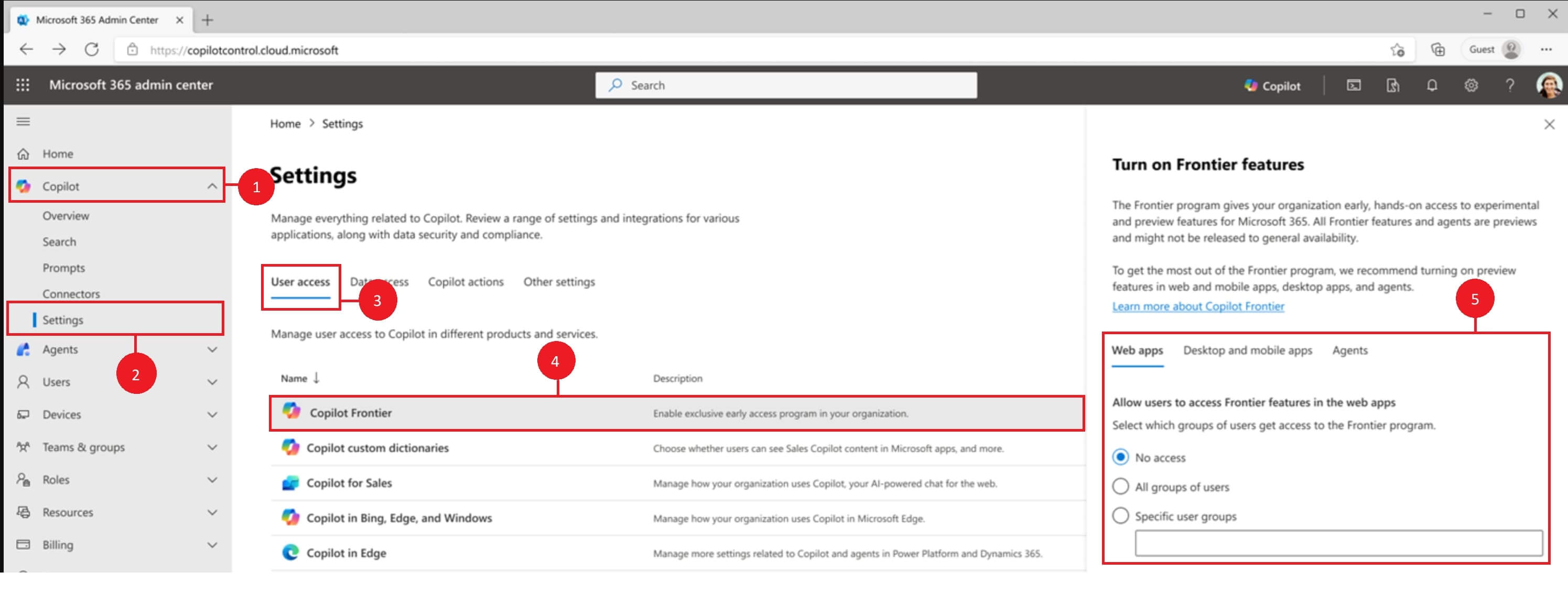
Prerequisites: Agent 365 is currently in preview. To get early access, your tenant must be enrolled in the Frontier preview program and have at least one Microsoft 365 Copilot license to enable Agent 365. Because this is a preview, capabilities and availability may change over time.
Entry point: Admins sign in to the Microsoft 365 admin center, go to Copilot → Settings → Copilot Frontier, then enable Agent 365. Once enabled, there is an Agents section in the left navigation where you discover, onboard and manage agents.
Where agents themselves run?
Agents can be hosted on many different stacks, for example Microsoft Agent Framework, Copilot Studio, Azure AI Foundry, Semantic Kernel, OpenAI Agents SDK, Claude Code SDK or LangGraph.
Agent 365 does not host the agent logic. You extend agents with the Agent 365 SDK so they can participate in identity, notifications, observability and tool governance.
Your agents still run on the platforms where they were built. Agent 365 sits on top as a control layer so you can register them, control their access, and monitor their activity through your Microsoft 365 admin center and security tools.
How Agent 365 Connects Across the Microsoft Cloud?
Agent 365 is most useful when you see it as a connective layer between agents and the rest of the Microsoft ecosystem.
Entra ID and identity governance
Each agent can be given an Entra Agent ID, which provides:
- A first-class identity for authentication and authorization
- Conditional access and other Entra policies
- Lifecycle management and de-provisioning when an agent is no longer needed
This treats agents as a new class of identity, not just background scripts.
Integration with Purview and Defender
Agent 365 integrates with Microsoft Purview so you can apply data protection and compliance policies to agents and audit what they access or create.
It also integrates with Microsoft Defender to detect, investigate, and respond to threats that involve agents in real time, using the same security foundations you already use for other workloads.
Integration with Microsoft 365 apps via tools & notifications
Through the Agent 365 SDK and Microsoft tool servers based on the Model Context Protocol (MCP), agents can:
- Receive notifications and respond in context inside Teams, Word and Outlook, for example replies to comments or emails sent to the agent’s mailbox.
- Use governed tools to send email, locate and interact with documents in SharePoint, and respond to document comments, without each development team hand-building bespoke integrations.
- IT governs these MCP tool servers centrally, so teams can give agents powerful capabilities while still keeping access scoped and auditable.
Connection to Work IQ and Copilot
Agent 365 equips agents with the apps and tools they need and connects them to Work IQ, which provides context about how work flows across people, data and processes.
Copilot and Work IQ can then treat agents as governed participants in the work graph, not isolated bots. That enables scenarios where agents join real business workflows, rather than only answering prompts in a chat window.
What New Value does Agent 365 Unlock?
AI agents become a managed portfolio
Before Agent 365, scaling agents meant accepting rising uncertainty. You might get productivity wins, but you risk sprawl and duplicated effort. Agent 365 makes adoption behave like any other enterprise investment: you can see inventory growth, tie ownership to outcomes, measure performance, and retire agents that do not earn their keep.
Innovation cycles speed up
Many organizations have a familiar pattern. A team builds a high-value agent, IT blocks it for review, and momentum dies. Agent 365 shortens that cycle because governance is standardized through identity and policy templates. The business win is speed with control.
Clear ROI visibility reduces the risk of canceled agent projects
Gartner’s cancellation forecast is a warning about disorganized scaling. Agent 365 gives organizations leverage that most programs lack: a registry to prevent sprawl, access control to prevent misuse, observability to prove ROI, and security to preserve trust.
A Practical Control Layer for Enterprise Agents
Ignite 2025 did not just introduce a new Copilot feature. It introduced the missing layer for enterprise agent scale. Agent 365 gives organizations a registry to stop sprawl, identity and policy to keep trust intact, observability to prove value, interoperability to match real ecosystems, and security to make scaling safe.
If your organization is serious about agents as more than experiments, this is the moment to treat management as a product decision, not a compliance afterthought. The companies that do will be the ones that turn AI agents into a genuine advantage for your teams instead of another short-lived initiative.
Want to explore how Agent 365 fits your Copilot and Foundry roadmap? Contact us to map your first governed agent scenarios and build an enterprise-scale adoption plan.
Share this on

Jerry Johansson
Works in IT and digital services, turning complex ideas into clear, engaging messages — and giving simple ideas the impact they deserve. With a background in journalism, Jerry connects technology and people through strategic communication, data-driven marketing, and well-crafted content. Driven by curiosity, clarity, and a strong cup of coffee.