
Copilot readiness means finding out what Copilot will be able to see before anyone asks it a question. The license takes minutes to switch on. The checking takes longer, and most organizations start it too late.
Copilot answers questions using content the signed-in user can already open. It does not grant new access. It makes existing access easy to reach, which is a different problem and a much older one.
A folder shared by link with a contractor three years ago is still shared. Nobody browsed to it, so nobody noticed. Copilot browses.
A Copilot readiness check answers one question before go-live: what will Copilot surface that nobody intended to share, and who fixes it. Microsoft publishes a Microsoft Copilot & Copilot Chat Risk Assessment Quickstart on its Service Trust Portal, built on the risks and mitigations framework from its Security Development Lifecycle. It will not tell you which of your own findings to fix first.
What a Copilot Readiness Check Covers
A readiness check is an inventory of what Copilot will be able to reach, plus a decision about what to fix before it can. Four areas: who can see what, how sensitive content is marked, what is out of date, and where Copilot gets switched on first.
Readiness is not adoption. User training, prompt libraries and use case selection all matter, and all of them belong after go-live. Putting them in the same assessment is why readiness projects run for months without producing a fix list.
The two jobs also have different owners. Readiness belongs to IT and compliance, adoption belongs to the business, and giving both to the same person is how the security work stops the week the pilot starts going well.
Nobody decides to skip it. The pilot has a launch date. The permission review rarely does, so it slips instead of blocking anything.
Microsoft's own preparation guidance for SharePoint splits the same way. Its five steps are all environment work: run the Content Management Assessment, manage site lifecycle and archiving, close oversharing, use the SharePoint Admin Agent, set up backup and restore. None of them is about teaching anyone to write a prompt.
An AI Readiness Checklist You Can Run Before Turning Copilot On
Start at the top. The first check is the one that finds real exposure in almost every tenant.
|
Check |
How to check it |
Skip this when |
|
Sites shared with everyone in the organization |
Activity report Shared with "Everyone except external users" |
Never. Start here |
|
Overall permission exposure across sites |
Site permissions report, shown as Site permissions across your organization |
Under about twenty sites. Do it by hand |
|
Items overshared through special groups |
Sites and files shared via special SharePoint groups report |
You have already remediated at item level |
|
Link expiry and sharing defaults |
SharePoint admin center, Policies then Sharing |
Anonymous links were disabled tenant-wide from the start |
|
Sensitivity labels on regulated content |
Sensitivity label applied to files report, plus Purview |
No regulated data in scope |
|
Sites nobody owns or has reviewed |
Site lifecycle management: site ownership, inactive site and site attestation policies |
Never |
|
Which group gets Copilot first |
Microsoft 365 admin center |
You are enabling the whole tenant at once |
The Content Management Assessment Runs Most of This for You
Microsoft bundles most of this into one place. The Content Management Assessment in the SharePoint admin center runs the reports and sorts the sites that need attention, and Microsoft lists defining Copilot readiness for the organization as one of its purposes.
It recommends rerunning the assessment every thirty days while you remediate. It now sits under Advanced Management, then Start assessment, having moved from All Features.
You probably already have the tooling. SharePoint Advanced Management switches on for your SharePoint administrators as soon as a single user in the tenant holds a Microsoft Copilot license, on top of a qualifying Office 365 or Microsoft 365 plan, or through the E7 Frontier Suite.
What you get is the subset that supports Copilot, not all of SAM, so restricted site creation by apps still needs the Plan 1 add-on. Most organizations reach that condition on day one of a pilot and never open the reports.
Restricted Content Discovery Buys You the Rollout Date
The output that matters is a decision per site: fix the permissions, or keep the site out of Copilot until someone does. Which permissions to fix first is a SharePoint governance question, and I have worked through that one separately.
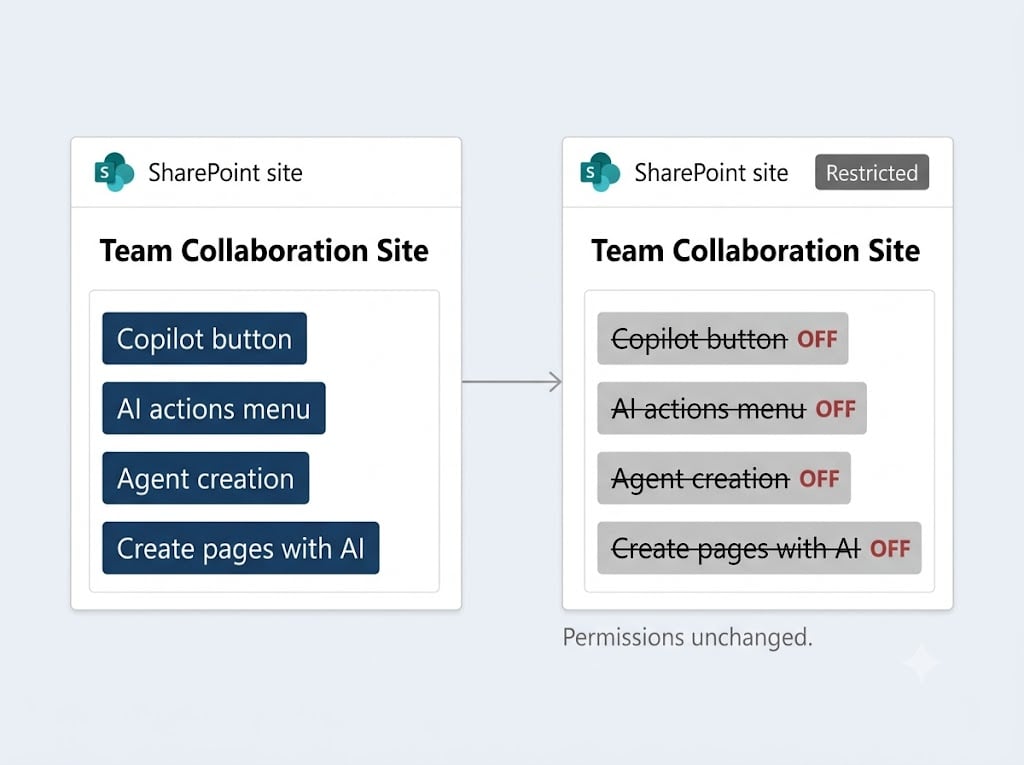
Restricted Content Discovery handles the second option without changing a single permission, which is how you unblock a rollout that would otherwise wait behind a permissions project. It appears as Restrict content from Microsoft Copilot on the site's Settings tab, and it does more than hide the site from search. It removes the Copilot button, the AI actions menu, agent creation and Create pages with AI, then tags the site as Restricted.
Site administrators can manage it themselves where you delegate that, with a justification that lands in the Purview audit log. The ceiling is 20,000 sites, and it covers SharePoint sites. OneDrive is not included. The older control it replaces, Restricted SharePoint Search, stopped accepting new enablement on July 31, 2026.
The obvious move is to lock everything down first and reopen on request. It breaks in week three. You cannot tell which permissions people actually rely on, so every reopening request gets approved blind, and three months later the environment is back where it started with IT cast as the department that blocked everyone for nothing.
Under Twenty Sites, Skip the Tooling
Small tenants do not need any of this. Twenty sites and two content owners is an afternoon with a spreadsheet, and buying a scanning tool for that is admin work with no risk reduction behind it.
Where you do need it, the pilot group I would pick is one department with ordinary content, not the executive team. The findings come out the same, and nobody has to explain a surprise to the board.
Who Is Responsible When Copilot Returns the Wrong File
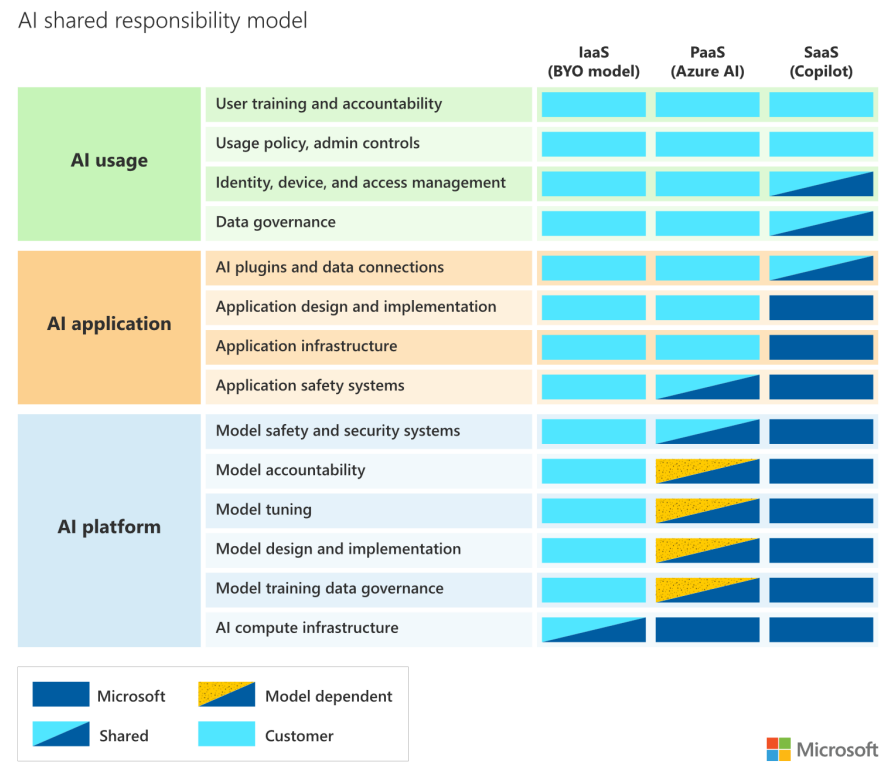
Copilot returns a file the user had permission to open, so no control failed. The organization still has a problem, and no product closes that gap.
Microsoft owns the hosting, the EU Data Boundary commitments, and the guarantee that your prompts, responses and data accessed through Microsoft Graph are not used to train foundation models. Your side of the line is shorter to say and harder to do. You own who can see what, who approved the rollout scope, and whether the content is still correct.
The model layer is the one place where you make a choice instead of inheriting one. Copilot now runs third-party models from OpenAI and Anthropic as subprocessors, you decide as an admin whether to enable them, additional terms may apply, and Anthropic's models currently sit outside the EU Data Boundary. If you operate under an EU data residency commitment, that is a decision to make deliberately, not one to inherit.
Site access review is what closes the gap in practice. It lets you delegate data access governance reports to the site owners who created the exposure, and that is the only version of this that scales past a few dozen sites.
That is also why a risk assessment for Copilot looks at the tenant rather than at Copilot. The questions are all about your configuration: which sites carry permissions nobody has reviewed since a migration, and which document sets still hold versions that should have been retired.
The question I would settle before go-live is who signs off on rollout scope. That is different from who runs the project. It is whoever puts their name on the decision that this group of people can now ask questions across this set of content. Most organizations answer it only after the first awkward result, in front of the people it affects, and the answer ends up the same either way.
Timing Decides How Much of This Gets Funded
While the Copilot business case is still open, permission cleanup is part of the project and has a budget line. After go-live, the same findings turn into a list of reasons someone should have checked earlier, and nobody wants to own that list.
Work with Precio Fishbone
Copilot readiness is one part of a wider question: whether your Microsoft environment and your ownership model are ready for AI at all. Precio Fishbone runs that assessment across the Microsoft stack, from the permission layer underneath Copilot to the governance model above it.
If you want to know what Copilot would surface in your tenant next week, talk to our team about an AI data and governance review.
Frequently Asked Questions
What is a Copilot readiness assessment?
A structured review of what Copilot will be able to reach in your tenant, run before you enable it. It covers permission exposure, sensitivity labels, ownerless sites and rollout scope, and it ends in a fix list with named owners.
Do we need to fix SharePoint before enabling Copilot?
In most tenants, yes. Copilot surfaces whatever the signed-in user can already open, so inherited permissions and old sharing links become visible in the first week. The work is permission cleanup in SharePoint, not a Copilot setting.
How long does a Copilot readiness assessment take?
The number of SharePoint sites involved and the number of content owners who have to be consulted set the timeline, not the scanning. Consultation is almost always the slower half.
Is Microsoft Copilot secure by default?
Copilot inherits your existing permissions instead of creating new ones, so it is as secure as your current configuration. The one setting that is a genuine choice is whether you enable third-party models, and where they process data.
Share this on

Pär Johansson
Pär works with international business at Precio Fishbone, project delivery & digital services, helping turn complexity into progress and strategy into long-term value. With many years of experience in international business, He is known for building strong relationships and turning plans into meaningful progress. Driven by people, trust and sustainable growth.