
Introduction
Microsoft’s Risk Assessment QuickStart is a practical starting point for evaluating Microsoft 365 Copilot. It maps core AI risks and mitigations, explains the shared-responsibility model with real customer Q&A, and links to deeper resources for due-diligence. Businesses can use this report to structure stakeholder workshops, prioritize mitigations, assign owners, and turn the findings into an initial risk register and remediation plan.
Microsoft 365 Copilot, Copilot Chat, How It Works?
Microsoft 365 Copilot and Copilot Chat are intelligent assistants that help you work with your organisation’s content. Copilot Chat is primarily a web chat experience that offers features like Pages, Code Interpreter, and image generation; the Microsoft 365 Copilot licence adds a Microsoft Graph-grounded chat and deep integration with Teams, Outlook, Word, Excel, and PowerPoint, plus access to pre-built Microsoft 365 agents.
Microsoft 365 Copilot turns a user’s prompt into an actionable result through a staged flow: prompt, grounding, model response, post-processing, and delivery.
First, the user types a request in Copilot. Copilot then improves that request through grounding so the model has specific, relevant context to work with. Grounding can include explicit references to Microsoft 365 entities (people, files) and, depending on admin or user settings, Copilot may fetch additional Microsoft 365 or web content, such as recent emails for a summary request. Throughout, Copilot only accesses data that the signed-in user is already allowed to see, based on existing Microsoft 365 role-based access controls.
Next, the grounded prompt is sent to the foundation model to generate a draft answer. Copilot then post-processes that draft before the user sees it. This post-processing can include additional grounding calls to Microsoft Graph, responsible AI checks, and security, compliance, and privacy reviews, as well as generating commands that apps can run on the user’s behalf. Finally, Copilot returns the result to the app, where the user can review and decide what to do next.
A few implications follow from this flow. Because Copilot relies on the existing Microsoft 365 permissions model, it presents only items the user can already access, which helps reduce the risk of unintended data exposure within or across tenants. And because the service adds responsible AI checks during post-processing, organisations gain another layer of control before responses reach end users.
AI Shared Responsibility Model
The Copilot 365 risk management positions Copilot as a shared effort. The platform delivers built-in safeguards, privacy reviews, and responsible AI checks, but customers remain accountable for how Copilot is configured, what data it can reach, and how people use it day to day. In Microsoft’s words, mitigating AI risks is a joint responsibility: customers must follow the Product Terms and Acceptable Use Policy and train users to understand the limits and fallibility of AI.
Practically, this means your risk assessment should map who owns what. Microsoft secures and operates Copilot as a SaaS service; you decide which capabilities to enable, which data sources to ground responses in, and which access controls apply.
Depending on the implementation path you choose, different operational policies and controls sit with your organisation, not with Microsoft. Keeping the shared model in view helps you separate risks that Microsoft mitigates at the service layer from those you must handle through identity, permissions, information governance, and user education.
The guide also highlights tenant-side controls that reinforce the customer’s share of responsibilities. SharePoint Advanced Management, now included with Copilot licences, gives admins tools to prevent oversharing, clean up inactive sites, and tighten access so Copilot only draws on current, appropriate content. These controls directly influence what Copilot can access and therefore reduce exposure during rollout.
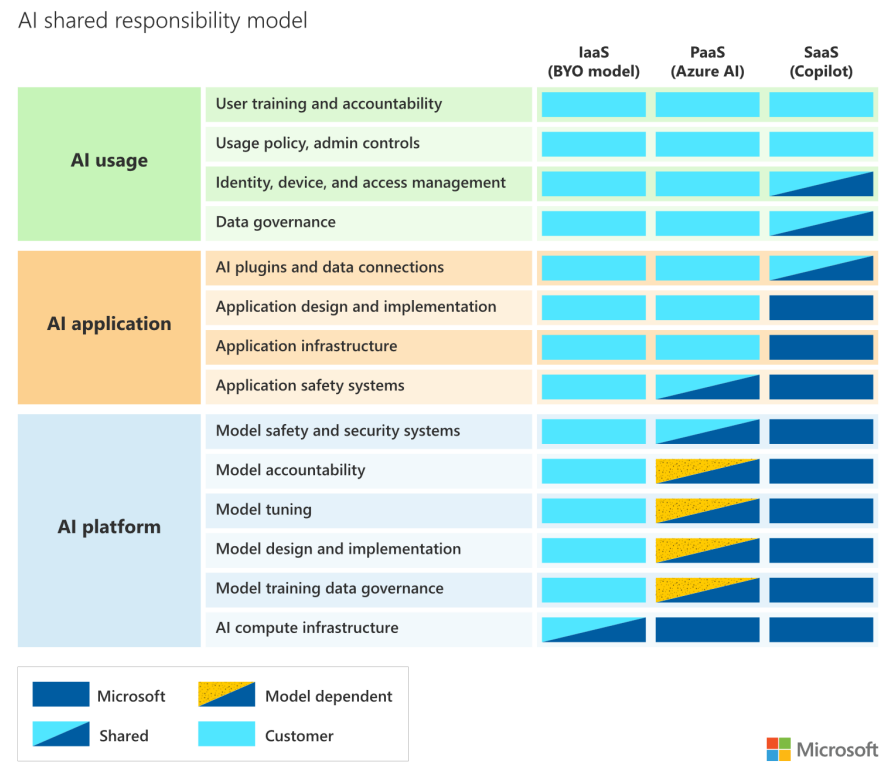
Source: Microsoft 365 Copilot & Copilot Chat Risk Assessment Quickstart (Aug 2025)
Key Focus of The Guide
Microsoft’s Risk Assessment QuickStart is designed to help organisations run a practical Copilot 365 risk assessment. It sets out the main categories of AI risk and how Microsoft addresses them, offers example questions and answers drawn from real enterprise reviews, and links to further materials for deeper due-diligence. In this guide, three main aspects were covered:
- AI risk and mitigation
- Data security and privacy
- Deployment and governance
AI risk mitigation framework
The guide explains Copilot's risks and fixes in straightforward language and shows where safeguards are built into the product. Copilot grounds prompts in Microsoft 365 data, then runs responsible-AI checks and privacy/security reviews before returning an answer, which reduces off-topic or ungrounded outputs. The guide also indicates the importance of optimizing prompt and instructions to get the best result from Copilot AI.
It treats mitigation as a shared responsibility. Microsoft supplies model-level and service-level protections, and customers are expected to enforce acceptable use and train users on AI’s limits. The risk list covers bias, misinformation or “hallucination,” over-reliance, privacy, security and resiliency, with corresponding controls and testing.
On the resiliency side, Microsoft documents redundancy, data replication and integrity checks, plus DDoS protections used across its online services.
Check Our White Paper GPT Integration in Microsoft Ecosystem
Data security and privacy
Microsoft 365 Copilot operates within the Microsoft 365 service boundary and honors our tenant’s permissions and policies. It grounds prompts in our tenant’s Microsoft Graph, sends the grounded prompt to Azure OpenAI within Microsoft’s service boundary, and returns results that only include content the signed-in user can already access.
Customer data is not used to train foundation models by default, and Copilot’s foundation models do not learn dynamically from your usage. The guide also points to alignment with global regulations and Microsoft’s Responsible AI Standard, including attention to EU AI Act requirements.
Deployment and governance
Successful roll-outs are as much policy and hygiene as they are licensing. The guide recommends keeping the shared-responsibility lens in view during risk assessment so you can separate what Microsoft covers from what your organisation must manage.
It highlights SharePoint Advanced Management (SAM), now included with the Copilot licence, to rein in oversharing, clean up inactive sites, and enforce access reviews so Copilot draws from current, properly secured content. For operational oversight, the paid Copilot plan adds admin analytics and ROI insights, while the free Copilot Chat plan does not include these controls.
Together, these points form the core of the guide: know the risks and controls, keep data access tight, and put lightweight governance in place so Copilot runs safely and predictably at scale.
Make Governance Your First Copilot Feature
Microsoft positions this Risk Assessment QuickStart as a first-pass guide. It helps you identify Copilot 365 risk, explore mitigations, and align stakeholders, but it's not a final risk assessment. The scope covers both Microsoft 365 Copilot and Copilot Chat and is meant to kick-off due-diligence and internal review.
Plan for change. Microsoft will continue to update its Security Development Lifecycle to address emerging AI risks, and it will evaluate Copilot and underlying foundation models with pre-release security checks and AI red teaming. Stay informed about model changes and their effect on risk posture during upgrades.
Use this QuickStart as a practical starting point, then fold the recommendations into your collaboration governance so security, privacy, and productivity move forward together.
If your organization is already using Copilot or is planning to do so, then it is clear that your organization requires a governance tool. Book a free demo to see how our experts can help you.
Share this on