
What Are Dataverse and SQL Server?
Choosing between Microsoft Dataverse and SQL Server (or Azure SQL) is a common decision for teams building on the Microsoft stack. Both store structured data, but they serve different goals: Dataverse prioritizes governed business data for Power Platform, while SQL prioritizes flexibility and engineering control for custom backends.
Microsoft Dataverse: Data Platform for Power Platform Apps
Microsoft Dataverse is a cloud-based, fully managed data platform for storing and governing business data used by Power Apps, Power Automate, and Dynamics 365. It provides a structured model and is optimized for operational records, such as customers, cases, work orders, approvals, and process status, where consistent security and data behavior across apps and automations matter.
SQL Server: Relational Database for Custom Development
SQL Server (and Azure SQL) is an enterprise relational database built for custom application backends, complex data services, and performance-sensitive workloads. Teams design the schema directly, write SQL queries and procedures, and optimize performance with indexing and tuning. SQL is often the right choice when you need maximum control, deep customization, and broad compatibility across tools and technology stacks.
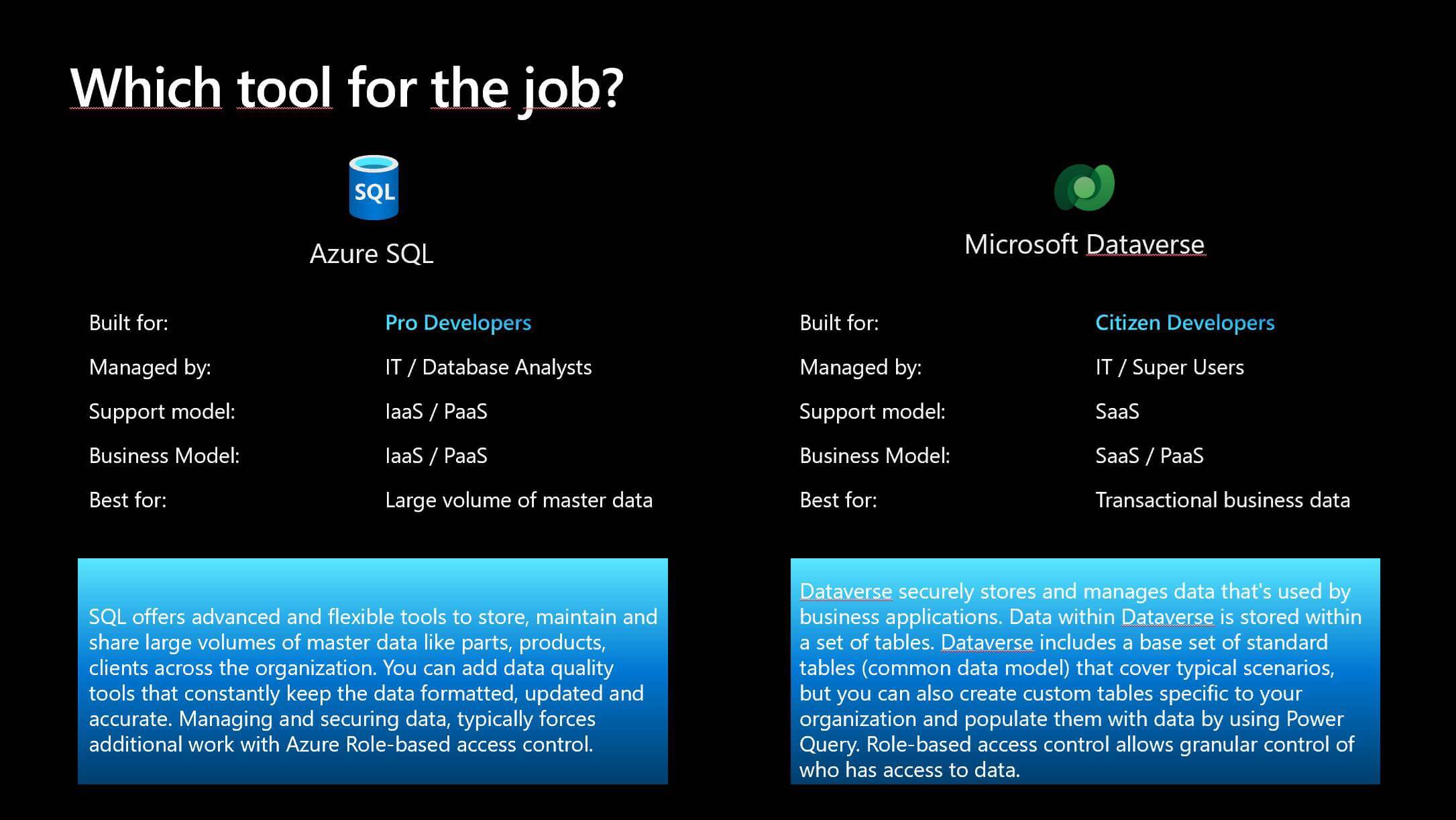
The decision is less about “which database is better” and more about fit. Use Dataverse when you need a governed operational system of record tightly integrated with Power Platform. Use SQL when you need a general-purpose database engine optimized for custom development, advanced tuning, and specialized workloads.
Key Differences Between Dataverse vs SQL Server
Deployment model and architecture
Dataverse is cloud-native and fully managed. You can launch it quickly without provisioning servers or managing database infrastructure, which reduces deployment complexity for business apps built on Power Platform.
SQL Server is a relational database (a traditional database system that stores data in tables and uses relationships between them). It can run on-premises, in the cloud (Azure SQL), or in a hybrid setup, giving teams more architectural control, but typically requiring more upfront design and configuration.
Operational responsibility and maintenance
Dataverse shifts much of the operational workload to Microsoft. Updates, baseline maintenance, and many platform safeguards are handled for you, which helps teams move faster with fewer administrative tasks.
SQL operations vary by deployment. With Azure SQL Database or Azure SQL Managed Instance, Microsoft handles core platform maintenance like patching and backups, but your team still owns schema design, query performance, security configuration, and cost management.
Performance tuning and workload suitability
Dataverse performs well for typical line-of-business workloads, but high-volume integrations can run into service protection limits and throttling. For workloads that require sustained high throughput and fine-grained tuning, SQL is usually the better fit.
SQL Server is designed for demanding workloads where performance control matters. It supports advanced optimization through indexing, partitioning, and query tuning, which makes it a strong fit for complex queries and high-throughput applications.
Security and compliance approach
Dataverse emphasizes built-in governance aligned with Microsoft’s compliance ecosystem, including role-based security and column-level security that business application teams can manage centrally.
SQL Server provides highly configurable security, including database-level controls and network design choices. This flexibility can be critical for strict internal requirements, but it increases the need for continuous enforcement and monitoring.
Integration focus and ecosystem fit
Dataverse integrates tightly with Power Apps, Power Automate, Dynamics 365, and Microsoft 365. It is well suited to low-code delivery because it offers standard connectors and APIs that reduce integration effort in Microsoft-centric environments.
SQL Server is widely used across custom applications and enterprise integration landscapes. It connects well to a broad range of tools and third-party systems and supports advanced ETL and analytics patterns, although integrations often require more custom engineering work.
When to Choose Dataverse vs SQL Server
When Dataverse Makes More Sense
Use Dataverse when you are building on Power Apps and Power Automate and want a data layer that fits naturally with Power Platform. It is designed for business apps where data must be consistent across multiple apps, flows, and integrations.
Dataverse is a strong choice when your data is operational like customers, cases, work orders, approvals, status tracking, and other day-to-day records. These are the types of entities teams create, update, and act on continuously.
Check our white paper of Dataverse for a deeper breakdown of how Dataverse supports secure, scalable apps and automation.
Pick Dataverse when you want governance out of the box. If you need role-based access, controlled sharing, and guardrails that reduce low-code risk, Dataverse is typically faster to implement and easier to manage than building these controls yourself.
When SQL Server Is the Better Fit
Use SQL Server when you are building a custom backend and the database needs to be engineered for your application. This is the right path when your team wants full control over schema design, query patterns, and performance optimization.
SQL Server is usually the better fit when you expect heavy throughput or complex querying. If your workload depends on advanced tuning like indexes, partitioning, stored procedures, SQL gives you the controls you need.
Choose SQL Server when your system must integrate broadly across non-Power Platform applications, services, or third-party tools, and you want a database that is widely supported and widely supported across tools and platforms.
Wondering when to use Dataverse or Azure SQL? Check out this article.
Sometimes a Hybrid Setup Fits Best
A hybrid model is ideal when you need both: Dataverse to run day-to-day operations, and SQL to power reporting and broader data needs.
Use Dataverse as the “system of record.” Keep the data that employees actively work in Dataverse. This keeps permissions, data consistency, and process automation aligned across Power Apps and Power Automate.
Use SQL as the “system of insight.” Move selected data into SQL for dashboards, historical analysis, and cross-department reporting. SQL is better for heavy reporting, complex views of the business, and long-term retention without slowing down operational apps.
For analytics, many organizations also use the Dataverse to Fabric link (Synapse Link experience) to land data in a Lakehouse with a SQL endpoint, rather than building analytics directly inside the operational store.
Protect speed and cost as you scale. Hybrid reduces pressure on Dataverse by preventing it from becoming a catch-all for everything (especially file-heavy records and audit/log growth). Dataverse stays lean for operations; SQL carries analytics weight.
Make roles clear to avoid confusion. Dataverse owns the “current truth” for operations. SQL is where you curate and analyze. When teams define this boundary early, they reduce duplicate data, inconsistent reports, and governance headaches.
Conclusion
This guide has helped you clearly distinguish where Microsoft Dataverse fits best versus when SQL Server is the stronger choice. Dataverse is typically the right foundation for governed operational data that powers Power Apps and Power Automate, while SQL Server remains the better option for custom backends that require deeper control and performance tuning.
In many real-world deployments, combining the two is the most practical way to keep operational workflows fast while enabling reliable reporting and analytics at scale.
If you want a tailored recommendation for your organization, contact us. We can help you define the right boundaries between Dataverse and SQL, avoid common cost/performance pitfalls, and turn your architecture into an implementation plan.
FAQ: Dataverse vs SQL Database
What are the disadvantages of Dataverse?
Common drawbacks include licensing costs that can rise at scale, capacity management for database, file, and log storage, and platform request limits that can throttle high volume integrations. It is also not designed for heavy direct SQL workloads since the SQL endpoint is read only.
Can I use SQL in Dataverse?
Yes. Dataverse provides a SQL (TDS) endpoint that emulates a SQL connection so you can run SQL queries against Dataverse tables, but the access is read only and it follows the Dataverse security model.
Is Dataverse better than SQL?
It depends on the scenario. Dataverse is usually a better fit for Power Platform solutions that benefit from a managed data platform and built in governance, while SQL Server or Azure SQL is often better for complex backend processing and advanced integrations.
What are the disadvantages of Dataverse?
Common drawbacks include licensing costs that can rise at scale, capacity management for database, file, and log storage, and platform request limits that can throttle high volume integrations. It is also not designed for heavy direct SQL workloads since the SQL endpoint is read only.
Share this on

Jerry Johansson
Works in IT and digital services, turning complex ideas into clear, engaging messages — and giving simple ideas the impact they deserve. With a background in journalism, Jerry connects technology and people through strategic communication, data-driven marketing, and well-crafted content. Driven by curiosity, clarity, and a strong cup of coffee.