
Businesses generate massive digital data daily across Microsoft 365 when lawsuits or audits hit, finding relevant evidence manually becomes costly chaos. Microsoft Purview eDiscovery transforms this challenge into a streamlined process, turning scattered Electronically Stored Information (ESI) into court-ready records while ensuring compliance and cutting legal spend.
What is eDiscovery?
eDiscovery is the legal process of finding, preserving, reviewing, and sharing digital information for lawsuits, government investigations, or public records requests. This digital information, called ESI, includes emails, chat messages, cloud files, databases, business apps, social media posts, and more. Both sides in a legal case must share relevant ESI so lawyers can analyze, challenge, or present it in court.
Unlike traditional discovery with paper documents, eDiscovery deals with massive, fast-changing digital data spread across devices, users, and platforms. This data can easily be altered or deleted, sometimes accidentally making preservation critical to avoid court penalties for evidence destruction (spoliation). Success requires clear legal holds, safe collection methods, and technology to quickly filter huge data volumes.
eDiscovery in Microsoft 365
Built into Microsoft Purview
eDiscovery lives at the heart of Microsoft Purview (formerly Microsoft 365 Compliance since April 2022), Microsoft's unified platform for data governance and security compliance.
How eDiscovery Works in Purview
Purview's eDiscovery tools search and preserve data directly from Exchange Online mailboxes, Teams chats, SharePoint sites, and Office 365 groups, turning live Microsoft 365 content into legally defensible evidence. Legal preserve data in place, searches use keywords and conditions to surface relevant ESI, and exports deliver court-ready results, all governed by Role-based access control (RBAC).
Current Electronic Discovery Reference Model (EDRM)
EDRM provides a widely recognized standard that maps out the complete eDiscovery lifecycle for handling ESI in legal, compliance, and regulatory scenarios.
Maintained by the EDRM organization with its latest refresh in 2023, the current model outlines clear stages that guide teams from initial data identification through final production of court-ready evidence.
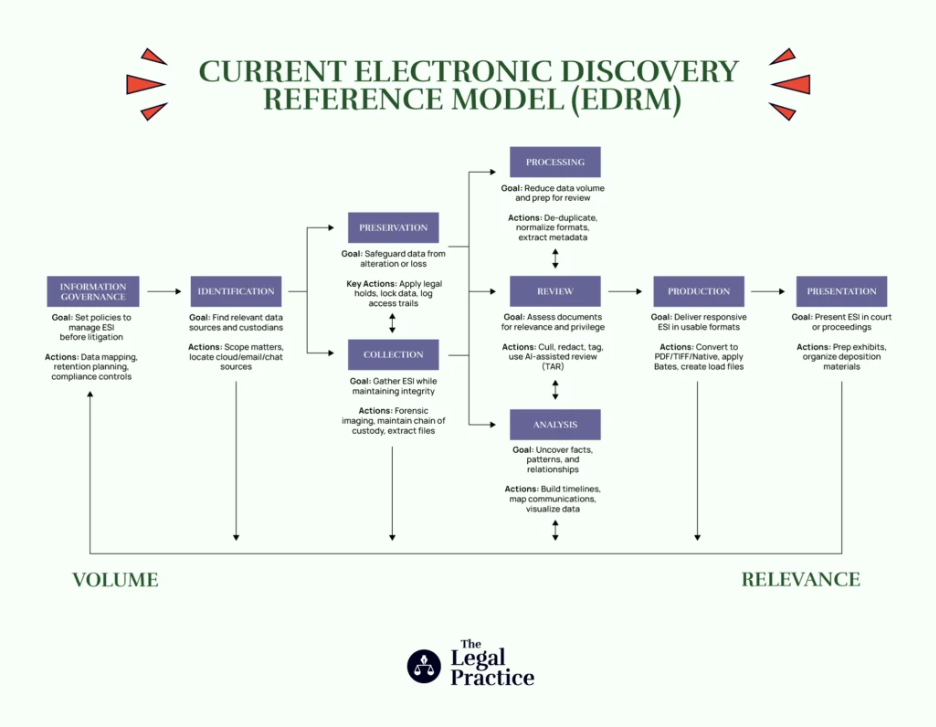
Source: The Legal Practice
Microsoft Purview's Three eDiscovery Solutions
Microsoft Purview delivers a robust suite of three interconnected eDiscovery solutions designed to scale from basic content searches to sophisticated, end-to-end legal workflows. Each solution builds strategically on the previous one, providing organizations with flexible tools that match their compliance needs, case complexity, and licensing level while maintaining seamless integration across Microsoft 365 data sources like Exchange, Teams, and SharePoint.
Content Search: Foundation for Quick Data Discovery
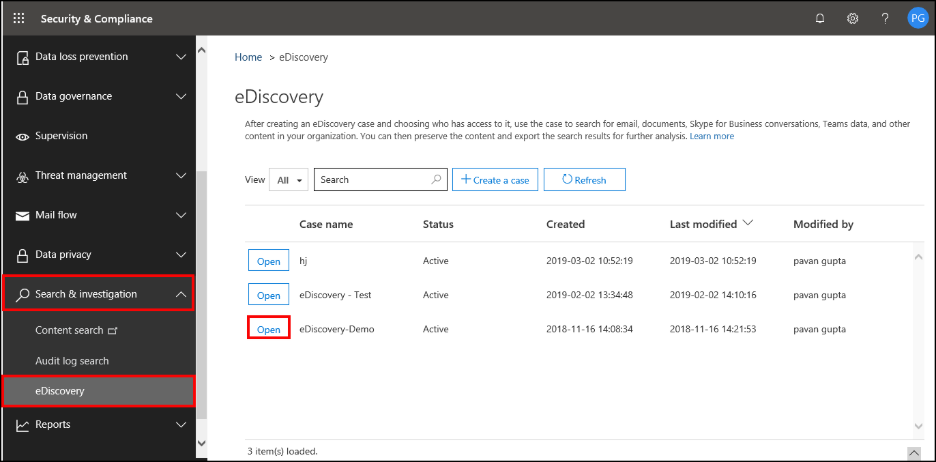
Content Search serves as the entry-level tool, enabling administrators to perform targeted content searches across all Microsoft 365 locations including mailboxes, Teams chats, SharePoint sites, and Office 365 groups. Users can construct precise keyword queries and advanced search conditions to surface relevant.
ESI, then export results directly to local computers for analysis or legal review.
RBAC permissions ensure granular security, allowing IT teams to define exactly which users can run searches, view results, or perform exports based on their organizational role and compliance responsibilities.
eDiscovery (Standard): Structured Case Management and Preservation
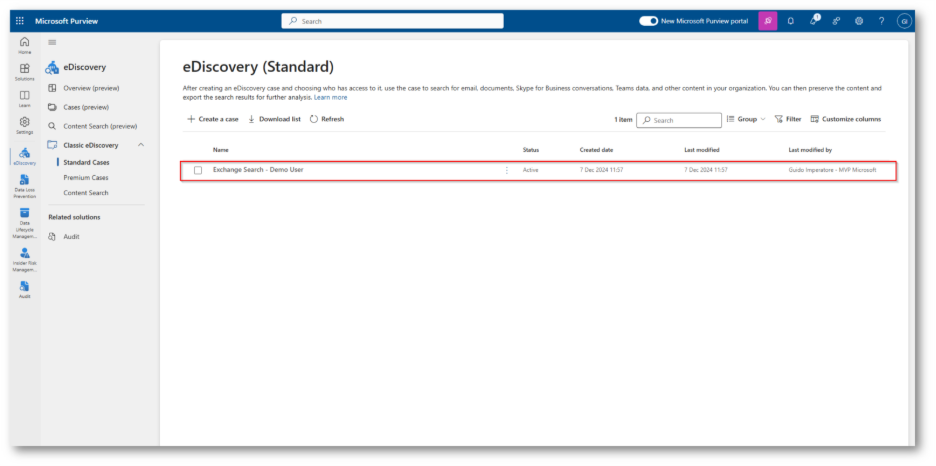
eDiscovery Standard significantly expands Content Search capabilities by introducing formal case management workflows tailored for legal investigations. Teams can create dedicated eDiscovery cases, assign specialized managers to oversee each investigation, and associate multiple searches and exports with specific cases for organized tracking and audit trails.
The standout feature is legal hold functionality, which automatically preserves relevant content locations such as entire mailboxes, specific Teams channels, or SharePoint sites, preventing deletion or modification while maintaining normal user access and avoiding data silos.
eDiscovery (Premium): Complete Legal Workflow Automation
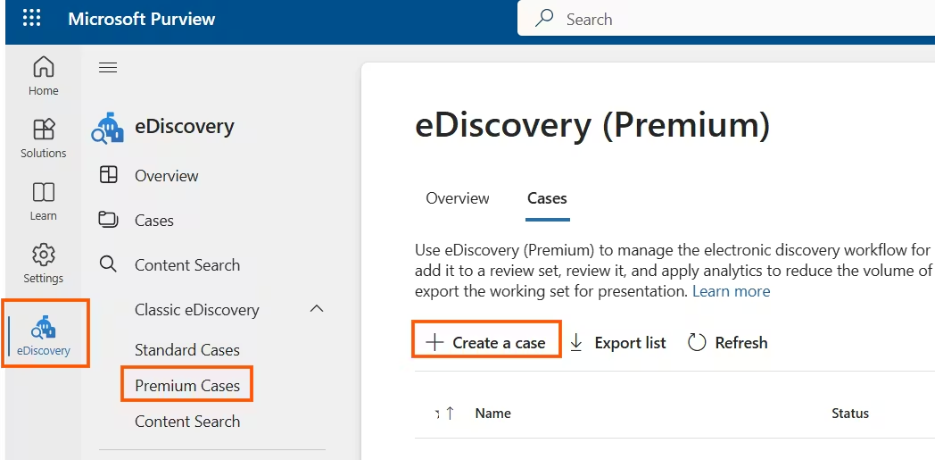
eDiscovery Premium represents the most advanced solution, providing a comprehensive end-to-end platform that covers the entire eDiscovery lifecycle: identification, preservation, collection, review, analysis, and production of evidence. Legal teams gain custodian management tools to communicate directly with data owners involved in cases, ensuring cooperation and transparency.
Premium introduces powerful AI-driven features including machine learning-based predictive coding models that automatically prioritize the most relevant documents, advanced analytics to narrow investigation scope, and review sets that copy live service data for safe analysis without disrupting production environments. This dramatically simplifies culling irrelevant information from massive datasets, accelerating case preparation while reducing costs and risks.
How to use eDiscovery in Microsoft 365?
Three Essential Steps to Get Started
Microsoft Purview eDiscovery follows three core steps, though exact features depend on your subscription level. These steps ensure proper licensing, permissions, and case setup for compliant legal workflows across Exchange, Teams, and SharePoint data.
Step 1: Verify and Assign Licenses
First, confirm your organization has the right subscriptions for eDiscovery (Standard) features like holds and exports. Required plans include Exchange Online Plan 2, Microsoft 365 E3/Office 365 E3 or higher, or F5 for Microsoft 365 Frontline Worker organizations. Users placing holds on mailboxes/sites must also receive specific per-user eDiscovery licenses to access these capabilities legally.
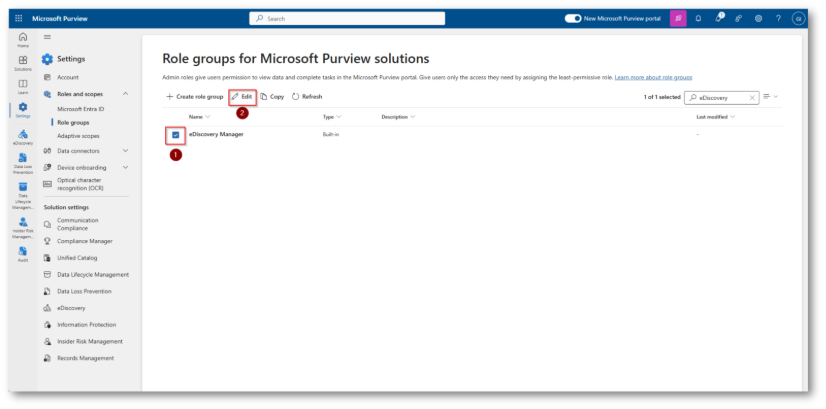
Step 2: Assign eDiscovery Permissions
Next, grant access by adding users to the eDiscovery Manager role group in the Microsoft Purview compliance portal. This group splits into two subgroups: Managers (who view/manage only their own cases) and Administrators (who access all cases, export any case data, add/remove members, and oversee everything). Proper RBAC prevents unauthorized access while enabling efficient team collaboration.
An example of Assigning the eDiscovery Manager permission:
It requires you to be a member of the Organization Management role, or you’re already assigned the Role Management role.
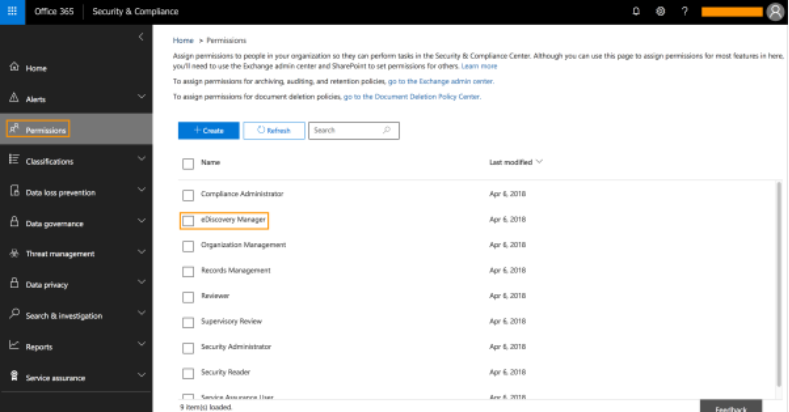
From the left pane, click Permissions. Then click on eDiscovery Manager.
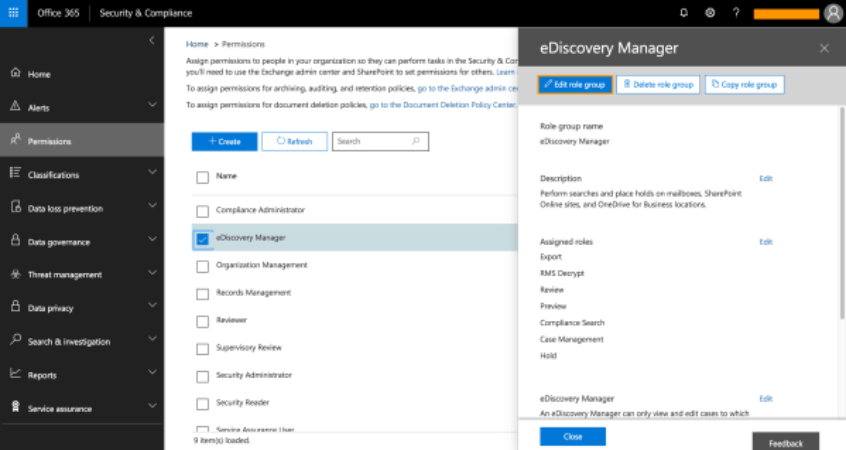
Click Edit role group, on the top-left side of the Manager flyout page
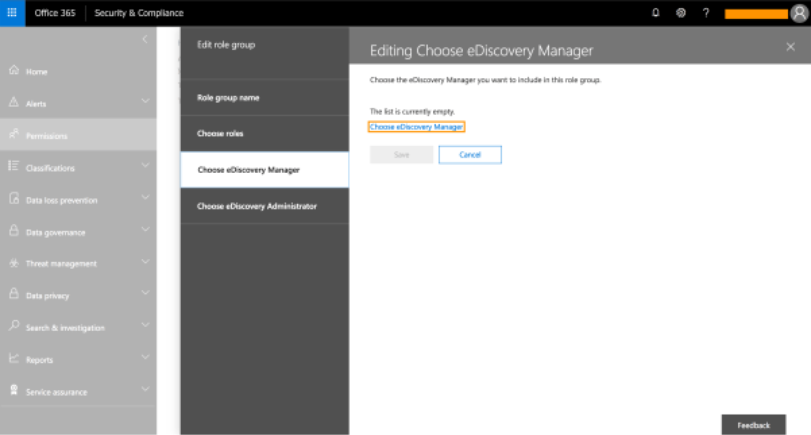
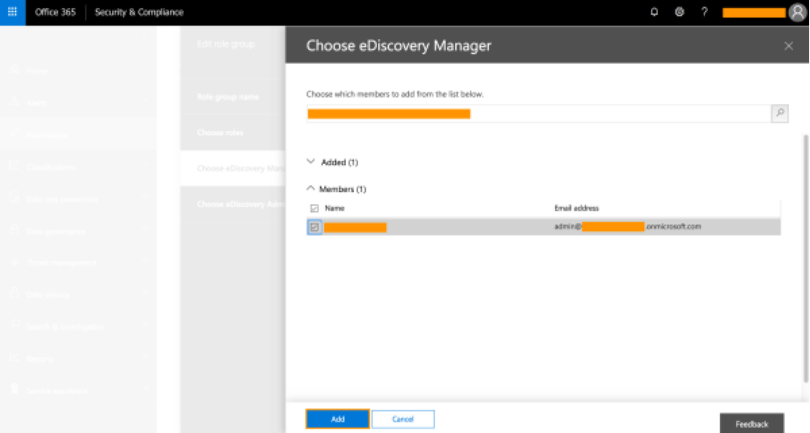
Then, click Choose eDiscovery Manager.
Search for the relevant user (or select multiple users). Click Add.
Note: mail-enabled security groups can only be added when it’s used on PowerShell.
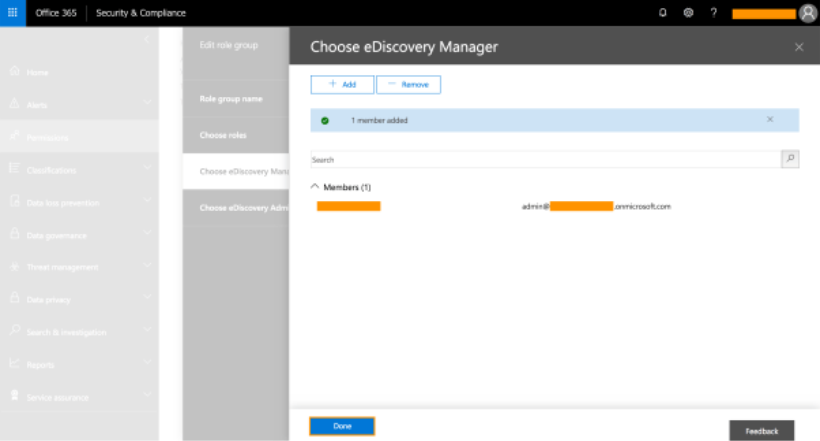
When you have been assigned the eDiscovery Manager permission. Click Done.
Step 3: Create a Case
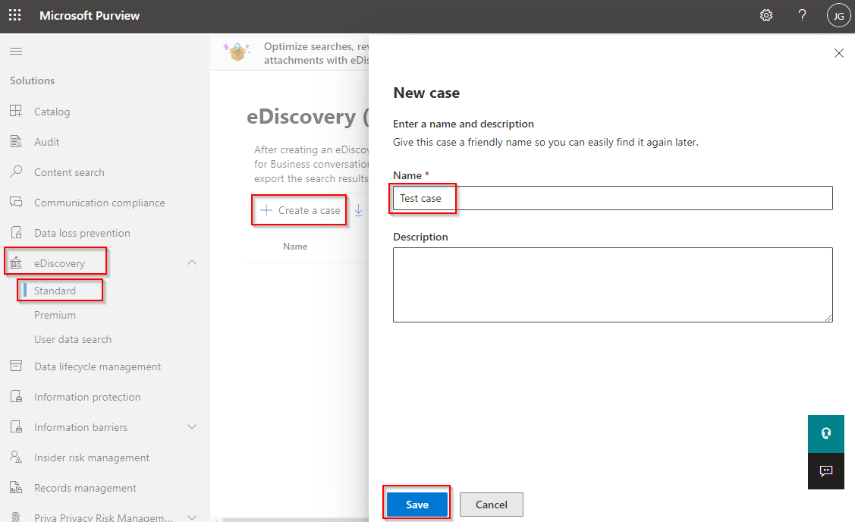
Finally, create your eDiscovery case, the creator automatically becomes a member with full access. Add other users or role groups as needed for collaboration, but note automatic safeguards: if roles change within a member group, Purview removes the group entirely to prevent accidental permission escalation and protect your organization.
How does eDiscovery help Businesses?
Organizations create enormous volumes of digital data every day. Without a structured eDiscovery approach, locating and preserving relevant records for lawsuits or audits becomes expensive and inefficient.
Key Benefits of Effective eDiscovery including:
Ensure Compliance
Regulators demand strict data retention, security, and privacy standards. eDiscovery maintains organized, accessible records of emails, contracts, and communications to meet these requirements and avoid fines, penalties, or operational restrictions.
Reduce Risk
Poor data practices expose companies to lawsuits, violations, and cyber threats. eDiscovery tools track, protect, and produce required records, minimizing penalties, litigation risks, reputational harm, and accidental data loss or breaches.
Improve Efficiency
Manual document hunting takes weeks or months, driving up legal costs and delaying responses. eDiscovery automates collection, filters irrelevant data, and organizes records for quick access, cutting expenses and freeing teams for core business activities.
Best Practices for Businesses
Implement Forward-Thinking Data Practices
Companies succeeding in eDiscovery adopt proactive strategies that streamline data governance and make legal retrieval predictable rather than reactive, turning compliance from a burden into a competitive advantage.
Establish Information Governance Policies
Clear policies define what data gets created, how it's stored, and when it's safely deleted, ensuring only essential records remain active. This reduces eDiscovery scope dramatically by eliminating irrelevant clutter, prevents data hoarding that inflates storage costs, and creates defensible retention practices that courts respect during litigation.
Invest in eDiscovery Technology
Modern AI-powered tools automate the entire workflow, intelligent data collection from Exchange/Teams/SharePoint, near-instant processing of massive datasets, and predictive analytics that surface relevant evidence faster than manual review. These platforms handle deduplication, metadata preservation, and privilege logging automatically, slashing legal spend while maintaining an audit-ready chain of custody.
Regularly Audit Retention Policies
Data laws evolve constantly (GDPR updates, new SEC rules), so quarterly audits align retention schedules with current regulations and business needs. This prevents over-retention fines, optimizes storage budgets, and ensures Purview searches target truly relevant data rather than obsolete archives.
Get more information and see how Precio Fishbone helps with your business, reach out to our expert to explore what an agent strategy could look like for your organization, and discuss tailored AI solutions for your business.
FAQ
What electronic documents are used in eDiscovery?
eDiscovery routinely handles electronic files, digital records, instant messages, key ESI, and scanned paper documents to form a full evidence set. These materials undergo preservation and processing for complete legal documentation.
What should a modern eDiscovery pricing model prioritize?
Modern eDiscovery pricing focuses on predictable costs, bundled services, and flexibility. This includes fixed or tiered pricing based on data volume, integrated processing and production, scalable user access, and built-in AI and analytics, helping organizations improve efficiency without unexpected fees.
How is Data gathered and examined in eDiscovery?
Data is gathered by identifying and collecting relevant information from sources like emails, documents, and cloud platforms, while preserving metadata integrity.
It is then examined during the review and analysis stages, where search, analytics, and AI are used to identify relevant, sensitive, or privileged content.
This structured process helps organizations manage large data volumes while ensuring compliance and accuracy.
Share this on

Jerry Johansson
Works in IT and digital services, turning complex ideas into clear, engaging messages — and giving simple ideas the impact they deserve. With a background in journalism, Jerry connects technology and people through strategic communication, data-driven marketing, and well-crafted content. Driven by curiosity, clarity, and a strong cup of coffee.