
Why AI Agent Governance Matters Now
Over the past months, your teams have probably deployed AI agents through Microsoft Copilot Studio and Azure AI Foundry. Developers built them. Knowledge workers created them. They automate tasks, make decisions, and access sensitive resources without human intervention at every step. Yet in many organizations, IT has almost no visibility into which agents exist, what they access, or what they do.
This gap is known as agent sprawl. Unlike shadow IT, where unsanctioned software sneaks into the organization, agent sprawl happens openly. A single department might create dozens of agents for productivity, each with its own access patterns and potential security exposures. Without centralized governance, an agent could inadvertently expose customer data, bypass compliance policies, or consume resources inefficiently.
The challenge deepens as AI becomes embedded in workflows across Microsoft 365, Security Copilot, and third-party platforms. You need the same identity and access controls for agents as you have for human users. That requirement is exactly what Microsoft Entra Agent ID addresses.
What Is Microsoft Entra Agent ID?
Entra Agent ID is a purpose-built identity and access management system for AI agents. Rather than treating agents as service accounts or generic applications, it gives each agent a managed identity within your Entra infrastructure. This identity enables authentication, authorization, governance, and audit trails specific to how autonomous systems operate.
The solution extends Zero Trust principles beyond people to non-human actors. Every agent must authenticate and prove it has permission to access a specific resource, based on real-time conditions and risk signals. No assumptions. No blanket permissions.
The Foundation: Agent Identity Structure
Entra Agent ID introduces five core identity components that work together to manage the full lifecycle of an AI agent.
An agent blueprint defines the logic and behavior of a specific agent type. Think of it as the template or design document. The agent identity blueprint principal is a service account that represents that blueprint within your tenant and handles the creation of actual agent instances. An agent identity is the running instance of an agent, capable of requesting security tokens to access resources.
An agent user is a non-human account created when an agent needs human-like user capabilities, such as sending messages or accessing personal calendars. Finally, an agent resource is any agent or blueprint that acts as a resource in agent-to-agent communication flows, such as one agent calling another to complete a task.
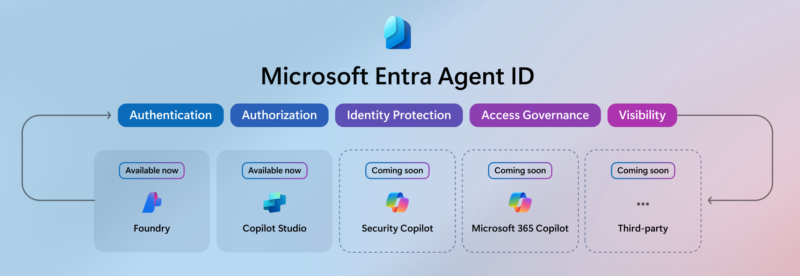
Currently, Microsoft Entra Agent ID supports agents created through Azure AI Foundry and Copilot Studio. In the coming months, it will extend to Security Copilot, Microsoft 365 Copilot, and vendor-built agents from third-party platforms.
Visibility: The First Step
When you first enable Entra Agent ID, every agent created in your organization automatically appears in the Entra admin center. No configuration needed. You navigate to Enterprise applications, filter by the "Agent ID (Preview)" type, and see your complete agent inventory at a glance.
This visibility alone is powerful. You can identify orphaned or forgotten agents, verify which teams built which agents, and establish a baseline for governance. However, the preview phase comes with limitations. You can update agent properties such as notes and logos, but display names are locked to prevent breaking links between Entra and the creation platform. As the product matures, these restrictions will ease, and full property editing will become standard.
The key insight here is that visibility is just the foundation. It answers the question, "What agents do we have?" The real power emerges when you layer identity controls and access policies on top.
Role-Based Governance
Entra Agent ID introduces three specialized roles to distribute governance responsibilities across your IT organization.
The Agent ID Administrator manages the full lifecycle of agents in your tenant. This person creates, updates, disables, and deletes agents; assigns owners and sponsors; manages credentials and permissions; and reviews audit logs to investigate incidents.
The Agent ID Developer creates new agent blueprints and service principals, typically working in Azure AI Foundry or Copilot Studio, and is automatically assigned as the owner of anything they build.
The Agent Registry Administrator oversees the agent registry service itself, managing metadata, collections, and visibility rules for agents across the organization. This role is less common but critical for organizations with many agents or federation scenarios involving multiple tenants.
Separating these roles ensures that no single person has more control over all agents and that accountability for agent actions is clear. A developer doesn't need administrator rights to build an agent, and an administrator doesn't need to understand agent development to manage governance policies.
Enterprise Integration and Ecosystem Support
Microsoft Entra Agent ID doesn't exist in isolation. It integrates with existing Microsoft security and governance tools that CIOs already rely on.
Microsoft Purview applies data protection and compliance controls to Entra-registered agents. You can enforce DLP rules, apply sensitivity labels, and prevent agents from accessing data marked "Highly Confidential" without approval. Purview also provides dashboards showing how agents are used across your organization, revealing both high-value automation and potential abuse.
Security Copilot, Microsoft's AI-powered security assistant, includes four specialized agents that help optimize your Entra policies. The Conditional Access optimization agent recommends policy improvements. The Identity Risk Management AI monitors for anomalies in real time. The Access Review agent suggests permissions to remove. The App Lifecycle Management agent helps audit and decommission agents safely.
Entra ID Governance extends to agents as well. You can place agents into access packages, manage entitlements through automated workflows, and include them in access reviews. Your agent governance follows the same rigorous approval and audit processes as human user access.
What's Coming Next
Microsoft is advancing Entra Agent ID in two parallel tracks: one focused on developers and one on identity practitioners.
For developers, built-in security controls will enforce a least-privilege model by default. Instead of requesting broad permissions, an agent will ask for just-in-time, scoped tokens valid for exactly one resource or one action. A document processing agent, for example, would request access only to a specific SharePoint file for a specific time window.
Instant enterprise onboarding will remove friction from the approval process, letting developers register an agent once and have it work across multiple tenants, each with its own policies and audit logs. Multi-tenant support means you maintain a single codebase and telemetry stream while respecting tenant-specific governance.
For identity practitioners, richer Conditional Access policies will allow you to set fine-grained permissions based on real-time signals. Enhanced lifecycle management will automate agent onboarding and offboarding with the same rigor applied to human users, from creation through decommissioning. Expanded auditing and monitoring will give you detailed logs and forensic capabilities to trace every significant action an agent takes, essential for compliance and incident response.
Additionally, over the next six months, Microsoft will expand Microsoft Entra Agent ID to include agents from Security Copilot, Microsoft 365 Copilot, and third-party AI platforms. This broader scope will consolidate all agent governance under one platform, eliminating the need for multiple identity systems.
Getting Started
Begin by signing into the Microsoft Entra admin center and filtering Enterprise applications to see your Agent ID (Preview) agents. This first step costs nothing and requires no configuration. You're simply making the implicit explicit: bringing agent identities into view.
Next, designate an Agent ID Administrator to own the governance strategy. This person should map which agents exist, who uses them, and what resources they access. Create a baseline inventory.
Then, if your organization is already using Conditional Access policies for users, draft analogous policies for agents. Start conservatively. Your goal is not to block innovation but to prevent agents from accessing resources they don't need. Use custom security attributes or blueprint grouping to tag agents by sensitivity level or business unit, then apply policies that enforce the principle of least privilege.
Finally, monitor sign-in logs weekly to see if policies are triggering and whether blocked access attempts represent genuine security events or false positives. Adjust policies based on what you learn.
If you want more AI solutions or to learn more information, talk to your consultant at Precio Fishbone.
Do I need to redesign my agents to use Microsoft Entra Agent ID?
No. Agents created in Copilot Studio and Azure AI Foundry are automatically registered and governed by Entra Agent ID. Existing agents will gain governance controls without code changes.
Can I apply the same Conditional Access policies to agents and users?
Not yet. Agent-specific policies are evaluated based on different signals, such as agent risk scores rather than device compliance or location. However, you can create consistent governance intent across both agent and user policies.
What happens if an Entra Agent ID policy blocks an agent?
The agent's token request is denied, and the action fails. The attempt is logged, and you can investigate through sign-in logs to understand why the block occurred and whether the policy needs adjustment.
How does Entra Agent ID differ from treating agents as service accounts?
Service accounts are static and typically over-provisioned with permissions they rarely use. Entra Agent ID agents request just-in-time tokens scoped to specific resources, minimizing the blast radius if an agent is compromised. They also integrate with Conditional Access and risk-based policies, enabling dynamic governance.
Share this on

Jerry Johansson
Works in IT and digital services, turning complex ideas into clear, engaging messages — and giving simple ideas the impact they deserve. With a background in journalism, Jerry connects technology and people through strategic communication, data-driven marketing, and well-crafted content. Driven by curiosity, clarity, and a strong cup of coffee.