
Why Frontline Operations Need AI Support Now
Frontline operations involve workers who communicate rapidly across devices, shifts, and locations. Unlike traditional office roles, frontline workers rely on real-time messaging and task coordination rather than long-form structured processes. This creates challenges in maintaining situational awareness when shifts change or when updates occur across multiple channels.
Microsoft recognizes this pattern and provides tools that bring intelligence into the communication channels frontline teams already use. Frontline Agent is designed to surface relevant organizational content and reduce the effort required for workers to search for information or reconstruct context from past conversations. Rather than being a separate system, the agent extends Microsoft Teams and Microsoft 365 Copilot with contextual intelligence aligned to existing workflows.
Who Are Frontline Workers and Why Context Matters
Frontline workers are employees who perform operational tasks directly where business outcomes are produced. These roles typically involve shift-based work or work in locations outside of traditional desk settings, such as stores, warehouses, clinics, or field sites. Their work depends on fast, real-time communication rather than deep archival searches.
Examples of frontline roles include retail associates, warehouse logistics staff, healthcare caregivers, and field technicians. What these roles share is a need for context that flows through chat messages and shared workspaces. In frontline settings, context loss across shifts or communication channels leads to delays in execution or misalignment of tasks. 
Microsoft’s documentation on Frontline Agent indicates that the agent is designed to help workers access information that already exists in organizational content such as SharePoint and Teams. It does this within the tools frontline workers already use instead of requiring separate applications.
Core Scenarios Enabled by Frontline Agent
Frontline Agent is an AI assistant available in Microsoft 365 Copilot and Microsoft Teams that helps workers access and summarize organizational content.
Microsoft Support documentation notes that Frontline Agent (currently in Public Preview) can help frontline teams:
• Search for information quickly across SharePoint and Teams chats and channels.
• Summarize missed Microsoft Teams messages.
• Coordinate work by highlighting recent updates and actions.
The agent can read from content stored in SharePoint sites and Teams conversation streams to produce these summaries and search results. Because it uses existing content the user is permitted to access, it does not surface unauthorized information.
One practical use case is helping a worker catch up on updates at the start of a shift. Instead of manually scanning long chat histories, a worker can ask the agent to summarize relevant discussions and highlight actions required. Another use case is finding procedural guidance stored in SharePoint without leaving Teams. These behaviors improve access to internal knowledge without requiring new workflows outside familiar apps.
This capability is documented directly by Microsoft Support as part of the agent’s functionality.
How to set up Frontline Agent
Frontline Agent is available in the Microsoft 365 Copilot app store for users who have a Microsoft 365 Copilot license. Admins can pin the agent in Microsoft 365 Copilot and optionally make it visible in the Teams chat list.
If no SharePoint scope is defined, the agent can use information from all SharePoint sites that each user already has access to.
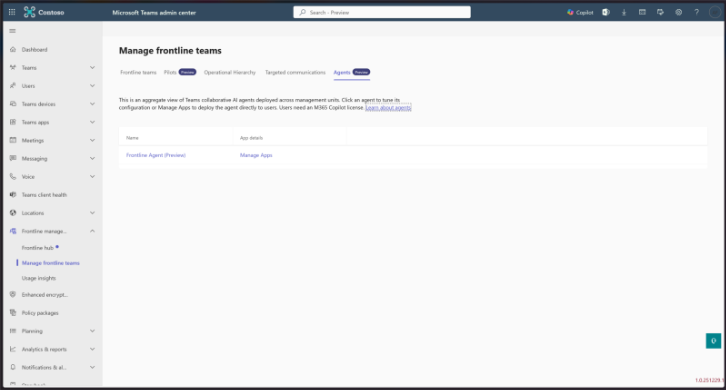
Step 1: Go to Teams Admin Center > Frontline management > Manage frontline teams, then select Agents.
Step 2: Select Frontline Agent, then paste the allowed SharePoint Home site URLs if you want to limit content sources.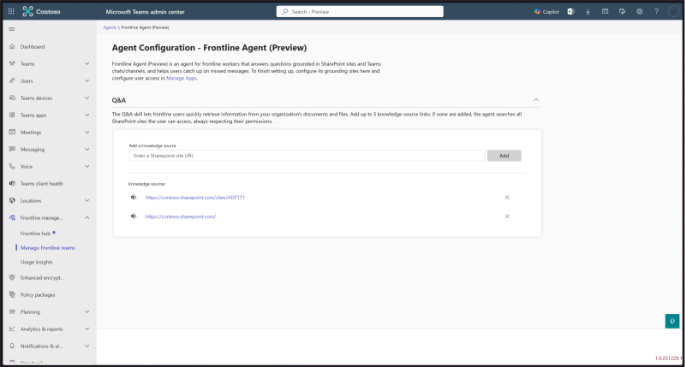
Step 3: Go to Teams apps > Manage apps, search for Frontline Agent, and open the app. 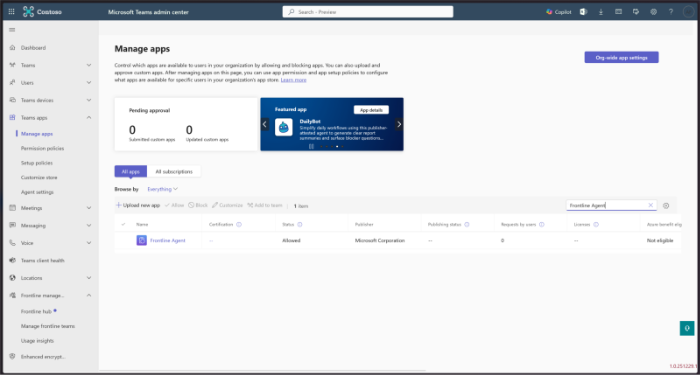
Step 4: Select Users and groups in the app settings. 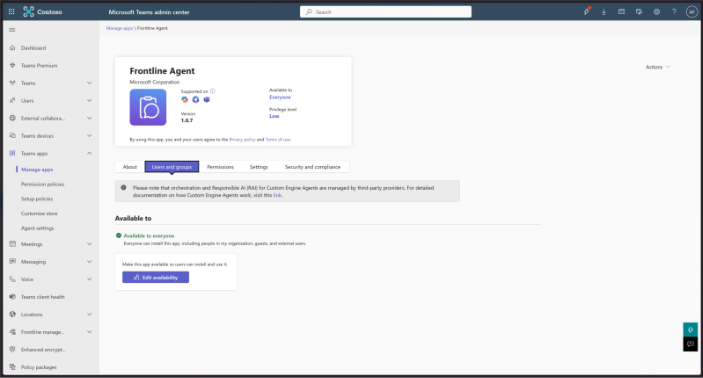
Step 5: Click Edit availability, choose the target users or Microsoft 365 groups, and apply the changes. 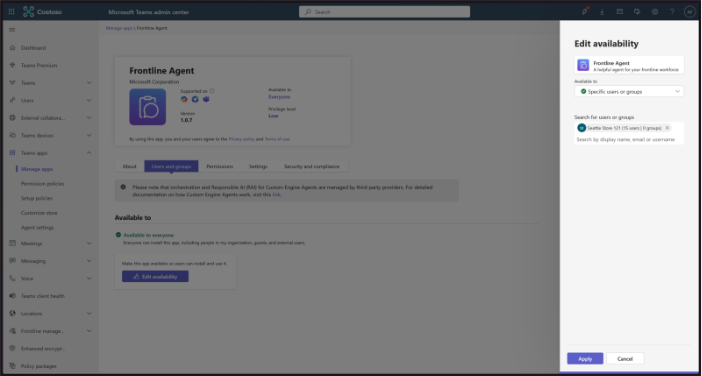
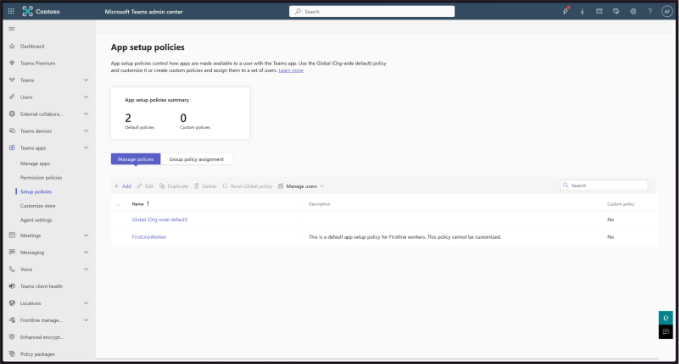
Step 6: Go to Teams apps > Setup policies and select Add to create a new policy.
Step 7: Enter a policy name, then select Add apps. 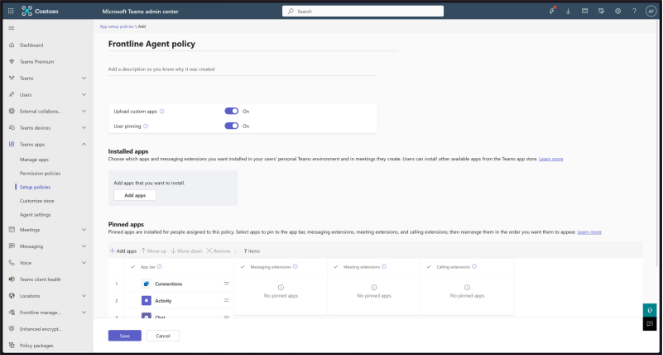
Step 8: Search for Frontline Agent, add it to the policy, and save. 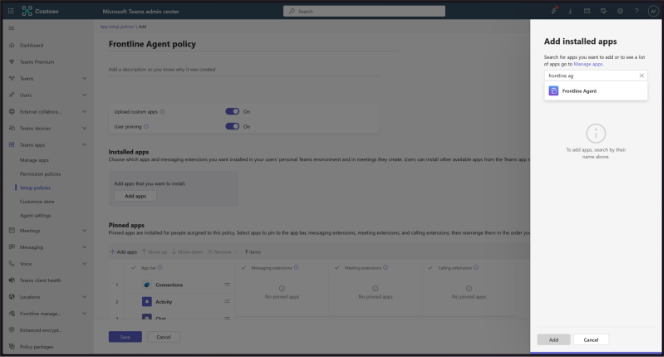
Step 9: Select the policy, choose Manage users, then Assign users, add users or groups, and apply. 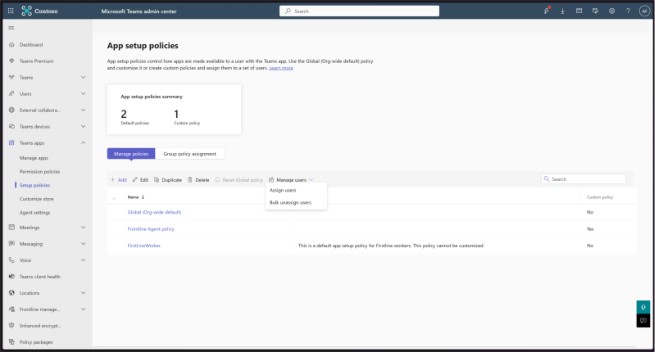
Step 10: Frontline Agent sends a welcome message in the Teams chat, and users can start using it.
How Frontline Agent Fits into the Microsoft 365 Environment
Frontline Agent integrates with Microsoft 365 Copilot and Microsoft Teams. According to official documentation, the agent is discoverable from the Copilot app catalog and also appears in the Teams chat rail. It behaves like other Copilot agents, providing contextual assistance within those environments.
The agent only processes content that employees already have authorization to access. This aligns with Microsoft’s security model, where SharePoint site permissions and Teams channel access control what content can be seen and summarized.
IT administrators can configure availability and scope for Frontline Agent using Microsoft 365 admin controls. This ensures that governance and compliance requirements are respected when the agent operates across organizational content.
Deployment Considerations for IT Leaders
Deploying Frontline Agent involves considerations around licensing, content readiness, and governance.
Licensing: Frontline Agent is currently available only to users who have a Microsoft 365 Copilot license. Microsoft Support documentation confirms that the agent is found in Microsoft 365 Copilot and Teams for these licensed users.
Content Readiness: Because the agent sources from SharePoint and Teams, the usefulness of responses depends on how well organizational content is organized and accessible. Poorly structured content results in less helpful results.
Governance: IT teams should determine which SharePoint sites and Teams channels the agent can reference. Microsoft Support notes that administrators can limit the sites the agent can draw from, which supports compliance and access control.
Training is still beneficial for frontline workers, even though the agent is conversational. Short practical sessions on common prompts and context-based questions help adoption and relevance in daily tasks.
Conclusion
Frontline Agent extends Microsoft 365 Copilot and Teams with AI capabilities that help frontline teams access internal organizational content, summarize conversations, and coordinate work within tools they already use. Its integration with Microsoft 365 security and permission models makes it suitable for enterprise environments.
For IT leaders, the relevance of Frontline Agent lies in its contextual support for frontline workflows rather than as a standalone tool. Assessing content readiness, licensing scope, and governance model is essential before large-scale deployment.
If you want to evaluate how frontline AI assistants fit into your broader enterprise strategy and governance framework, consider assessing frontline workflows and content structures as a next step.
Contact our consultants for a tailored assessment.
For more information
Share this on

Pär Johansson
Pär works with international business at Precio Fishbone, project delivery & digital services, helping turn complexity into progress and strategy into long-term value. With many years of experience in international business, He is known for building strong relationships and turning plans into meaningful progress. Driven by people, trust and sustainable growth.