
Data in Microsoft 365 is growing faster than most organizations can govern effectively. Employee records, customer information, financial reports, contracts, and daily collaboration documents now sit across SharePoint, OneDrive, Teams, email, endpoints, and a growing number of cloud services.
The real question for security and IT leaders is no longer “where is our data,” but “how do we keep sensitive information from leaking without slowing the business down.”
What is Microsoft Purview DLP and How Does it Work?
Data Loss Prevention (DLP) is a set of policies, processes, and technical controls designed to detect, monitor, and prevent sensitive information from being exposed or leaving approved environments.
Because data is a critical business asset, a strong DLP strategy helps reduce both accidental leakages, such as a file shared to the wrong audience, and intentional exfiltration by a malicious actor.
Microsoft Purview DLP is Microsoft’s native data protection capability for finding, monitoring, and helping prevent sensitive information from being shared or moved in risky ways across Microsoft 365 workloads via the Microsoft Purview scanner. In practice, it relies on three core functions:
First, it inspects content to detect sensitive information types, such as payment card data, government IDs, health information, or custom patterns.
Second, it enforces your policies by taking actions that can range from auditing and user warnings to blocking and notifications.
Third, it provides reporting and investigation views so security and compliance teams can track incidents, measure effectiveness, and tune policies over time.
One practical advantage is how natively it fits into Microsoft 365 workloads. Purview DLP works directly with Exchange, SharePoint, OneDrive, Teams, and endpoint controls, allowing organizations to apply consistent protection without building a separate integration layer.
What Data Security Challenges Does Microsoft DLP Solve?
Unintentional data exposure
Many incidents are caused by human error: the wrong file attached to an email, a confidential spreadsheet pasted into a Teams chat, or sensitive content saved in the wrong SharePoint site. Purview DLP can warn the user in real time, require justification, or block the action entirely when a policy is violated.
Shadow IT and unapproved cloud apps
Employees increasingly use unsanctioned cloud services. With Purview DLP extended to browsers and non-Microsoft cloud apps (through Microsoft Defender for Cloud Apps integration), you can control uploads to risky destinations, even when users try to move data out of Microsoft 365 to third-party apps.
Hybrid work and remote collaboration
With hybrid and remote work, users send and access sensitive data from many locations and networks. Purview DLP policies apply consistently whether a user is in the office, at home, or on the road, and Endpoint DLP lets you monitor device activities such as copying to USB or printing.
Compliance pressure
Organizations must comply with multiple regulations such as GDPR, HIPAA, PCI DSS, and industry specific rules. Purview DLP includes 200+ built-in sensitive information types and supports custom types and advanced classification methods, which you can customize to match your own compliance program.
Insider risk and intentional exfiltration
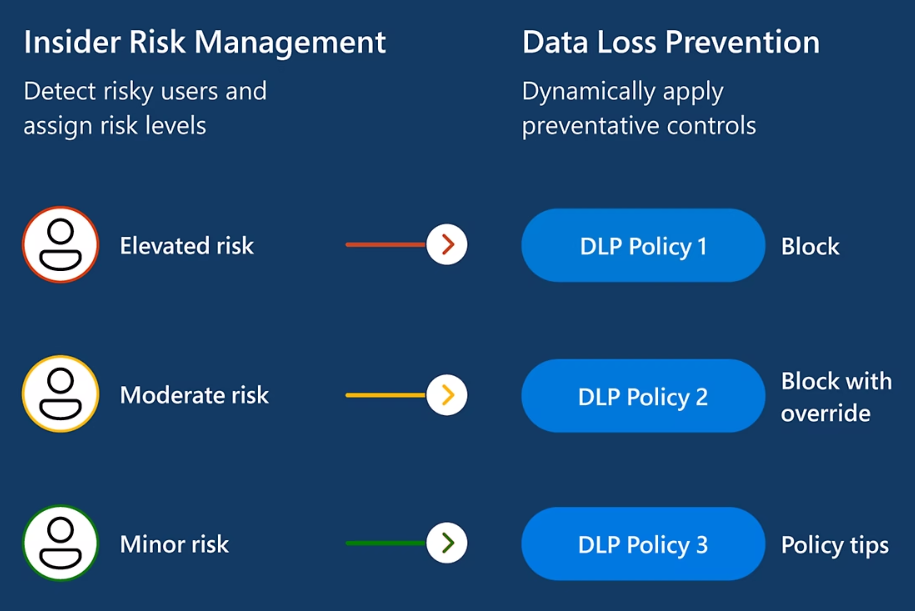
Not all data movement is accidental. DLP alerts can highlight patterns that suggest deliberate exfiltration, such as a user copying many sensitive files to removable media or uploading large volumes of confidential content to personal cloud accounts. While dedicated insider risk tools go deeper, Purview DLP is often the first signal that something is wrong.
In short, it is most valuable when it reduces day-to-day leakage risk, not when it is treated as a one-time compliance exercise.
How Microsoft Data Loss Prevention Protects Sensitive Data Across Microsoft 365
One of the strongest advantages of Microsoft Purview DLP is its reach. You define policies once in the Purview portal and can apply them across key workloads for consistent behavior.
Exchange Online and email
In Exchange Online, Purview DLP inspects email content, attachments, and recipient lists. You can stop messages that contain sensitive information from going to external recipients, encrypt email messages, or require justification before sending. For example, a policy might prevent unencrypted credit card data from leaving the organization by email.
SharePoint Online and OneDrive for Business
For SharePoint and OneDrive, DLP works both on data at rest and when users share or download content. Policies can detect sensitive information inside files, restrict external sharing, and control actions such as downloading to unmanaged devices. This is critical when your teams store large amounts of customer or employee data in document libraries.
Microsoft Teams
In Microsoft Teams, Purview DLP can monitor chats, channel conversations, and shared files. You can prevent users from posting sensitive data into chats with external guests or into channels that are not appropriate for that information. This matters as more decisions and file exchanges move out of email and into Teams messages.
Endpoint devices
With Endpoint DLP, some of the same policy logic is applied directly on Windows and macOS devices. Purview can track and control activities such as copying sensitive files to USB storage, printing documents, or uploading content through supported browsers.
If a device is offline, existing policy continues to apply to content already covered, and activity telemetry is cached and synced when the device reconnects. New files created offline may not be scanned or protected until the device is back online.
What Are The Pros & Cons of Microsoft Purview DLP?
When you evaluate Microsoft Purview DLP, it helps to balance the advantages of Microsoft-native integration with the operational and licensing trade-offs you may face as you scale.
Pros of Microsoft Purview DLP
- Native Microsoft 365 coverage: Works directly across core workloads such as Exchange, SharePoint, OneDrive, and Teams, with less integration effort than many standalone DLP platforms.
- Centralized administration: Policies are managed in the Microsoft Purview compliance portal, which reduces tool switching and day-to-day admin overhead.
- Endpoint protection with lower deployment overhead: For organizations already using Microsoft Defender for Endpoint, extending DLP to Windows and macOS devices typically requires less additional rollout complexity than adding a separate DLP agent.
- Ongoing feature improvements: As part of the Microsoft ecosystem, Purview DLP evolves continuously, including newer capabilities such as browser-related protection and tighter alignment with Copilot scenarios.
Cons of Microsoft Purview DLP
- Licensing can be confusing: Advanced capabilities often depend on Microsoft 365 E5 compliance or specific add-ons, and feature availability varies across plans.
- Less complete coverage outside Microsoft: If your environment relies heavily on non-Microsoft SaaS tools, third-party DLP platforms may offer broader or deeper controls in those apps.
- Policy sprawl risk: As rule sets grow, managing many overlapping policies across multiple locations can get difficult without clear governance and naming standards.
- Reporting may require extra work: Built-in reporting is improving, but some teams need additional configuration or external tooling for detailed compliance reporting.
Conclusion
Microsoft Purview DLP provides a practical, Microsoft-native way to detect sensitive information and reduce data leakage across Microsoft 365 workloads and endpoints.
If you want help planning or optimizing your Purview DLP deployment, we can assess your current data risk, design policies that protect sensitive information without disrupting collaboration.
Contact usFrequently Asked Questions
What data security challenges does Microsoft Purview DLP solve?
Microsoft Purview DLP primarily solves major regulatory and accidental leakage risks created by the massive unstructured corporate data. Specifically, Purview DLP tackles several overlapping challenges:
- Human Error: It handles unintentional data exposure, such as an employee pasting a highly confidential spreadsheet into an inappropriate Teams chat, by warning the user or requiring a justification message.
- Shadow IT: Utilizing integrations like Microsoft Defender for Cloud Apps, Purview DLP helps control illicit uploads to unapproved, non-Microsoft cloud formats.
- Compliance Navigation: It provides built-in templates over 200 specific sensitive information types relevant to HIPAA, GDPR, and PCI DSS compliance.
Does Microsoft Purview DLP work for remote and hybrid workers?
Yes. Microsoft Purview DLP protects data for remote and hybrid workers by enforcing policies regardless of location. Security rules follow the user and device instead of relying on a corporate network. Whether employees work from home, a café, or an airport, the same controls (blocking risky uploads, limiting USB transfers, or encrypting email) remain active.
How does Microsoft DLP manage insider risks and intentional exfiltration?
Microsoft Purview DLP detects suspicious activity through policy violations and alerts. For example, it can flag attempts to copy sensitive files to USB drives or upload confidential data to personal cloud storage. These alerts help security teams quickly investigate potential insider threats and stop data exfiltration.
Share this on

Pär Johansson
Pär works with international business at Precio Fishbone, project delivery & digital services, helping turn complexity into progress and strategy into long-term value. With many years of experience in international business, He is known for building strong relationships and turning plans into meaningful progress. Driven by people, trust and sustainable growth.