
What are Low-Code, No-Code Solutions?
Low-code and no-code platforms reduce the amount of traditional coding needed to build applications by using visual interfaces, drag-and-drop components, and pre-built templates. These tools make software development accessible to non-technical users, enabling both professional developers and business users to build applications without constant IT intervention.
Gartner predicts that by 2026, non-IT professionals will make up at least 80% of low-code platform users, rising from 60% in 2021. The global low-code development platform market was valued at $28.75 billion in 2024 and is projected to reach $264.40 billion by 2032, with a compound annual growth rate of 32.2%.
Microsoft Power Platform is Microsoft's main low-code and no-code platform, integrating generative AI and agentic AI capabilities to help both business users and professional developers build intelligent applications faster.
Microsoft Power Platform Overview
Microsoft Power Platform is a comprehensive suite of low-code, no-code tools consisting of five key components: Power Apps, Power BI, Power Automate, Power Pages, and Copilot Studio.
These tools share a common data foundation through Microsoft Dataverse and connect to over 1,000 business applications and data sources through its connector ecosystem. The platform integrates with Microsoft 365 Copilot, Dynamics 365, and Azure services.
Microsoft Power Apps
Power Apps helps teams build custom business applications for web and mobile without full-code development. Typical scenarios include internal request management, field service reporting, simple CRM extensions, and line-of-business apps that would otherwise sit in spreadsheets or email. IT can still enforce data policies and integration standards, while business teams design the front-end experience and workflows.
Microsoft Power Automate
Power Automate automates workflows between applications and services, streamlining repetitive tasks and improving productivity. The platform supports cloud and on-premises automation, offers Copilot assistance for creating automations using natural language, which are capabilities that will expand as next-generation models like GPT-5 become available.
Microsoft Power BI
Power BI provides interactive visualizations and business intelligence capabilities for data-driven decision-making. Power BI connects to hundreds of on-premises and cloud data sources, offers over 30 built-in visuals plus custom visualizations, supports real-time dashboards, and includes AI features such as automated insights and natural language queries.
Microsoft Copilot Studio
Copilot Studio let organizations build AI assistants and chatbots for scenarios such as customer support, HR queries, or IT helpdesk. These copilots can connect to existing data and processes, answer questions, trigger actions, and be published in Teams, on websites, or other channels.
Check Our White Paper: GPT Integration in Microsoft Ecosystem
Microsoft Power Pages
Power Pages helps teams build secure, data-driven business websites using drag-and-drop design. The platform integrates with Dataverse, includes Copilot-assisted form creation, and supports AI-assisted features for improved productivity.
What Does Gartner Say About Microsoft Power Platform?
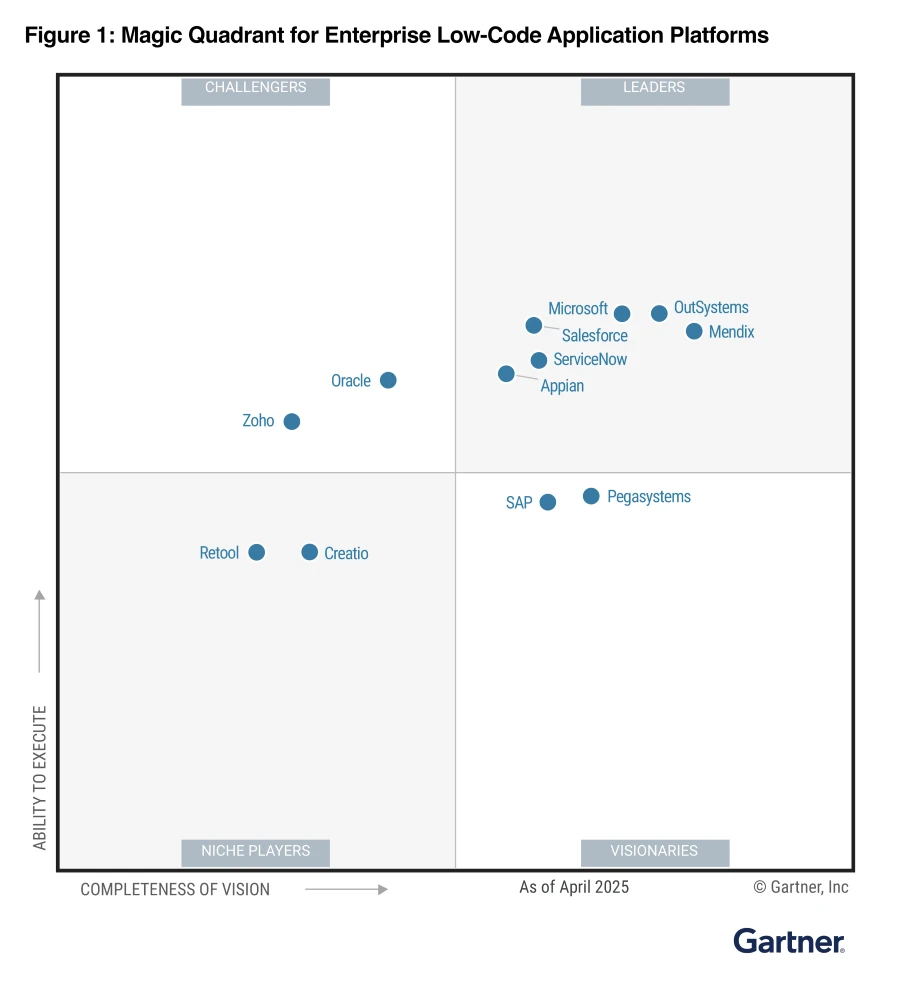
In the 2025 Gartner Magic Quadrant for Enterprise Low-Code Application Platforms, Microsoft Power Platform has earned recognition as a Leader, reinforcing its position as one of the most comprehensive and capable low-code platforms for enterprise organizations.
Gartner's assessment reflects a platform that has matured significantly, combining accessibility for citizen developers with sophisticated capabilities for professional developers, all while integrating cutting-edge generative AI technologies.
This matters in a crowded low-code market, where many vendors are competing for the same enterprise projects. Power Platform is deeply integrated with Microsoft 365, Dynamics 365, and Azure, and backed by Microsoft’s security and compliance stack, positioning it as a strategic choice for organizations seeking to accelerate digital transformation while maintaining control and governance at scale.
For CIOs and business leaders, this means Power Platform is not just a tactical tool but a strategic platform to standardize low-code development under a governed, secure umbrella.
Benefits of Microsoft Power Platform
AI Copilot Accelerates Time-to-Value
Microsoft reports that users completed data entry tasks up to 30% faster and saw a 60% higher success rate when using Copilot in Power Apps. Instead of building every step manually, teams can describe what they need in natural language and let Copilot propose screens, data structures, and basic logic.
For leaders, this translates into faster delivery of business solutions, fewer bottlenecks in IT, and more time for teams to focus on improving processes rather than manually pushing data around.
Gartner predicts that by 2028, agentic AI will be implemented via enterprise low-code application platforms in four out of five businesses globally, signaling that AI-powered low-code will become central to many organizations' strategies.
Built-in Safeguards for Large Organizations
Power Platform comes with security and control features that matter for big enterprises managing many projects at once. The platform lets administrators set clear rules about who can share apps, keeps different departments' data separate, and tracks everything that happens in the system. Unlike some low-code platforms that sacrifice control for speed, Power Platform manages to do both.
This is especially important for companies in regulated industries like banking or healthcare, where compliance requirements are strict and can't be ignored. Organizations can confidently give more people access to build applications while ensuring IT and security teams maintain oversight that everything is properly managed.
Works Well with Other Microsoft Tools
Most enterprises already use Microsoft 365, Copilot Studio, or Azure, and Power Platform integrates directly with these systems. The platform connects to over 1,000 existing business applications and databases, so developers don't have to build custom bridges every time they need data from another system.
What's particularly useful is that Power Platform doesn't force a choice between simple and powerful. Developers can build straightforward applications through a visual interface, while experienced programmers can write code, connect to Azure services, and build custom integrations when needed.
Gartner notes that this flexibility means organizations can let different people contribute at their skill level, a manager might use the drag-and-drop builder while a developer customizes the backend. For companies already invested in the Microsoft ecosystem, this compatibility significantly reduces implementation time and total cost.
What To Consider Before Implementing Low-Code, No-Code Solutions
Before adopting low-code and no-code platforms, organizations should carefully balance innovation with control. While these platforms offer speed and accessibility, they introduce risks around security, governance, and flexibility that need proper management. Understanding these considerations upfront helps establish the right safeguards and avoid costly mistakes.
Governance and Shadow IT Risks
Low-code platforms can lead to "shadow IT" as uncontrolled apps built outside IT, leading to duplicated processes, inconsistent data, and security gaps.
Organizations need clear governance frameworks defining who can build what, combined with regular audits and centralized monitoring. Establishing accessible channels for requesting new tools helps foster transparency and prevents development from going underground.
Security Vulnerabilities and Data Protection
Developers often lack formal security training, potentially creating vulnerabilities like misconfigured access controls, SQL injection flaws, or unintended data exposure. Data leakage is particularly critical for regulated industries like healthcare and finance.
Organizations should implement comprehensive security protocols, including data encryption, strong authentication, regular security audits, and continuous monitoring. Security training for citizen developers is equally important to build secure design awareness from the start.
Scalability Limitations and Vendor Lock-In
Low-code platforms can struggle with large datasets or heavy user loads, and their proprietary nature creates vendor lock-in risks. Switching platforms becomes expensive because data portability is limited and applications are tightly coupled to the vendor's ecosystem. Organizations should evaluate platforms based on open standards support, API availability, and data export capabilities.
How We Help
Low-code and no-code platforms have changed how organizations build applications, business users can now create solutions in weeks instead of months. Microsoft Power Platform combines accessibility with enterprise capabilities, enabling teams across departments to innovate faster while maintaining security and control.
Every organization's Power Platform journey is different. We typically start with an assessment of your current applications, data landscape, and Microsoft investments. From there, we design a Power Platform roadmap, governance model, and a set of pilot use cases that deliver quick wins while setting the foundation for long-term scale.
If you would like to explore what this could look like in your organisation or you are unsure where to start, contact us to schedule a conversation with our team.
Share this on

Jerry Johansson
Works in IT and digital services, turning complex ideas into clear, engaging messages — and giving simple ideas the impact they deserve. With a background in journalism, Jerry connects technology and people through strategic communication, data-driven marketing, and well-crafted content. Driven by curiosity, clarity, and a strong cup of coffee.