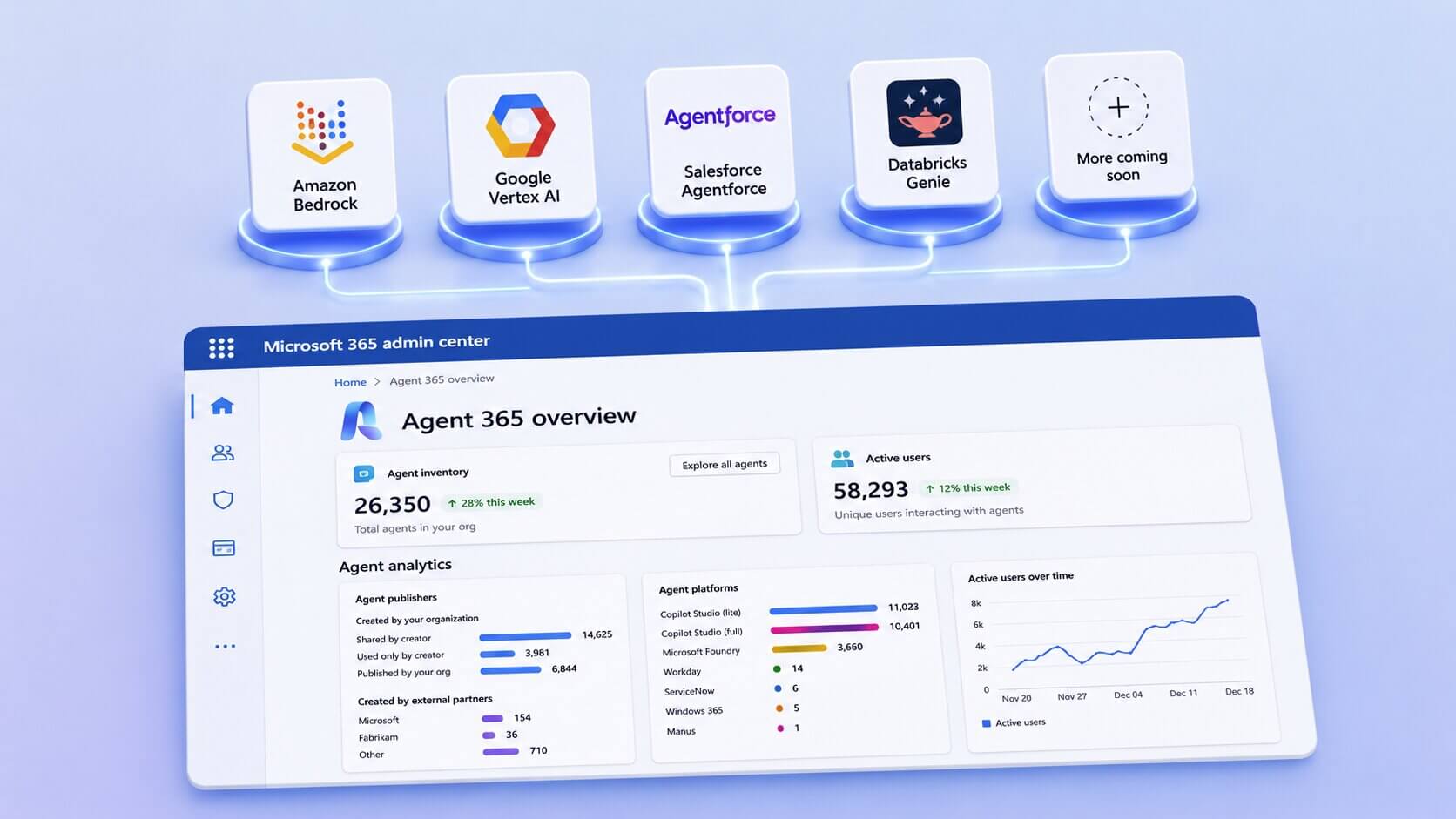
I spent this week reverse-engineering Agent 365 Registry Sync (Preview) to understand what it actually does. If you run agents on AWS Bedrock or Google Vertex AI, the line between what it shows you and what it controls is sharper than the marketing suggests.
Two agents can live in the same Agent 365 console and tell you completely different things. Agents onboarded via the Agent 365 SDK have Microsoft Entra Agent ID. Agents onboarded via Registry Sync do not.
Registry Sync finds agents. Agent 365 SDK governs them. Confuse the two and you will either waste effort governing trivial agents, or believe you control something you have only counted.
Agent control comparison: SDK vs Registry sync
Depth comes from identity, not from the interface. With an Entra Agent ID, an agent becomes something your directory understands. Without one, Agent 365 can only repeat what the source platform hands over. Everything below follows from that.
Agents onboarded via the Agent 365 SDK get deep governance
Take the travel agent Microsoft demo at Microsoft Build 2026. It was built on Lang Chain and Node.js, then wired into Agent 365 through Agent 365 SDK. That single step turns it into a governed blueprint with a whole family of instances under it.
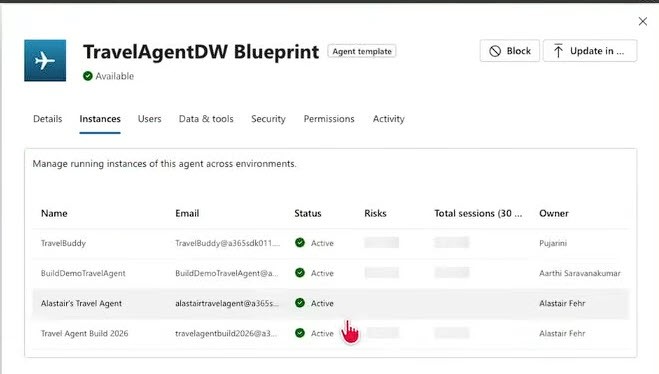
FIGURE 1: TravelAgentDW Blueprint showing four governed agent. View full-size image
The blueprint has four instances: TravelBuddy, BuildDemoTravelAgent, Alastair's Travel Agent and Travel Agent Build 2026. All of which can be managed very deep from status, a session count and an owner that can held accountable.
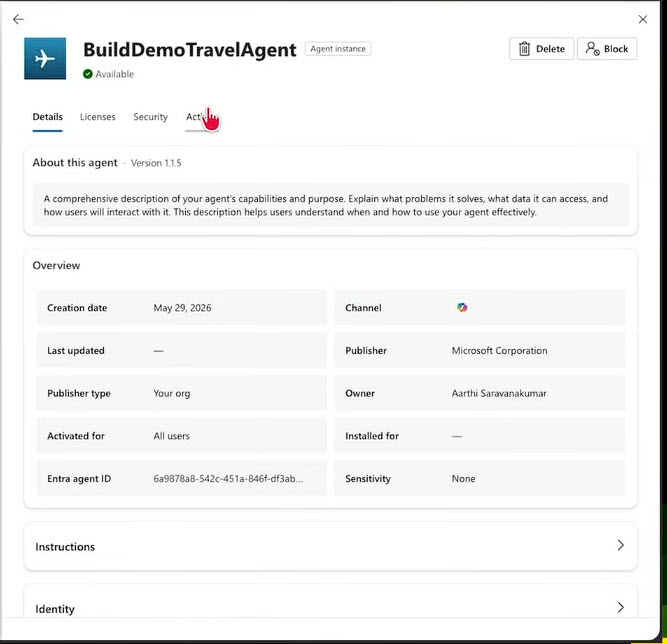
FIGURE 2: BuildDemoTravelAgent Details tab. View full-size image
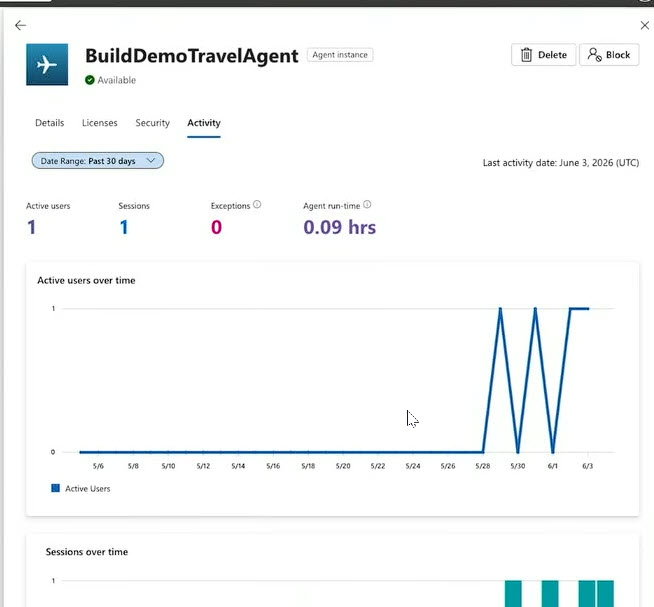
FIGURE 3: BuildDemoTravelAgent Activity tab. View full-size image
You can see who owns the agent, which channel it runs in, how many people use it, how long it runs and whether it throws errors. None of this exists without the Entra Agent ID. That ID is also what lets Purview and conditional access touch the agent at all.
If you want the mechanics of how an agent gets that ID, I wrote about how the Agent 365 SDK brings custom AI agents under enterprise control.
Registry Sync only finds agents
Registry Sync is the opposite picture. In the Agent 365 overview it is one card, sitting beside the registry count and active users.
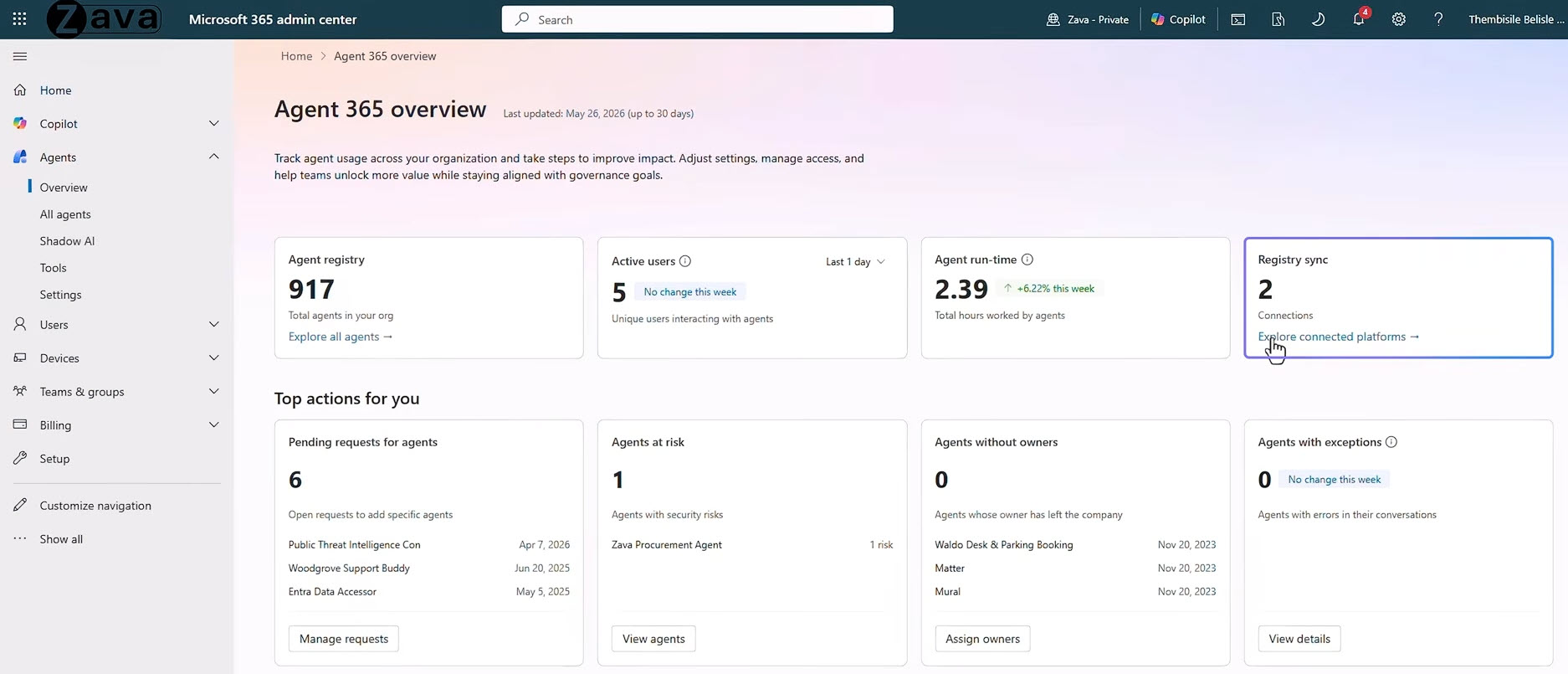
FIGURE 4: Agent 365 overview in M365 admin center. View full-size image
My Google Vertex AI connection tells me it found one agent, when it last synced and whether the sync worked. The agent, "Support Help Desk," gives me a name and a creation date. That is the whole record.
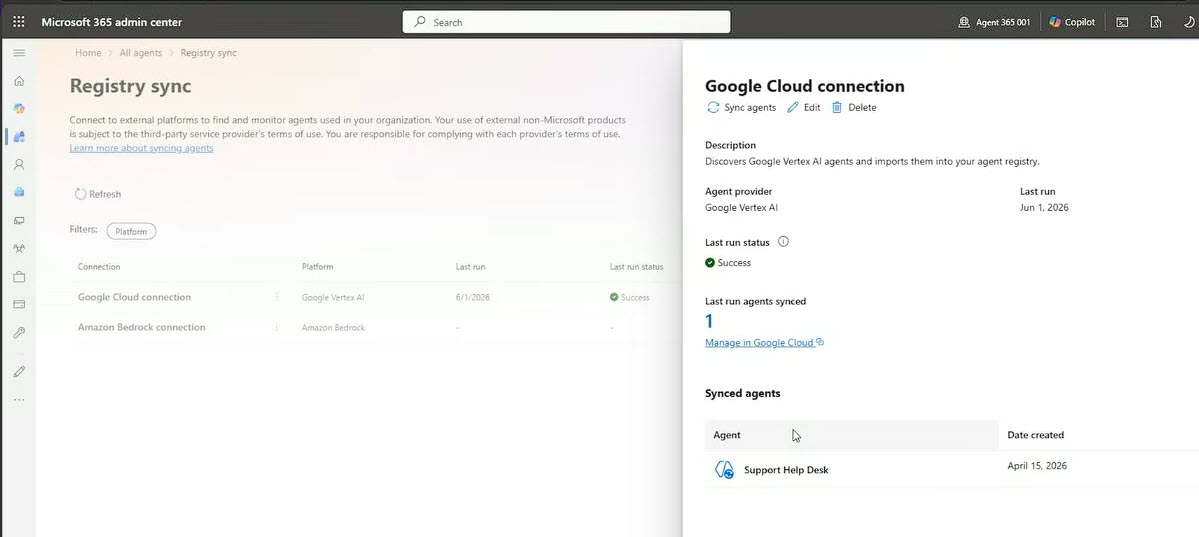
FIGURE 5: Google Cloud connection panel on Registry sync. View full-size image
Agents are imported to the admin center but managed in the external platform. Meaning even with Registry sync turned on, I can only see what agents are currently running on Google Cloud Platform. No Entra Agent ID, so no deep governance like instances, no owner, no activity, no Purview. Whatever actions I get depend on the platform's own API.
Why does your organisation need Registry Sync?
From the last section, you can see clearly that registry sync does not provide deep management of agents. Which raises the obvious question. Why does a company even need this? Why don't we just use Agent 365 SDK?
You cannot govern an agent you do not know exists
The hard part of agent governance in organisation, especially enterprise, is not writing policy. It is discovery. A team launches an agent on Bedrock, central IT never hears about it. That is shadow AI, and Registry Sync is how you find it.
Registry Sync drags those agents into one registry and labels them. Without this step, the SDK has nowhere to start, because you do not know which agents need an identity.
Not every agent deserves the SDK
Wiring an agent up with the SDK costs developer time. Most low-risk agents will never need conditional access or runtime telemetry, and for those a name and an owner is enough. Companies should only spend dev resources on integrating agents that touch sensitive data or take real actions.
Those are the ones to build as custom agentic AI solutions from the start. Governing everything to the same depth is how teams burn their budget on agents nobody cares about.
One Inventory Is Better Than Five
In a decentralised company, IT does not hold a login to every cloud console. When an auditor asks how many agents you run and where, you want one answer, not five spreadsheets that disagree. Registry Sync gives you that single list.
Registry Sync Is the First Step in AI Governance
The mistake I would warn against is treating Registry Sync as the finish line. It is the front door. It answers "what do we have?" so you can answer "what actually needs control?"
The route from one to the other is three steps:
- Discover. Registry Sync connects the platform and imports agents. They arrive unmanaged.
- Assign identity. A developer uses the Agent 365 SDK or CLI to give a chosen agent a Microsoft Entra Agent ID, inheriting an agent blueprint.
- Apply control. IT adds conditional access, Purview protections and an agent sponsor. The agent turns managed.
You only move an agent up these steps if it earns higher trust levels. An internal helper agent that touches no sensitive data may sit at step one indefinitely. An agent that reads customer records belongs at step three with stricter control.
As of this writing, the connect flow offers four platforms, Amazon Bedrock, Google Vertex AI, Databricks Genie and Salesforce Agentforce, as listed in Microsoft's Registry Sync documentation.
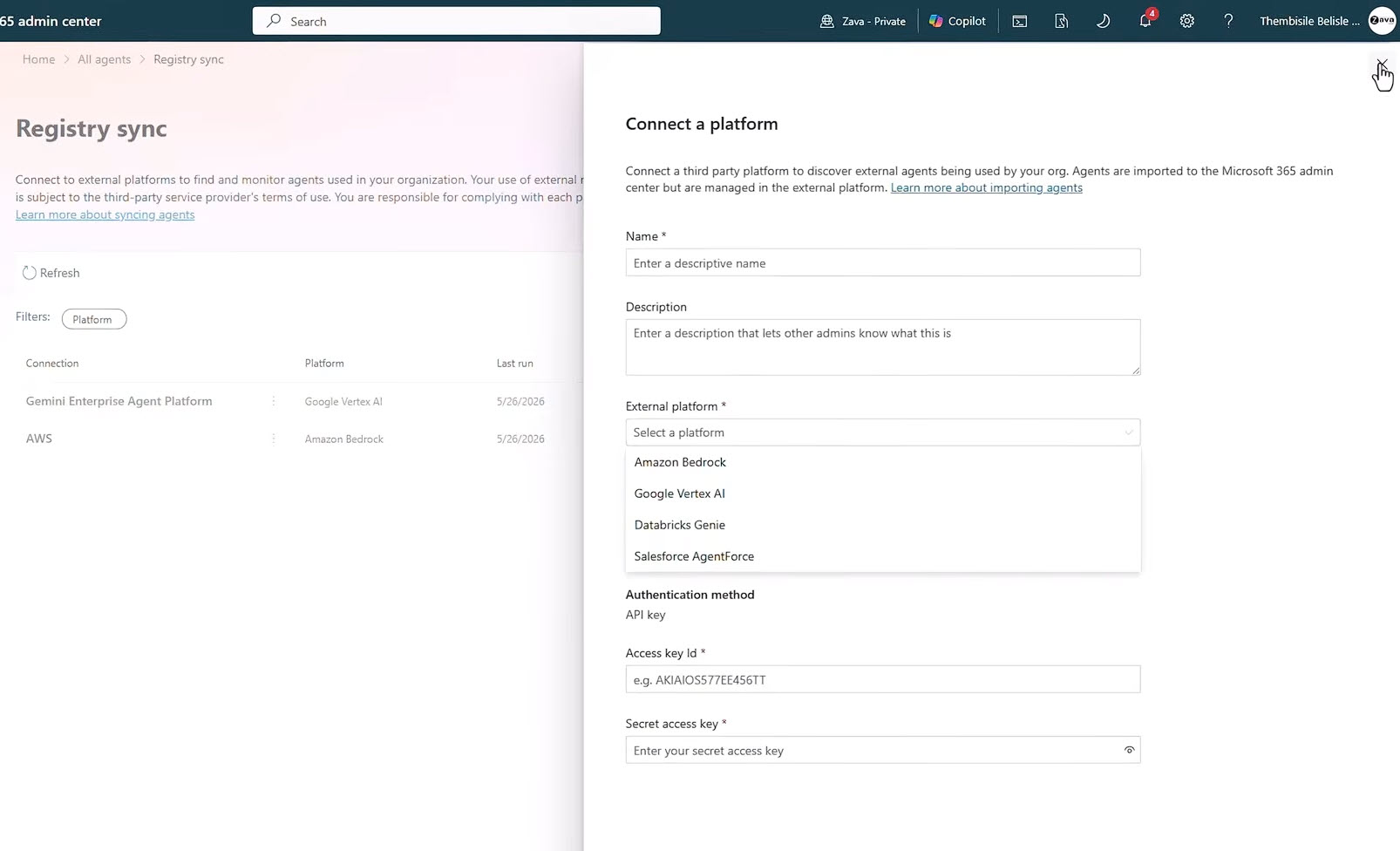
FIGURE 6: Connect a new platform panel to Agent 365. View full-size image
Conclusion
The first job is not connecting platforms or writing SDK code. It is sorting your agents: which ones only need to be seen, and which need identity, telemetry and real control. Agent 365 Registry Sync gives you the visibility to sort them honestly.
Talk to our expertAt Precio Fishbone, we help organisations map their agents across Microsoft and other platforms, then decide where visibility is enough and where the SDK is worth the effort. If that is the call in front of you, a focused conversation is the best place to start.
Frequently Asked Questions
Does Registry Sync let me control what an external agent accesses?
No. It imports metadata and supports only the actions the source platform's API allows. Controlling what an agent accesses needs a Microsoft Entra Agent ID, which comes through the Agent 365 SDK.
Which platforms does Agent 365 Registry Sync support today?
As of writing, four: Amazon Bedrock, Google Vertex AI, Salesforce Agentforce and Databricks Genie. Microsoft says the list is growing, so check the connect flow for the current set.
Is Registry Sync generally available?
Agent 365 reached general availability on 1 May 2026, but Registry Sync is still in preview. Sync is manual today, with scheduled sync on the roadmap.
When should I use the SDK instead of Registry Sync?
Use the SDK when an agent touches sensitive data or takes business actions and needs identity, observability and conditional access. Use Registry Sync to find and inventory agents before deciding which ones justify that work.
Share this on

Pär Johansson
Pär works with international business at Precio Fishbone, project delivery & digital services, helping turn complexity into progress and strategy into long-term value. With many years of experience in international business, He is known for building strong relationships and turning plans into meaningful progress. Driven by people, trust and sustainable growth.