
1. Agents Can Now Message You Privately Inside a Group Chat
Before this, when an agent needed to tell you something in a shared channel, everyone saw it. Useful for some things, noisy for most.
Now agents can send a targeted message directly to you inside a group conversation. Only you see it. The rest of the channel stays uncluttered.
Say your team has an onboarding agent running in a shared channel. A new hire needs to complete an access request, but that prompt doesn't need to surface for the other fifteen people in the channel. With targeted messages, the agent handles it quietly and directly.
The message appears tagged with "Only you can see this" and is automatically purged from clients after 24 hours, though it may be retained in your organization's secure storage depending on compliance policy. Clean, relevant, and out of the way for everyone else.
2. Agents Can Now Follow a Project Over Days and Weeks, Not Just One Conversation
This is probably the most meaningful update in this batch.
Until now, most agents in Teams had no memory between conversations. Every new message was a fresh start, which made them fine for quick tasks but unreliable for anything that spans multiple days.
Agent sessions change that. An agent can now maintain context and track progress across multiple interactions over time, contributing to ongoing discussions in channels without losing track of where things left off.
Think of a product launch running across three weeks. An agent can track which tasks are still open, flag what's falling behind, and keep contributing to the channel discussion as the project evolves. It's no longer starting from zero every time someone sends a new message.
For teams managing anything longer than a single conversation, this is where agents start to feel less like a search box and more like something that's actually following the work.
3. Working With Agents Mid-Conversation Just Got Faster
Worth flagging upfront: these three features are currently in public preview, not fully rolled out yet.
Slash commands let you invoke an agent quickly without having to @ mention it or break your flow. Type a command, the agent responds in context.
Quoted replies let agents reference a specific earlier message, so when an agent weighs in on an approval or a clarification, it's anchored to exactly the right thread, not floating loose.
Emoji reactions let agents signal status or completion with something lighter than a full reply. An agent marking a task done with a checkmark reaction is faster to read than a paragraph confirming it.
None of these changes the game on its own. Together they make the day-to-day of working with agents feel a bit less like operating a separate tool and a bit more like someone already in the thread.
4. The Tools Your Team Uses Already Have Agents in Teams
This is probably the most immediately useful thing in this update for most teams.
A handful of major platforms now have agents that work directly inside Teams conversations via a simple @ mention in any chat, channel, or meeting. No separate login, no context switching, no workflow interruption.
GitHub Copilot turns conversation context into code actions: pull requests, bug fixes, and iterations without leaving the Teams window. A developer can describe a bug in a channel and have Copilot start working on it from that same message.
Atlassian Rovo brings Jira and Confluence into Teams chats. Update an issue, draft a page, or pull project context, all without switching to the Atlassian tab.
Cursor lets engineering teams investigate code, fix bugs, and ship features directly from Teams discussions. The conversation and the work stay in the same place.
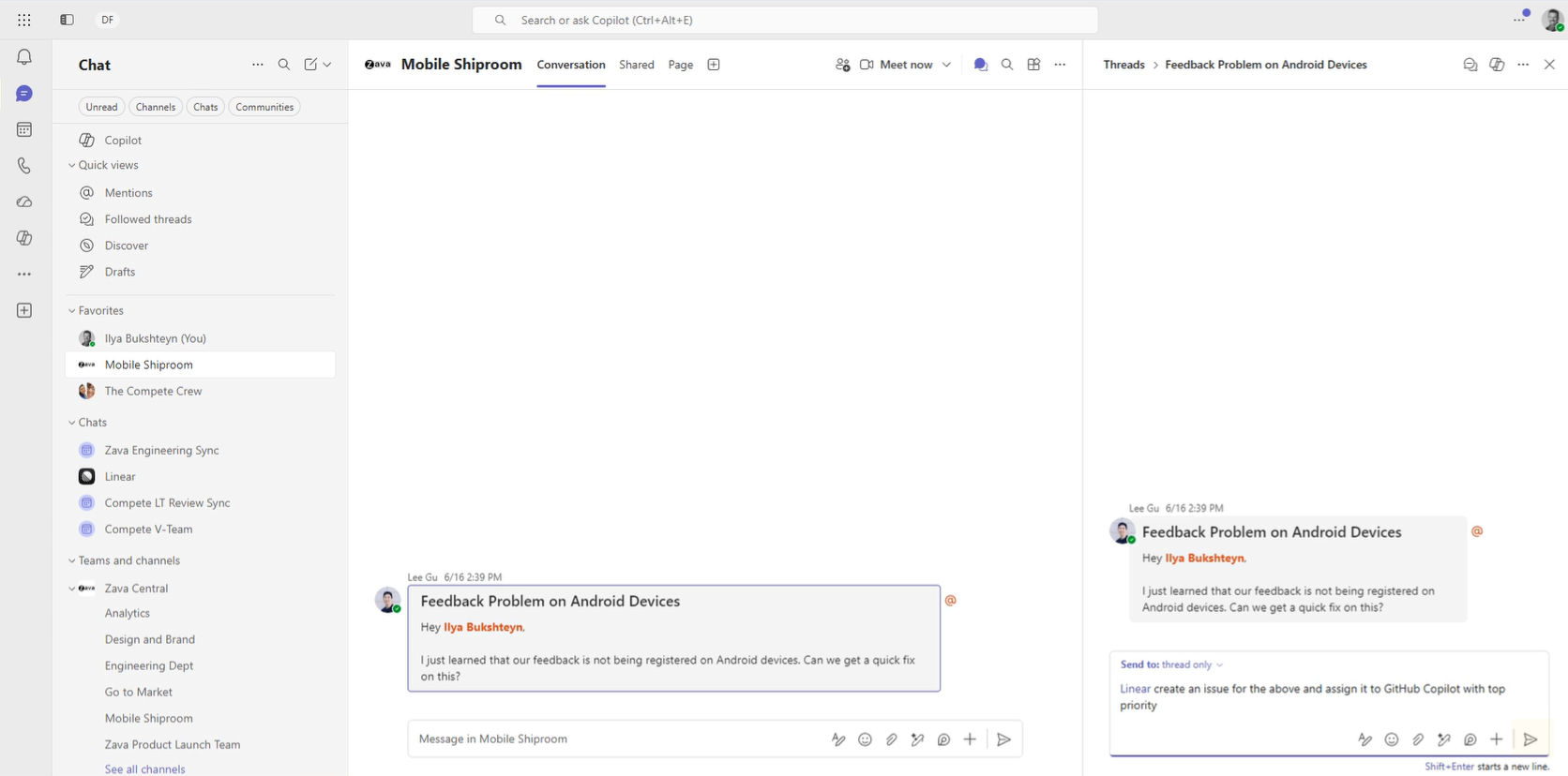
Linear captures issues and updates projects from Teams conversations automatically. Decisions made in the channel become tracked work items without anyone needing to copy-paste them elsewhere.
Lovable is coming later this month. The idea: describe what you want to build in a Teams chat, and it ships a working web app from that conversation.
You can also try the simulated demo of Linear in Teams to see what this actually looks like before enabling anything.
If your team already uses any of these tools, ask your IT admin whether the relevant agent has been enabled in your environment. It's the fastest way to see any of this in action.
5. Agents Now Work in Private and Shared Channels
This one quietly fixes something that's been a limitation for a while.
Agents and apps in Teams used to be limited to standard channels. That left two of the most common ways teams actually collaborate without agent support.
Private channels for sensitive internal work, like hiring, legal reviews, or executive discussions, now support agents. Shared channels for external collaboration with clients or partners also now support agents.
So if your procurement team runs a shared channel with a key vendor, an agent can now participate there. If your HR team uses a private channel for headcount planning, same thing.
Agents can now participate wherever the actual work is happening, not just the default spaces.
What This Adds Up To
Taken individually, these are incremental updates. Taken together, they show Microsoft continuing to move Teams from a place where people talk about work to a place where agents can actively participate in it.
The most practical starting point is section four. If your team already uses GitHub, Jira, Linear, or Cursor, check what's already been enabled in your Teams environment. That's the fastest path to seeing what any of this looks like day-to-day.
As a Microsoft partner working with enterprise teams on AI adoption, Precio Fishbone keeps a close eye on how these updates play out in practice. If you want to talk through what's relevant for your organization, we're happy to.
Let's discuss
Frequently Asked Questions
Do these updates require a new license or additional cost?
The partner agents (GitHub Copilot, Atlassian Rovo, Cursor, Linear) each require their own license or subscription. The Teams platform features themselves, including targeted messages, agent sessions, and private and shared channel support, are part of Microsoft 365. Your IT admin can confirm what your current subscription covers.
Are slash commands and emoji reactions for agents available now?
Not fully. As of Build 2026, slash commands, quoted replies, and emoji reactions for agents are in public preview. Available for testing, but not yet generally available across all tenants. Your IT admin can check whether your organization has access to preview features.
Can any agent send targeted messages, or only Microsoft's own?
Any agent or bot built on the Teams platform can use targeted messages, including third-party and custom-built agents. The capability is part of the Teams SDK, which is now generally available, so organizations building their own agents can enable this now.
What is the difference between agent sessions and Copilot Memory?
Copilot Memory is personal. It remembers your preferences and working style across your own Copilot conversations. Agent sessions are collaborative. They allow an agent operating in a Teams channel to maintain context and track progress across a shared, ongoing workflow. Different layers, different purposes.
We use Slack. Is this Microsoft making a case for switching?
That's a fair read of the direction. Microsoft is clearly investing in Teams as the platform where agents and people work together. Slack has its own agent ecosystem too, so this isn't a one-sided story. For organizations already on Microsoft 365, the integration depth with Work IQ, Entra, and the partner agent network is a real advantage. For organizations not on M365, the calculus is genuinely different.
Share this on

Pär Johansson
Pär works with international business at Precio Fishbone, project delivery & digital services, helping turn complexity into progress and strategy into long-term value. With many years of experience in international business, He is known for building strong relationships and turning plans into meaningful progress. Driven by people, trust and sustainable growth.