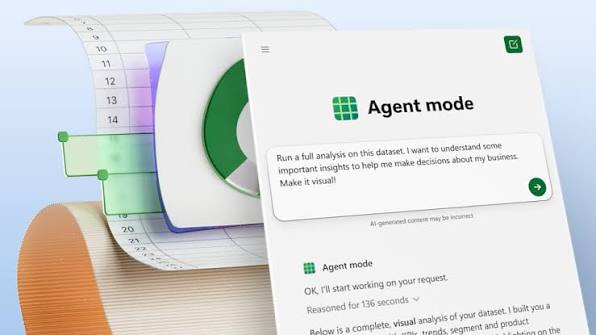
The Problem With AI and High-Stakes Work
A study coordinated by the European Broadcasting Union and the BBC, covering 3,000 responses across 18 countries, found that 20% of AI-generated responses contained major accuracy issues, including hallucinated details and outdated information.
That finding was about news content. But the same problem, an AI that produces confident output it cannot actually verify, would be far more damaging in finance, where a wrong number in a model or a misread assumption can ripple across an entire organization.
That context matters when looking at what Microsoft has been building inside Copilot in Excel, particularly the capabilities aimed at supporting finance teams.
A Pattern Worth Noticing
First came the Legal Agent in Word, built specifically for the precision and auditability that legal workflows demand.
Shortly after, Microsoft moved into financial analysis, where the stakes are arguably even higher. Every number needs to be traced back to a source. Every formula needs to be held up to scrutiny. Every output needs to be defensible in a board room or an audit.
Moving from legal to finance in quick succession is not accidental. These are two of the most precision-dependent domains in any organization, and they are both getting purpose-built AI rather than adapted general tools.
Why Excel Is the Right Place to Start
Excel has dominated finance for decades for a reason.
It is not just a spreadsheet tool. It is where quarters get closed, where forecasts get debated number by number, where everything ultimately traces to a source. For finance professionals, a sharper tool means a sharper edge, and the work has always been about modeling reality with a little more precision than the day before.
When AI enters that environment, it faces the same standard: show the work, use data that can be verified, and make every step traceable. Many AI tools make that claim. Copilot in Excel is now being put to the test.
Tested Against Real Finance Workflows
Most AI product announcements describe what a product can do. This one describes how it was tested before shipping.
Before new Copilot capabilities land in Excel, Microsoft runs them through graded levels of task complexity and benchmarks built around the work finance teams actually do, ensuring the output is multi-step and verifiable rather than just a single-task response. Get an inside look at the evaluation framework, benchmarks, and domain-specific approach for finance.
Microsoft Finance itself runs Copilot in Excel across FP&A, Accounting, Tax, Compliance, and Treasury in live workflows. They push back on what does not work and hold the product to the same standard their own teams operate under. By the time it ships more broadly, it has already been run through a finance organization working at scale.
Microsoft has also partnered with the Financial Modeling Institute, the global body that credentials the industry's most demanding modelers. Its library of real-world financial modeling cases is now a core part of how Copilot in Excel gets evaluated for finance work.
Three Capabilities That Matter
Skills: Defining How Copilot Works
The standout new capability is skills, which let teams define exactly how Copilot should handle common repeatable processes.
Rather than rebuilding from scratch each time, a skill steps Copilot through a defined process, whether that is a DCF model, a month-end close, a reporting refresh, or a variance breakdown. The output follows in the right structure and format, making it easier to review, hand off, and reuse.
A library of sample finance skills is available now. Teams can also build their own using an open-standard markdown file saved to OneDrive, and Copilot picks it up automatically. Learn more on how to create, use, and manage skills here.
Partners including LSEG, Ramp, Rogo, Samaya AI, Velixo, and Vena are already building skills that will land on Microsoft Marketplace in Q3 2026.
On top of skills, Copilot can adapt to how individuals prefer to work. Personalization lets users set preferences once and have Copilot apply them consistently. Workbook rules capture structure, naming, and formula conventions directly in the file, so they travel with it wherever it goes.
Financial Data Connectors: Trusted Data, Inside the Workbook
Analysis is only as good as the data behind it. Copilot in Excel now pulls directly from the sources finance professionals actually rely on, bringing market data, fundamentals, and research into the workbook without the manual data extraction step.
Beyond the LSEG and Moody's connectors released in May, new additions include:
- CB Insights for predictive intelligence on private companies and markets, supporting M&A and corporate development workflows.
- Daloopa for audit-ready fundamentals sourced from SEC filings, investor presentations, and press releases, used to update operating models and build comp tables.
- FactSet for financial and alternative data used by investment professionals and financial institutions, covering modeling, screening, and market analysis. Currently in preview, generally available in July.
- Morningstar for investment research, ratings, and portfolio analytics, used to evaluate holdings, compare funds, and support asset allocation decisions.
- PitchBook for institutional-grade private capital market intelligence, including company profiles, deal histories, and fund data, used to build target lists and support diligence workflows.
- S&P Global via Kensho's Deterministic Retrieval, providing structured, API-driven access to S&P Global data with predictable, cited results and full control over orchestration.
Third-party connectors may require separate licensing or subscriptions from the respective provider. Learn more here.
Traceability: Knowing How You Got There
In finance, the answer alone is never enough. You need to know how you got there.
Plan with Copilot lets teams see exactly what Copilot is about to do before anything changes. It lays out which ranges, worksheets, formulas, and assumptions it intends to update, along with clarifying questions. The team reviews and approves before a single cell changes.

Copilot attribution in Show Changes records every edit with a link back to affected cells, attributed to Copilot alongside the work of human collaborators, the same way tracked changes work for anyone else on the file.
Put together, it behaves less like a black box and more like a colleague who shows their work.
What Finance Teams Can Actually Do With It
Microsoft has laid out six concrete workflow scenarios combining skills, connectors, and Work IQ.
Close the books: compare last quarter's actuals to plan using internal forecast reviews and planning decks, identify the five largest revenue, expense, margin, and cash flow variances, and draft an executive-ready business review summary.
Update the forecast: roll forward the current forecast using the latest approved assumptions, incorporate market data, reconcile changes against the operating plan, and summarize what drove the updated outlook.
Build a valuation model: run a DCF, comparable company analysis, and sensitivity model, pulling financial fundamentals, analyst expectations, market benchmarks, and transaction multiples to explain the key valuation drivers.
Find the next acquisition: identify candidates matching internal strategy documents and acquisition criteria, combining company performance and market signals with funding history and investor activity.
Analyze portfolio performance: assess a portfolio against investment objectives and internal investment committee materials, pulling fund analytics and ratings alongside market performance and risk data.
Stay ahead of earnings: analyze results, estimate revisions, analyst expectations, and management commentary, pulling consensus forecasts, transcript intelligence, and market data to spot sentiment shifts.
The Use Case
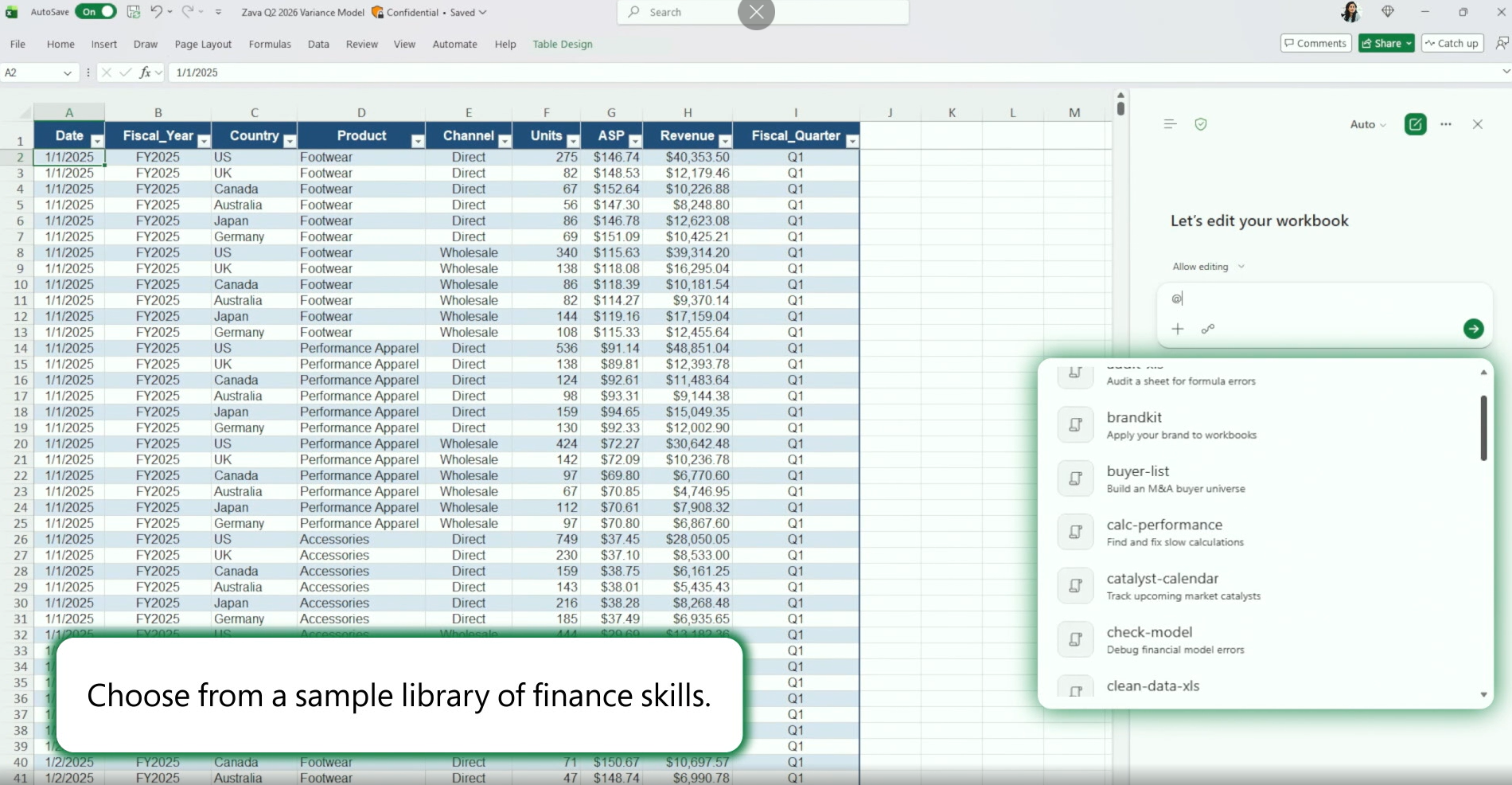
Choose a finance skill
Instead of starting from a blank prompt, the analysts can select a pre-built finance skill from the library, such as comparable company analysis, buyer screening, model validation, or spreadsheet cleanup. Each skill follows a defined workflow, ensuring consistent outputs across the team.
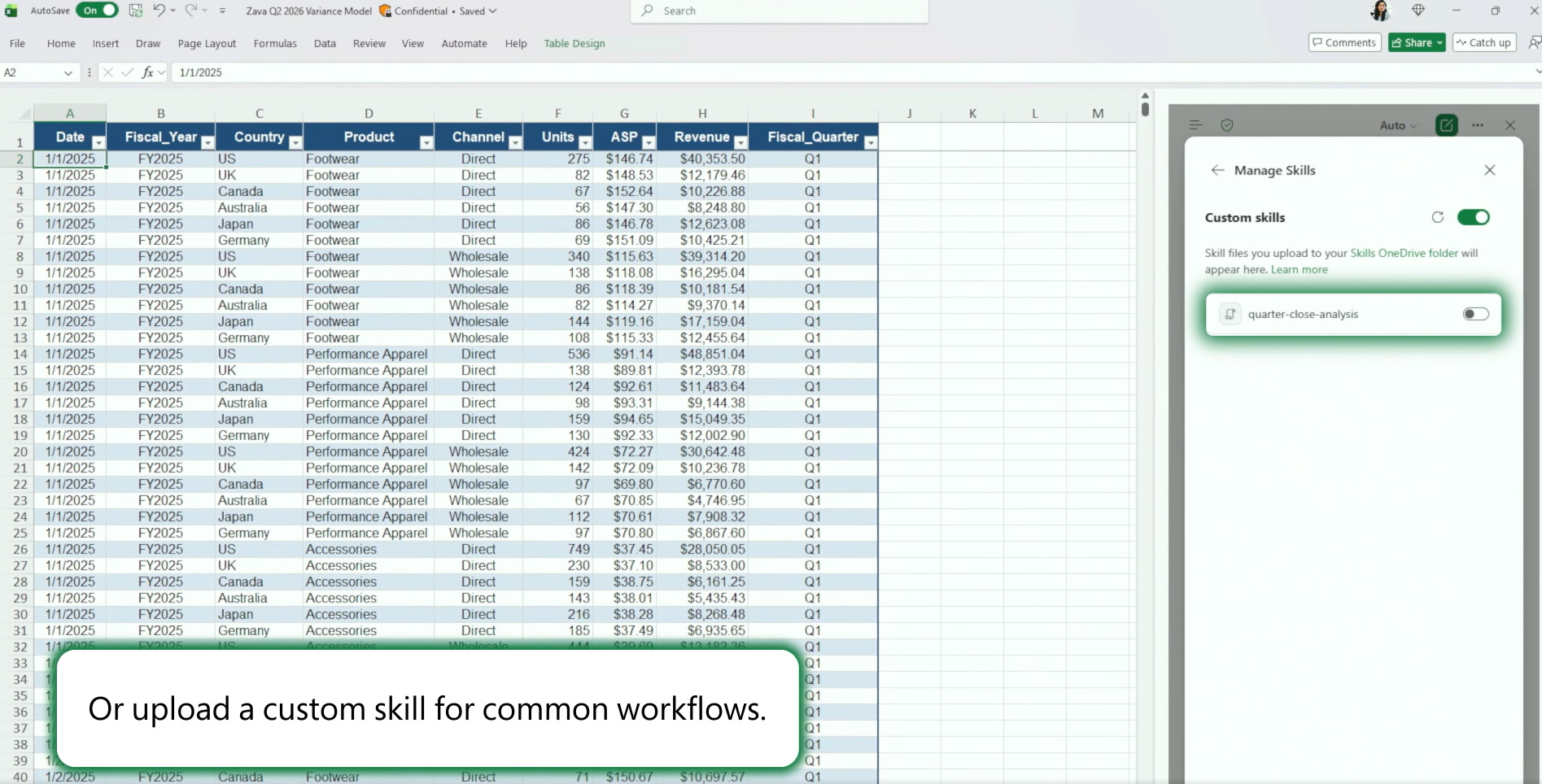
Create custom skills
Teams can also upload their own skills for recurring finance processes. Saved as markdown files in OneDrive, these custom workflows become reusable across analysts, helping standardize internal processes while adapting Copilot to the organization's own way of working.
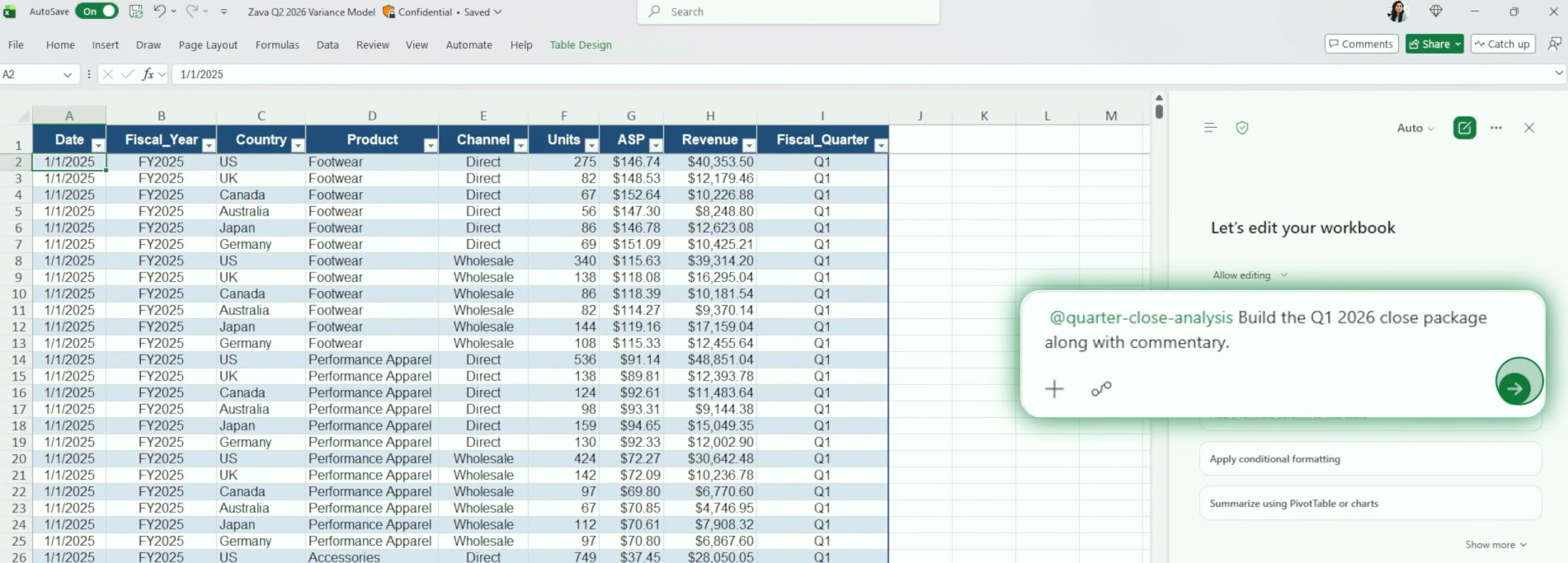
Invoke the workflow
Once a skill is selected, the analyst simply references it in natural language and describes the task. Copilot then executes the predefined workflow inside Excel, combining the structured process with the context of the current workbook.
Generate the deliverable
Copilot completes the workflow inside Excel, using Work IQ to combine the selected skill with the workbook and relevant organizational context. The result is a structured output, complete with calculations, commentary, and supporting analysis that follows the team's predefined process.
Where these prompts draw on market or private company data, external connectors are required.
What Is Available Now
Personalization, workbook rules, pre-built skills, financial data connectors, Plan with Copilot, and Copilot attribution in Show Changes are generally available now for Microsoft 365 Copilot customers across Excel for Web, Windows, and Mac.
Custom skills are on the Insiders channel for Windows and Mac now, rolling out broadly next month.
The Bigger Picture
Legal and finance are two domains where getting it wrong is expensive in ways that are hard to recover from. Microsoft is not trying to drop a general AI tool into these workflows and hope for the best. The approach, testing against real professional standards before shipping, partnering with domain credentialing bodies, pressure-testing internally, is a reasonable response to what the work actually demands.
Now most finance teams already know where the manual work piles up. The more useful question is whether the tools are now good enough to do something about it.
If your team is thinking through where Microsoft AI fits into your financial operations, Precio Fishbone works with organizations on exactly that.
Book a consultation
Frequently Asked Questions
What is Work IQ and how does it connect to these finance features?
Work IQ grounds Copilot in your organization's own documents, like forecast reviews, planning decks, and investment committee materials, so analysis starts from internal context rather than just external data sources.
Can skills be shared across a team or are they per user?
Skills are saved as open-standard markdown files in OneDrive and can be reused across workflows. Enterprise-wide deployment via Microsoft 365 Admin Center is coming alongside partner-built skills in Q3 2026.
Do connectors like PitchBook or FactSet come included with an M365 Copilot license?
No. Third-party connectors require separate licensing or subscriptions directly from the data provider.
Which connectors are in preview and which are generally available?
FactSet is in preview and goes GA in July. CB Insights, Daloopa, Morningstar, PitchBook, and S&P Global via Kensho are available now, alongside LSEG and Moody's released in May.
Is the Financial Modeling Institute partnership about certification or product testing?
Product testing. FMI's real-world financial modeling cases are used as benchmarks to evaluate Copilot in Excel before features ship.
Share this on

Pär Johansson
Pär works with international business at Precio Fishbone, project delivery & digital services, helping turn complexity into progress and strategy into long-term value. With many years of experience in international business, He is known for building strong relationships and turning plans into meaningful progress. Driven by people, trust and sustainable growth.