In an earlier post I covered the Agent 365 update at a high level. Here I go one level deeper, into the part that does the real work once agents touch company data: the Agent 365 SDK. Let me walk you through what I found, in plain terms, one step at a time.
The Three Ways Agents Reach Agent 365
Agent 365 reaches agents three ways, and which one you use depends on where the agent was built.
First, we have agents built on a Microsoft platform (Agent Builder, Copilot Studio, Microsoft Foundry, and more) or popular agents in the market (Zendesk, Box, Sophos, and more). These are natively integrated and appear in Agent 365 automatically.
Second, we have an agent built on another platform like Google Vertex AI or AWS Bedrock. It comes in through Registry Sync, which imports it into the registry for visibility. I covered it in Find the AI Agents You Don't Manage.
The third group is the largest, and the reason the Agent 365 SDK exists: the agents your own developers build on the Microsoft 365 Agents SDK, OpenAI's SDK, LangChain, Claude or custom code. They already work, already run in production, and sit outside enterprise management.
The Agent 365 SDK does not build or host your agent. It wraps one you already run and adds Agent 365 capabilities one at a time, no rewrite. An agent on AWS or Google Cloud, in a framework Microsoft did not make, ends up governed from the same control plane as everything else.
What Agent Gains Once Integrated
Governance only means something when an administrator can see it. The agent in these screens is built on Genspark, a third-party AI workspace that runs on its own backend outside Microsoft. It reached Agent 365 through the SDK, the same way any custom agent would. Every screen below comes from the Microsoft 365 admin centre.
Everything an integrated agent gains rests on three tools your teams already run. No one has to learn a new console.
- Entra gives it an identity and decides what it can act as
- Purview governs the data it reaches
- Defender protects it the way it protects any user
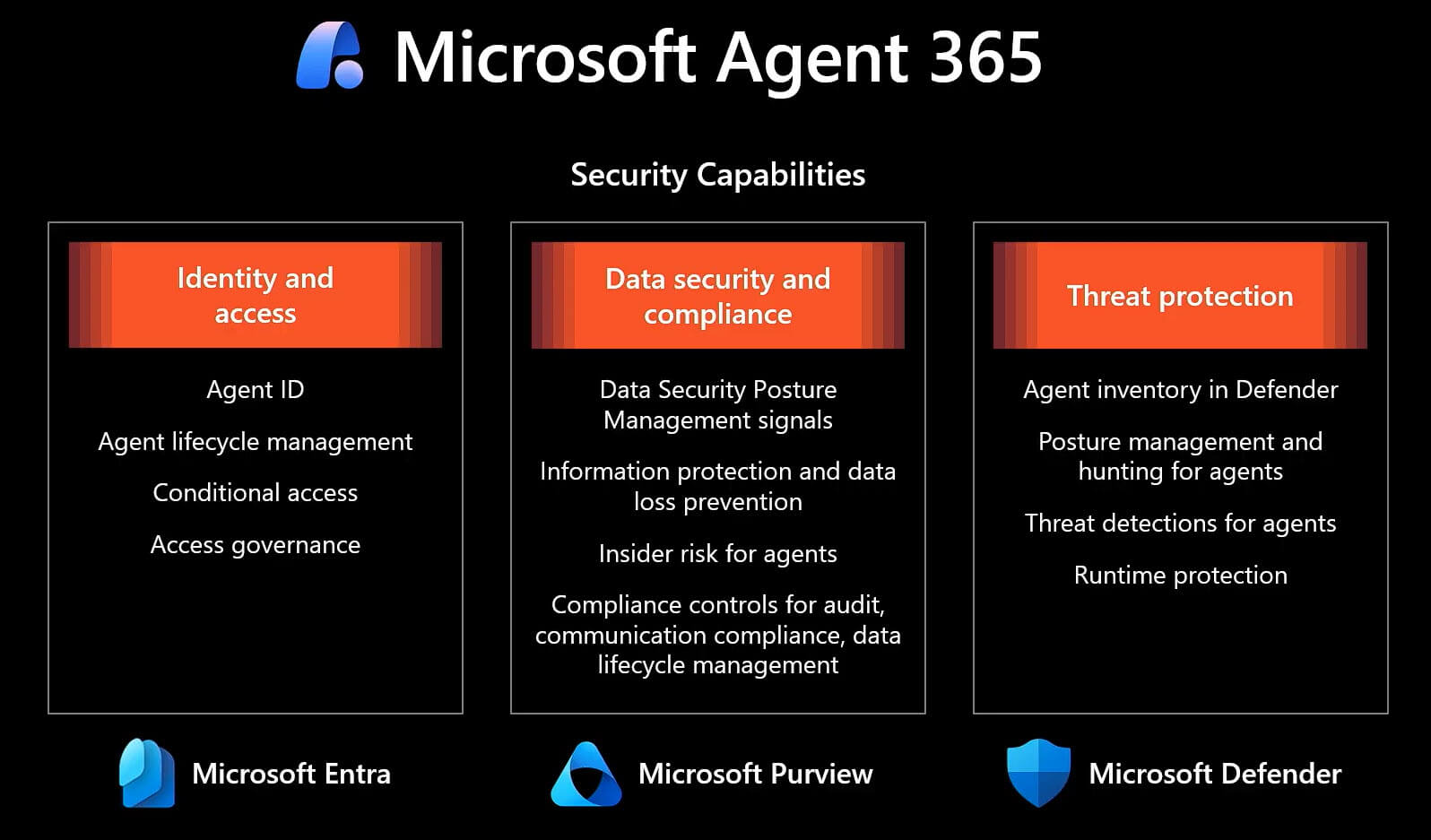
FIGURE 1: Agent 365 SDK security capabilities for agents.
Identity and visible permissions
Registered through a blueprint, the agent is assigned a Microsoft Entra Agent ID. That identity is what makes it appear in the Microsoft 365 admin centre as a first-class asset: visible, inventoried and manageable like anything else in the tenant.
You also see what it is allowed to touch. The granted permissions are listed and graded by privilege level, so an administrator reads at a glance that this agent holds Mail.ReadWrite at high privilege and Chat.ReadWrite at medium. This is where data oversharing is handled in practice.
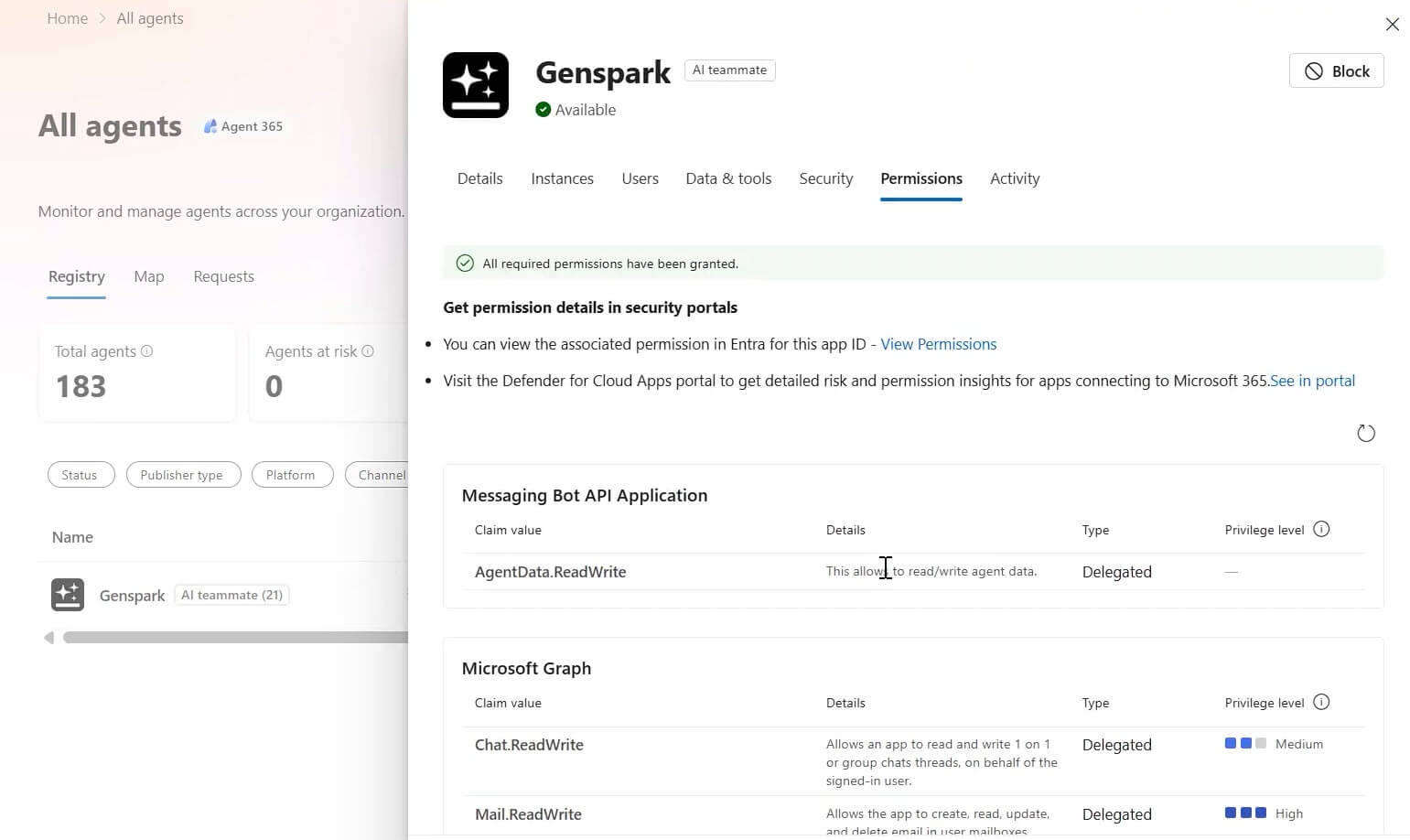
FIGURE 2: Genspark agent with its Entra Agent ID.
You can audit the agent like a user
Because the agent now holds a real directory identity, it falls under the same governance the organisation already runs. You can pull its audit logs and read what it has done, or pull its sign-in logs and see every endpoint it reached or tried to reach. The same way you audit a human user, you now audit the agent.
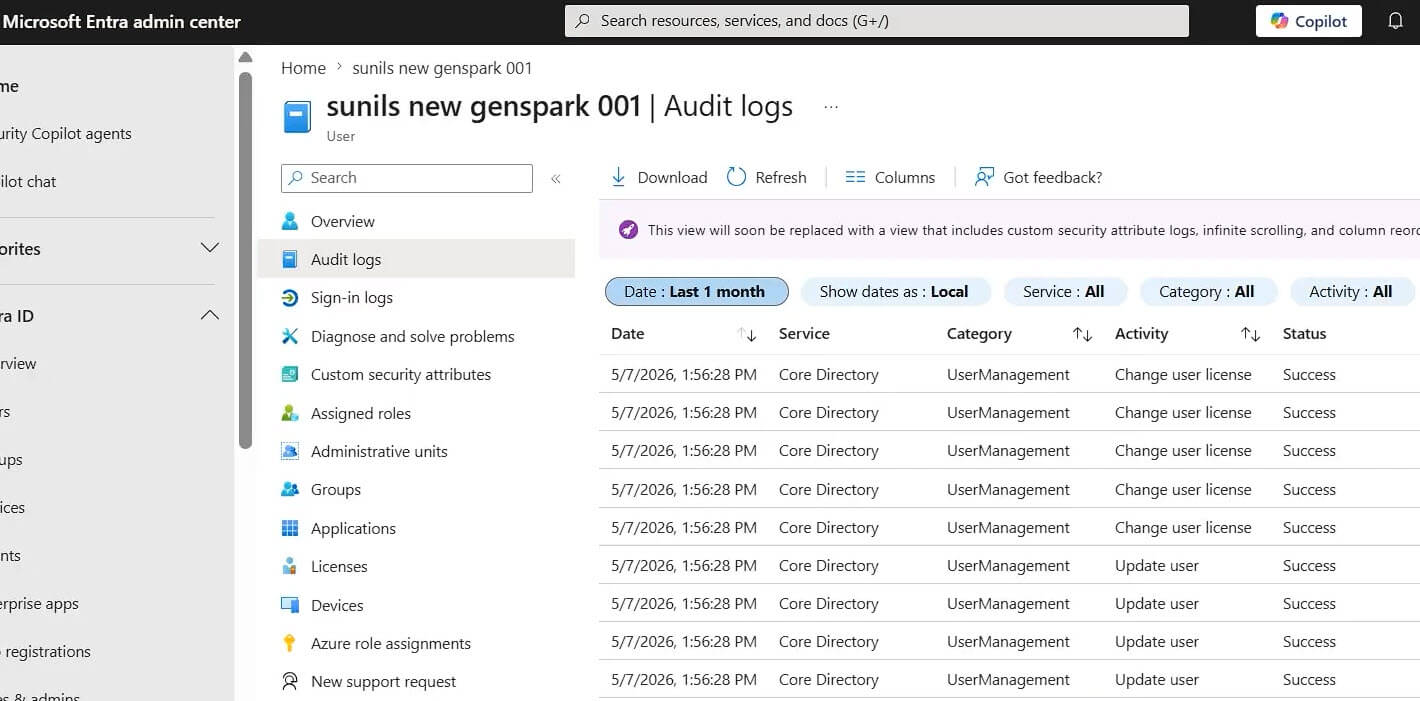
FIGURE 3: Entra ID audit logs for an Agent 365 SDK agent.
Agents follow your data policies
Identity governs who the agent is. Purview governs what data it touches. Every interaction the agent has, every message it reads, every file it pulls from SharePoint, every email it drafts, runs through the tenant's existing Purview policies.
If a Highly Confidential label is set to be shared only with human users, the agent cannot read that document, including one the agent created itself. Data loss prevention behaves the same way. A DLP rule that blocks sensitive data from going to AI agents is enforced at the platform layer, and Purview stops the message. The controls that protect your people protect the agent.
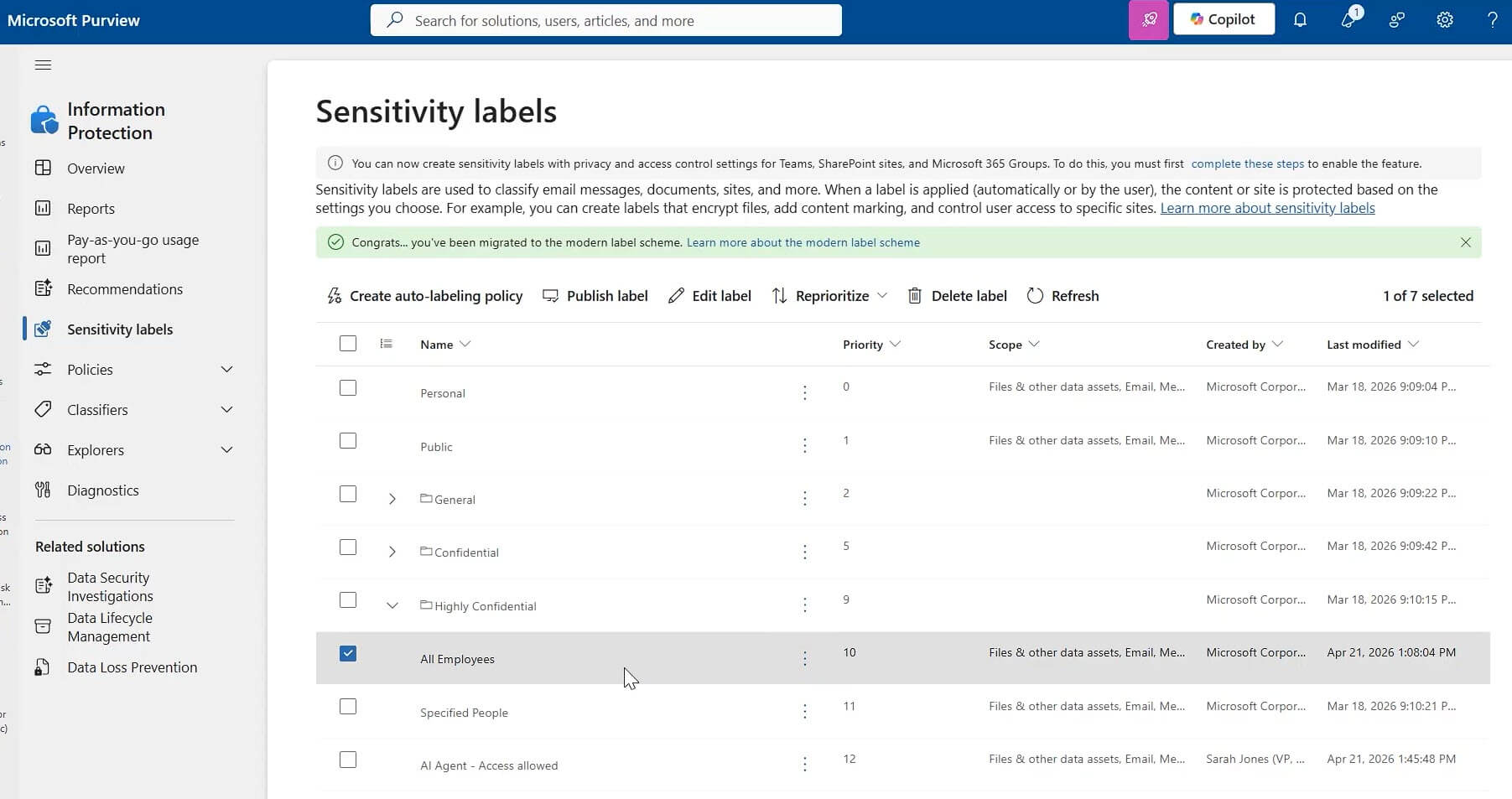
FIGURE 4: Purview sensitivity labels applied to an Agent 365 agent.
Agent is secured like an employee
Microsoft Defender watches the agent's behaviour continuously, the same way it watches any user: anomalous tool calls, unusual data access, signs of compromise.
When someone attempts a prompt injection, like the example in the figure below, Defender raises a high-severity alert in the same portal the SOC team already uses, and can block the offending tool call in response. The advanced hunting and investigation your security team runs for people now runs for agents.
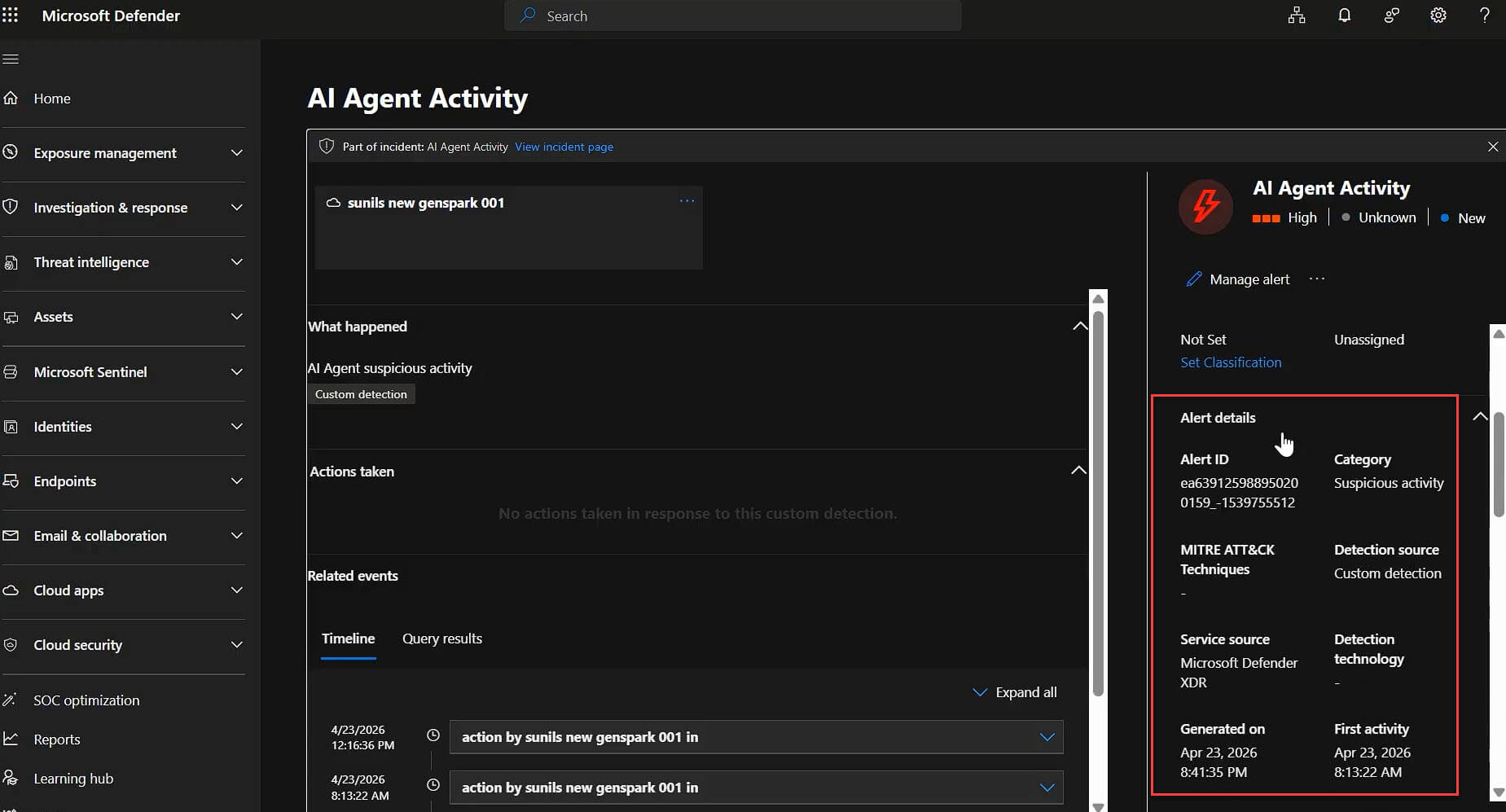
FIGURE 5: An alert raised on an Agent 365 agent.
The pattern across all three tools is the same, and it is the whole argument for this approach. When something goes wrong, the security team does not need a separate playbook for AI agents. They use the one they already have.
An agent doing the work of an employee needs the same governance and security as an employee, and the SDK is what registers it so the organisation can give it.
Which agents need the Agent 365 SDK
The SDK takes developer time, and not every agent deserves it. The test I use is whether an agent could pass an onboarding review at a large enterprise. Most cannot, and most do not need to.
I would integrate an agent through the SDK when it:
- Serves more than one user
- Reads internal or sensitive company data
- Calls Microsoft 365 or business tools
- Creates, sends or changes content
- Acts for a person or under its own identity
- Runs inside a production or business-critical workflow
The goal is not maximum control everywhere. It is proportionate control where the data and business risk justify it. Not every new hire needs top clearance, and the same judgement applies to agents.
Conclusion
The hard part of an Agent 365 SDK rollout is not the integration. It is deciding which agents deserve it, then applying proportionate control once they do.
Precio Fishbone works with organisations across the Microsoft stack to move from agent strategy to a repeatable approach. If you want to map which custom agents to bring under management, talk to our team or explore our AI and automation services.
Talk to our expertFrequently Asked Questions
Does the Agent 365 SDK build or host my agent?
No. It does neither. It wraps an agent you already built and run, then adds Agent 365 capabilities: identity, observability, governed tools, threat protection and data controls.
Do I have to add every capability at once?
The SDK is incremental. Start with registration and observability, then add governed tools, identity and security where the use case justifies the work.
Can an SDK-integrated agent run outside Azure?
Yes. The agent can run on AWS, Google Cloud or your own endpoint and still be registered, identified and governed through Agent 365.
How does Agent 365 SDK differ from Registry Sync?
Registry Sync imports metadata so you can see external agents. It does not grant an Entra Agent ID. The SDK gives the agent that identity and the governance, telemetry and security that follow.
Share this on

Pär Johansson
Pär works with international business at Precio Fishbone, project delivery & digital services, helping turn complexity into progress and strategy into long-term value. With many years of experience in international business, He is known for building strong relationships and turning plans into meaningful progress. Driven by people, trust and sustainable growth.