
Register a server with Azure Arc and a policy can install Azure Monitor Agent (AMA) on it automatically. A data collection rule then decides what the server sends, and the data lands in the same place as your Azure virtual machines. That is the practical core of Azure Arc monitoring for estates that span Azure, other clouds and on premises.
Monitoring data also feeds security work. Our explainer on Microsoft Defender describes protection that extends across multi cloud environments, and our Ignite 2025 cloud security summary covers the move to monitor cloud and hybrid assets from one platform. Good agent coverage is the foundation for both.
What AMA covers in a hybrid estate
Microsoft's Azure Monitor Agent overview lists Azure, other clouds through Azure Arc and on premises through Azure Arc as supported environments. Windows client operating systems are supported as well.
Windows agents collect Event Logs, performance counters, file based logs and Internet Information Services logs. Linux agents collect Syslog, performance counters and file based logs. That covers most day to day on premises server monitoring needs, and the same data can serve services such as Microsoft Sentinel.
How the architecture fits together
Three parts, one flow
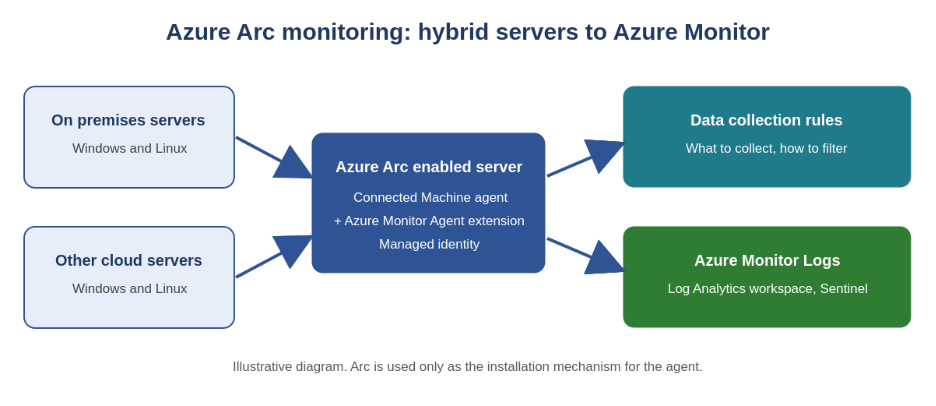
First, the Azure Arc Connected Machine agent registers the server with Azure. Second, AMA is installed as a VM extension through the Arc extension framework. Third, data collection rules define what is collected and where it goes. Microsoft's page on managing Arc VM extensions explains the extension model.
Microsoft states that the Arc agent is used only as an installation mechanism. It adds no cost or resource consumption, and paid Arc options are not required for AMA. A related Microsoft page adds that the Connected Machine agent does not replace AMA. It simply lets you manage machines hosted outside Azure.
Authentication
AMA authenticates to your workspace with a managed identity, created when you install the Connected Machine agent. The legacy Log Analytics agent used a workspace ID and key. Microsoft describes managed identity as more secure and manageable.
For Azure Arc enabled servers, system assigned managed identity is the only supported option, and it is enabled automatically when the Arc agent is installed. This differs from Azure VMs, where Microsoft recommends a user assigned identity for large deployments.
Rules and associations
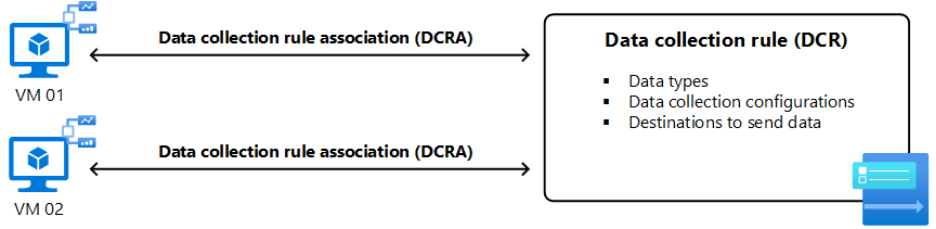
Each agent retrieves the rules associated with it, then checks back periodically for changes. One rule can apply to many machines, and one machine can have several rules. Microsoft's data collection rule overview describes the full model. If the destination is a Log Analytics workspace, the rule must exist in the same physical region as the workspace.
What it really costs
Software and data
Microsoft states there is no cost to use Azure Monitor Agent, but you might pay for data ingestion and storage. The cost lever is therefore the rule, not the agent. A rule can filter and transform data before it is sent, so collecting only what you need is the main way to control spend. Microsoft's page on Azure Monitor logs cost explains the options.
Disk on the server
There is also a local cost for on premises server monitoring. AMA caches data on the machine. For Arc enabled Windows servers, Microsoft lists about 10.5 GB for the agent cache. On Linux, it suggests about 10 GB for the event cache, plus package and log space. Check these figures against older servers with small disks, and plan for upgrades, when two agent versions briefly coexist.
Security and compatibility questions
Hybrid estates often hold the oldest systems, so compatibility checks come first. Microsoft lists the supported systems as x64 and does not support x86. Several of them, such as Windows 11 and many Linux distributions, are also supported on ARM64. Heavily customised appliances are not supported. On Linux, AMA does not work when the system wide crypto policy is set to FUTURE. Our summary of Predictive Shielding in Microsoft Defender shows how legacy coverage is a security topic too, although that Defender feature is still in preview.
Microsoft states that the agent communicates outbound to Azure Monitor over TCP port 443, which helps with firewall planning. It also notes that the VM extension is not supported in air gapped clouds, while the Windows MSI client installer supports them. Check your own network boundaries with your security team before you commit to a design.
Deploying at scale
Microsoft documents three main methods for Azure Arc enabled servers. The table below summarises the trade offs, which come from Microsoft's deployment guidance.
| Method | Strength | Limitation |
| Individual extension install | Immediate, useful for testing | Limited automation, no DCR created |
| Azure Policy | Reinstalls if removed, installs on newly registered Arc servers | Compliance evaluation runs every 24 hours |
| Azure Automation | Scheduled runbooks, authenticates with a managed identity | Needs an Automation account and runbooks you maintain |
Most hybrid monitoring Azure estates combine methods. A small pilot uses individual installs, then Azure Policy takes over for production. Pair either with agreed rules, because the policy for Arc enabled machines installs the extension at a workspace but does not define what is collected.
Decisions for leaders
One view, clear accountability
Hybrid monitoring succeeds when one team owns the view. Our guide to the Microsoft 365 admin center makes the case for a single control hub, and our Agent 365 governance article describes governing assets built across different teams and cloud environments. Both support the same principle.
Governance and telemetry
Frameworks matter too. Our review of global standards for AI governance lists monitoring, traceability and incident readiness as core controls. For application telemetry, see our articles on Azure AI Foundry workflows, the Microsoft Agent Framework and Dataverse, which all connect to Azure Monitor.
Security operations
Finally, decide where the data goes. Microsoft describes onboarding Arc enabled servers to Microsoft Sentinel as one use of the agent. Review our Ignite 2025 Defender update before you design response workflows.
A hybrid plan you can defend
A good Azure Arc monitoring design answers four questions: which servers, which rules, which destination and who owns the result. The technology is mature, but the decisions around cost, access and ownership are where projects slow down.
Precio Fishbone is a Microsoft solutions partner that helps businesses grow with comprehensive AI solutions, tailored to what suits each organisation best. Planning on premises server monitoring with Azure Monitor Agent?
Talk to our team
Frequently Asked Questions
Do I need Azure Arc to monitor on premises servers with Azure Monitor Agent?
Yes. For servers outside Azure, the Azure Arc agent must be installed before AMA. The exception is Windows 10 and 11 client devices joined to Microsoft Entra, which use the client installer and do not need Arc. Arc is only the installation mechanism and adds no cost.
Does AMA work on cloned servers?
Microsoft states that cloning a machine with AMA installed is not supported. Build images without the agent and install it through your deployment method.
What happens if an Arc server loses connection?
Microsoft notes that AMA logs are stored locally and are updated after a temporary disconnection of an Arc enabled machine. Confirm in a pilot how your workloads behave.
Can Windows client devices be included?
Yes. Windows client operating systems are supported, and Microsoft states that they need the Azure Monitor Agent client installer for Windows client devices.
Share this on

Pär Johansson
Pär works with international business at Precio Fishbone, project delivery & digital services, helping turn complexity into progress and strategy into long-term value. With many years of experience in international business, He is known for building strong relationships and turning plans into meaningful progress. Driven by people, trust and sustainable growth.