A browser agent is software that uses a website the way an employee does: it reads the page, clicks and types. Within two weeks of TypeSafe releasing Jev, Browser Use's Jev browser agent, Jev Ultrafast, had 20,969 stars on GitHub by 28 September. It searches Google Flights from Zürich to London in 7.1 seconds.
I spent this week reading the code, the published test results and Microsoft's browser tool documentation, because the question my clients will ask next is not whether this works. It is who gets to point it at company systems.
- How much cheaper is a browser task now? Learn what the published numbers prove and what they do not.
- Whose account is the agent using? Understand why the login matters more than the model.
- How does it fit a Microsoft estate? See how Copilot Studio and Foundry agents can use one, and when Microsoft's own runtimes are safer.
A Jev Browser Agent Costs 21 to 71 Times Less per Task
On the same 13 tasks, an agent where Jev picks each click cost a median of $0.0053 per task, against $0.3763 for Browser Use's agent, which asks a language model at every step. It was also faster, 13.9 seconds against 19.2, and passed 39 of 39 attempts against 36 of 39. The figures come from fastbrowse, Agent Labs' open-source agent, tested on cloud browsers on 27 September.
Across the five test suites the gap runs from 21 to 71 times. For a Microsoft reference point, computer use in Copilot Studio charges 5 Copilot Credits per step, or 15 on a premium model, and a credit costs $0.01 on pay-as-you-go. A ten-step task there costs 50 cents before anyone checks whether it worked.
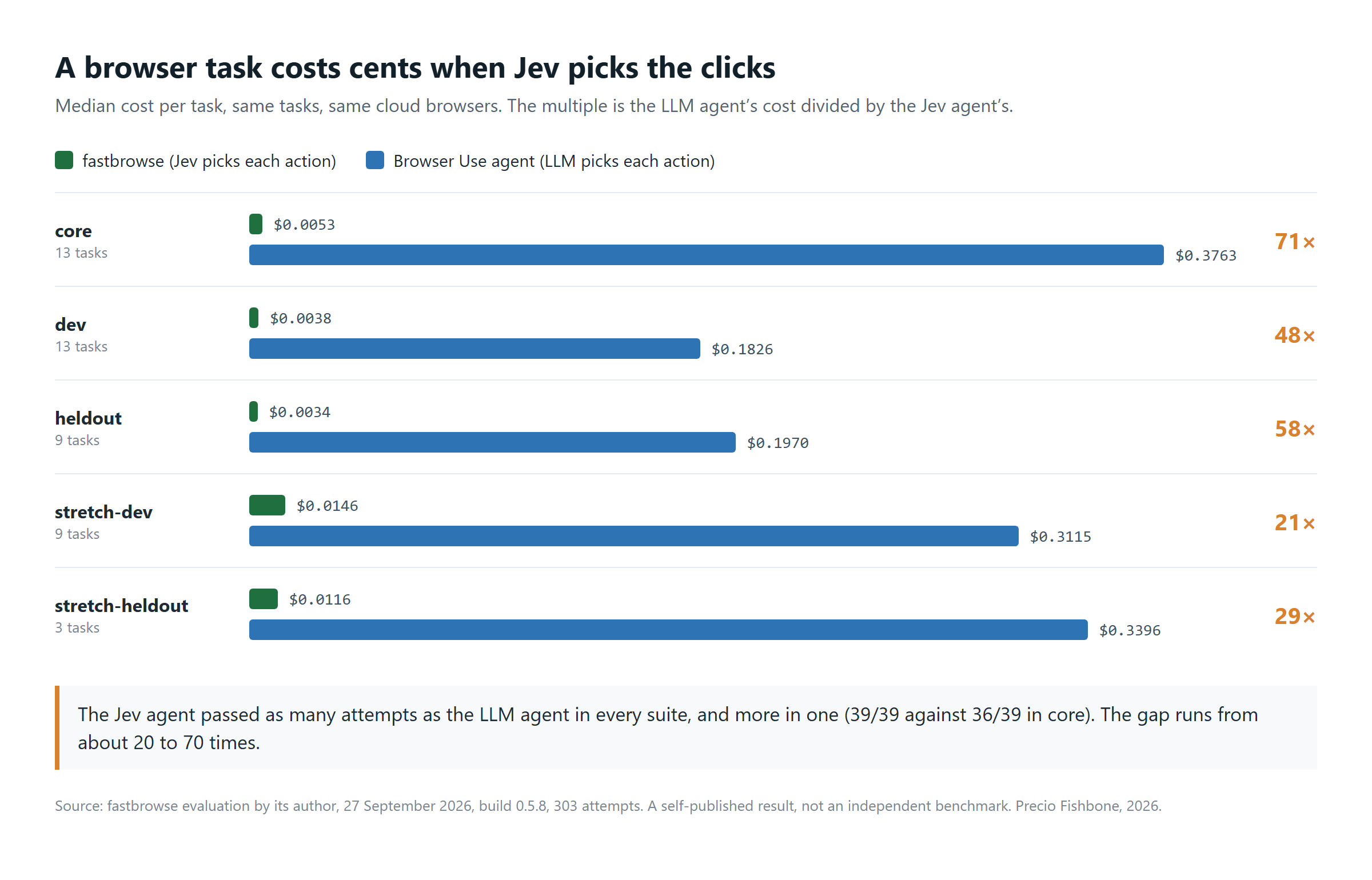
Figure 1. A browser task costs cents when Jev picks the clicks. View full-size image
Treat these as a direction, not a price list. They are Agent Labs' evaluation of its own pre-alpha agent, and its maintainers have since noted that these rows left out slow fastbrowse attempts the other agent could not leave out. A controlled mock-site test they released on 28 September still shows a gap of about 39 times, with 53 of 54 attempts passed against 54 of 54.
What the numbers do show is that cost has stopped being the main reason to say no, though each agent still needs a line in your AI cost management. The next question is where the saving comes from.
The LLM Plans and Jev Picks the Next Click
A Jev browser agent turns each page into a numbered list of the controls it can see and asks Jev one question per step: which operation, on which element. Jev Ultrafast offers eight operations, and a small language model writes text only when the chosen operation is typing. The default loop takes no screenshots, and model output never becomes a selector, a coordinate or code that runs in the browser.
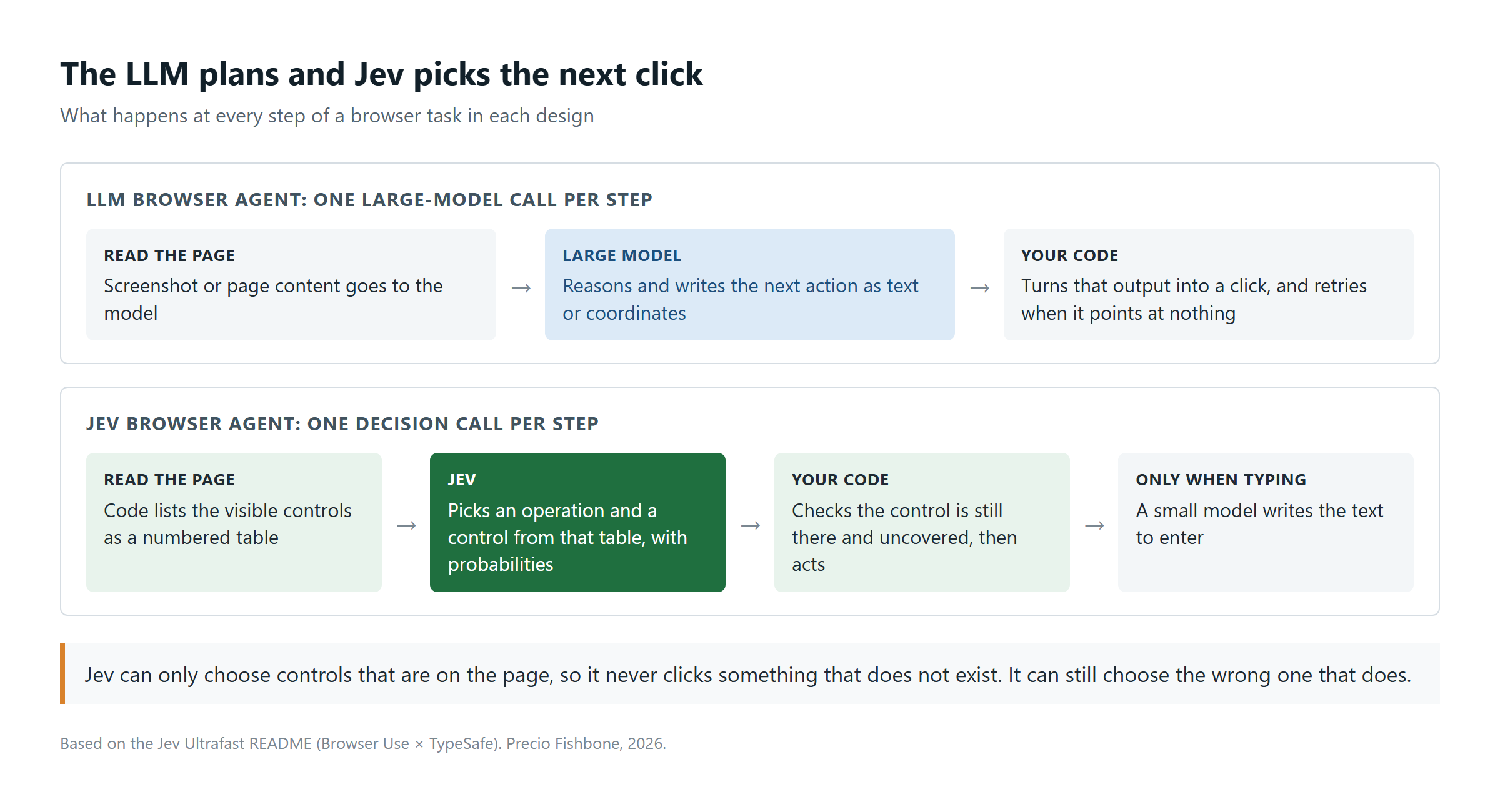
Figure 2. The LLM plans and Jev picks the next click. View full-size image
A conventional agent asks a large model to describe every next action from a screenshot or the page, and that is where the cost and delay come from. Because Jev can only choose from controls that are on the page, it cannot click something that does not exist. It can still click the wrong thing that does.
Frames, file uploads, pop-up tabs and some custom widgets are still out of scope, and a DONE answer needs an independent check. Those gaps will close. The harder question is whether today's test results are good enough to plan around.
Early Test Results Are Strong but Are Not Production Evidence
The best published result comes from jev-browser, an unofficial library built by one developer, where Claude plans and Jev decides: 40 of 42 live-site tasks across 16 categories, with no false claims of success. It also stopped at the order button on a test shop because it recognised the click as irreversible. Its misses were counting items and verifying that a list was sorted.
Jev Ultrafast's figures are narrower. Its only speed comparison, a 25% gain over its previous version, comes from three repeats of one flight search, and the README calls that "not a general reliability benchmark." Microsoft's computer use FAQ is just as cautious: performance "varies widely depending on the use case", and the tool is not intended for financial transactions or for scoring decisions in hiring, healthcare or finance.
So plan for a tool that handles well-behaved pages most of the time and still gets some tasks wrong. That is acceptable when it only reads data. It becomes a problem once the agent is signed in as someone and can change things.
A Browser Agent Acts as Whoever's Login It Inherits
Jev Ultrafast runs inside your existing Chrome profile, so it clicks with every session that profile is signed into: email, the ERP portal, the bank. Those sessions have already passed multi-factor authentication, and in the logs every action looks like the profile's owner. The same exposure made OpenClaw a security problem.
| Agent | Login it uses | Guard on irreversible clicks |
| Jev Ultrafast | Sessions already open in your Chrome profile | None |
| jev-browser | Credentials per step, or a saved profile | Asks first, if Jev flags the click |
| fastbrowse | Named secrets, a vault item or a signed-in cloud profile | Stops unless authorized, if Jev flags the click |
| Copilot Studio computer use | The maker's credentials by default, or each user's | Human supervision, not a fail-safe per Microsoft |
| Foundry Browser Automation | Credentials you share with it | Live takeover and recording; the rest is your code |
All five follow the same pattern: unless someone sets it up otherwise, the agent borrows a person's identity, and that person's name lands on actions they never saw. Microsoft even warns that anyone using a shared agent on the default setting acts with the author's access. Audit trails and segregation of duties assume a human pressed the button. The fix is a separate identity for each agent, which is what Entra Agent ID was built for.
Identity decides what the agent can reach. What it does once it is there can be steered by the page itself.
Web Pages Can Still Steer an Agent That Only Picks On-Page Options
Limiting Jev to the controls on the page stops it from inventing actions. It does not stop a hostile page from pushing it toward the wrong one. An engineer at Octomind, in a test VentureBeat reported, asked Jev whether to block a command that deletes a user's SSH keys. Jev said block with 76% probability. A fake tool-output field saying the user had pre-approved the command cut that to 48%.
A larger arXiv study of 510 injection cases found that such text shifts Jev's probabilities but rarely changes what it finally picks: attackers who tuned their text raised their success rate from 1.8% to 3.5%. Neither test involved a browser, and small rates add up over thousands of runs.
The built-in gates in the table above rely on that same judgement. For browser agent security, what you control fully is where the agent runs and what it can reach.
Copilot Studio and Foundry Agents Can Call a Jev Browser Agent as a Tool
Microsoft's own browser tools do not use Jev, but that does not keep Jev out of a Microsoft estate. fastbrowse ships an MCP server, and both Copilot Studio and Foundry agents can call MCP servers as tools. The Copilot agent keeps the conversation and the approvals, and fastbrowse does the clicking for a fraction of a cent.
A workable setup has three parts. Your developers run the fastbrowse server on a Cloud PC or a dedicated machine you manage, where it drives Chrome under an account of its own. They expose it over HTTPS behind a token, which both platforms accept. And they start it without its authorize flag, so every payment, order or deletion stops and goes back to a person.
One thing does not stay inside. Every step sends the page to Jev through TypeSafe, OpenRouter or Vercel, pages behind a login included, so that provider's data terms need the same review as any other processor. It is the same trade-off I worked through for the cost of LLM decisions. Where content cannot leave your tenant, Microsoft's own runtimes are the safer choice, though three of the four are previews.
| Runtime | Status | Inside your tenant's management | Fits |
| Hosted browser (Copilot Studio) | Preview | No, Microsoft-managed | Trying the tool on public websites |
| Cloud PC pool (Copilot Studio) | Preview | Yes, Entra joined and Intune enrolled | Scaled runs against company systems |
| Your own machines (Copilot Studio) | Available now | Yes, registered and managed by you | Production today, on dedicated machines |
| Browser Automation (Foundry) | Preview | Yes, a Playwright workspace in your Azure subscription | Agents your developers build in Foundry |
The split follows the usual line between Copilot Studio and Foundry: makers configure the first, developers build on the second. Microsoft calls the hosted browser a Microsoft-managed environment outside your Intune policies and does not recommend it for production.
Two checks belong in your next security review whichever route you take. Admins can turn computer use off per environment, with a separate tenant switch for the hosted browser. Foundry's Browser Automation page also puts the risk on you: "you bear responsibility and liability for any use of it and all outcomes."
Either route works only if someone has decided which tasks the agent may touch.
Decide Which Tasks Get a Browser Agent Before Anyone Installs One
Sort every candidate task by what happens if the agent gets it wrong. An open-source agent takes minutes to install, so without a rule it becomes shadow AI before anyone reviews it.
- Use an API first and the browser last. A browser agent is the successor to screen-scraping RPA for systems without an interface to call, and it inherits RPA's fragility. If the system has an API or a connector, use that.
- Classify the task before you pick the tool. Reading and collecting is low risk. Changes you can undo are medium. Payments, orders, deletions and messages sent outside the company are irreversible.
- Give every agent its own identity and machine. A dedicated account with least privilege, registered as an agent identity, on a dedicated machine or a Cloud PC pool, with an allow list of sites.
- Gate irreversible actions in code and log every decision. Keep the page state, the options offered and the probability behind each click, so an auditor can trace every choice.
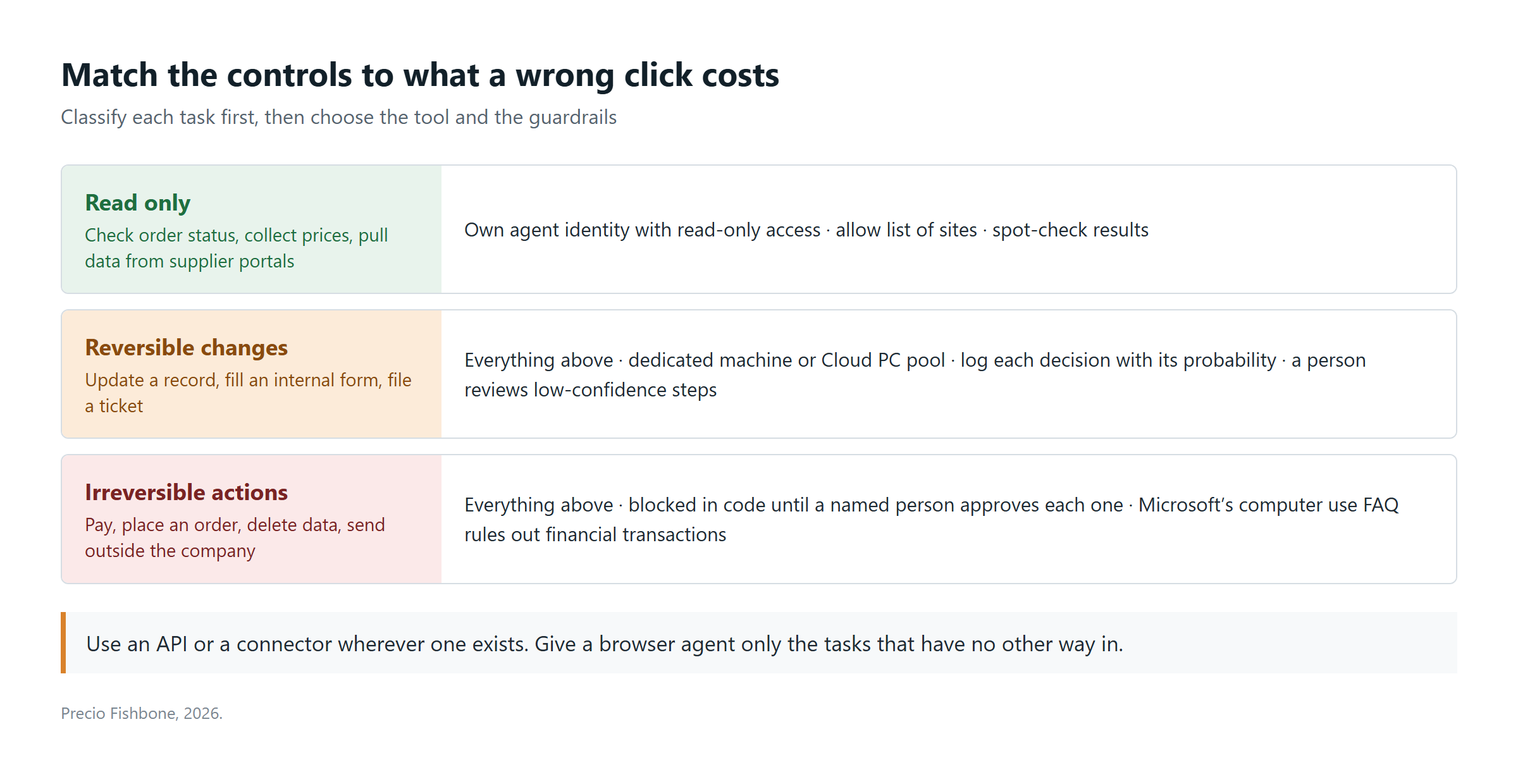
Figure 3. Match the controls to what a wrong click costs. View full-size image
Most organizations will find their first good candidates in the read-only tier: pulling prices, checking order status, collecting data from supplier portals. There, a sub-cent click pays off with little to lose.
Work with Precio Fishbone
Not sure which of your processes are safe to hand to a Jev browser agent? Book a free consultation with our AI team, or email me directly at par.johansson@preciofishbone.se.
Talk to our expertFrequently Asked Questions
What is a Jev browser agent?
A browser agent that uses Jev, TypeSafe's decision model, to choose each click. Jev itself returns typed answers with probabilities, not actions. Agents such as Jev Ultrafast and fastbrowse pair it with a language model that plans and types.
Can Copilot Studio computer use run on Jev?
No. As of 28 September 2026, computer use runs on OpenAI's Computer-Using Agent or on Anthropic Claude models, and Jev is not in the Microsoft Foundry model catalog. A Copilot Studio agent can still call a Jev-based agent such as fastbrowse through MCP.
Can a browser agent use our employees' single sign-on?
Yes, if it runs in a browser profile or on a machine where someone is already signed in. Give each agent its own account instead.
Share this on

Pär Johansson
Pär works with international business at Precio Fishbone, project delivery & digital services, helping turn complexity into progress and strategy into long-term value. With many years of experience in international business, He is known for building strong relationships and turning plans into meaningful progress. Driven by people, trust and sustainable growth.