
A New Kind of AI for Legal Work
Most AI tools built for legal work follow the same pattern: you ask a question, you get an answer.
The Legal Agent in Microsoft Word takes a different approach entirely. It doesn't just respond to queries. It works inside the document, following structured processes the way a legal professional actually does.
Legal workflows demand precision and auditability. General-purpose AI tools can assist with document review, but they aren't designed to follow the structured processes legal teams rely on to evaluate risk and maintain consistency.
That's the gap Microsoft is trying to close. And the way they've approached it is worth paying attention to.
What Microsoft Actually Built
Announced on April 30, 2026, the Legal Agent is available in Word on Windows desktop through Microsoft's Frontier program, currently in the US only.
For those unfamiliar, Frontier is Microsoft's early access program for its latest AI innovations. The Legal Agent appears directly in the agents dropdown menu within Copilot in Word, with no installation required. Users may need to restart Word to see it.
The agent was built in close collaboration with legal engineers, not designed as a general-purpose AI adapted for contracts, but shaped around how legal review actually works.
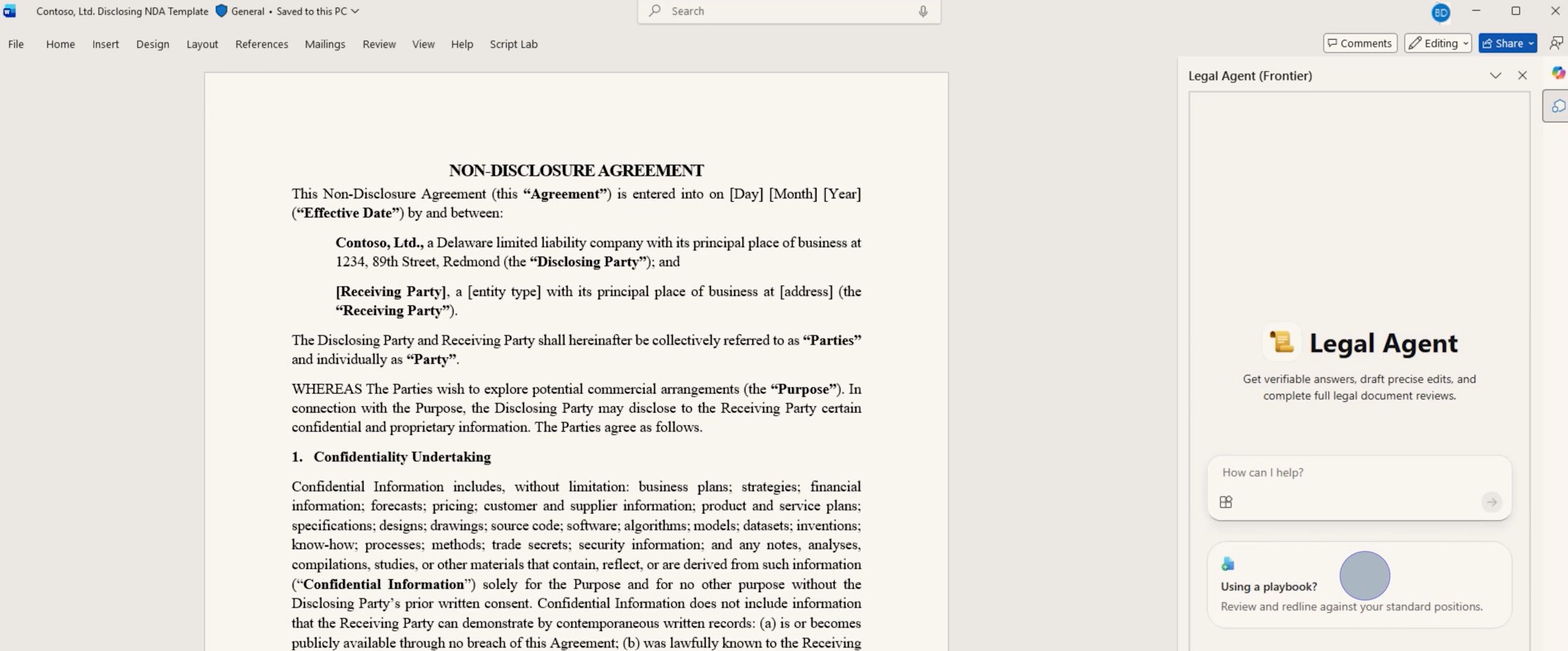
The Core Workflow: Playbook-Driven Contract Review
The headline capability is clause-by-clause contract review against an internal playbook.
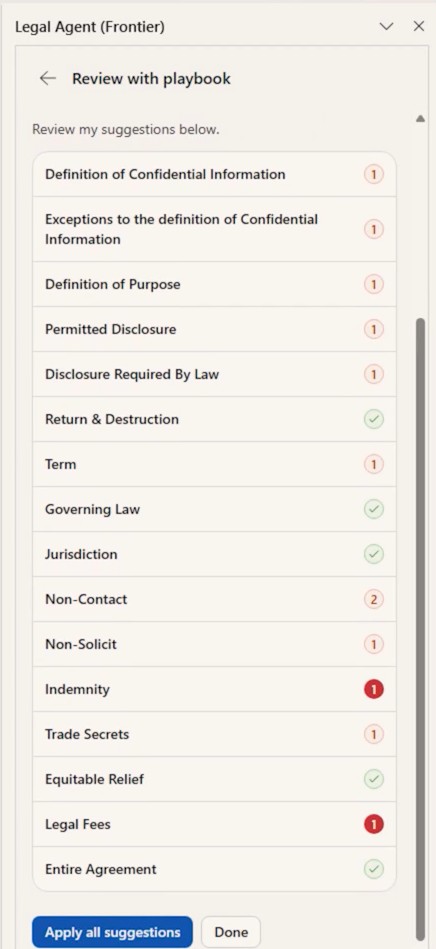
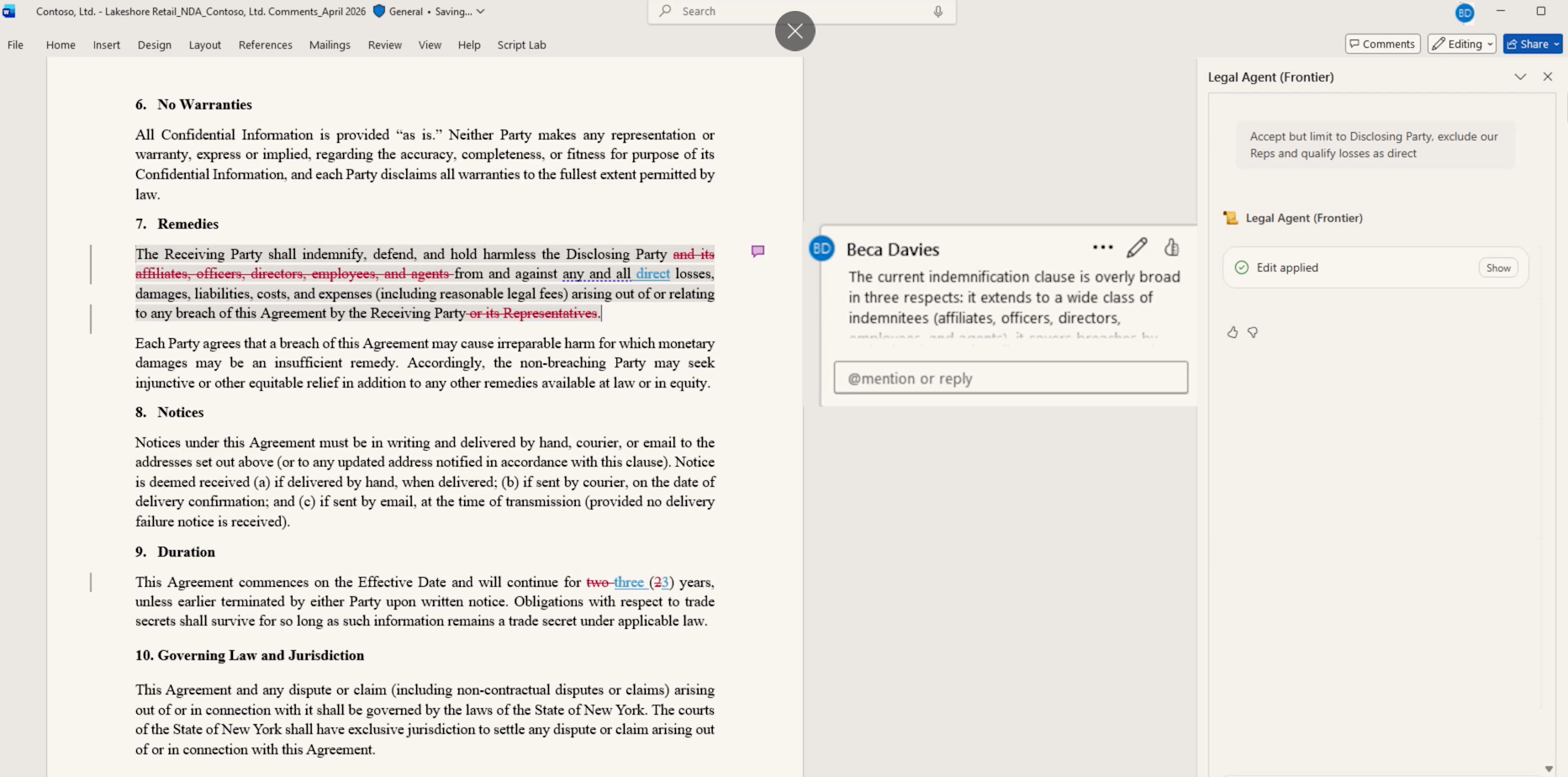
The agent scans a contract, flags provisions that don't conform to your standards, and proposes edits using native tracked changes in Word.
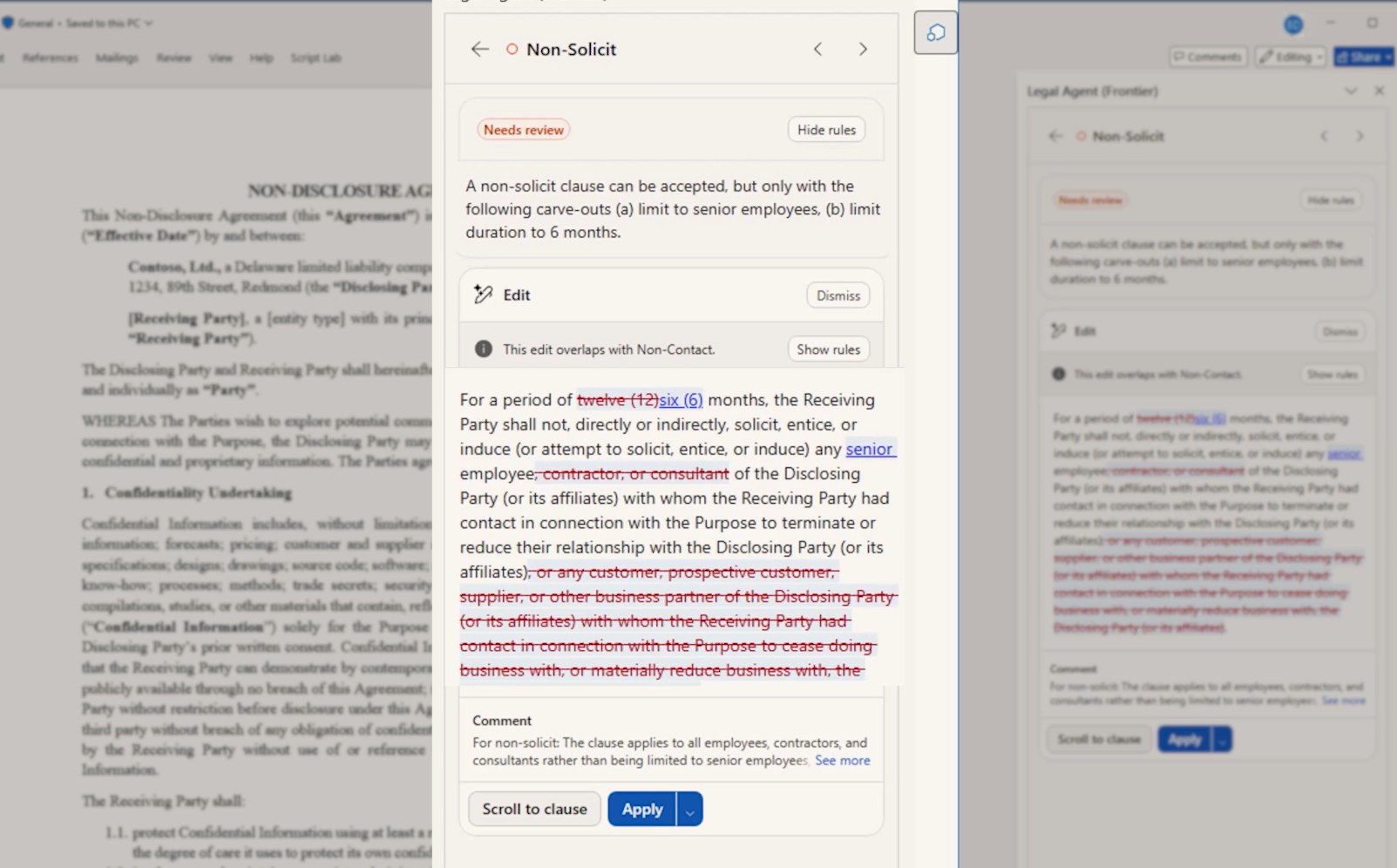
Every suggestion comes with citations that link directly to the source language in the document. Reviewers can verify where each recommendation comes from without hunting through pages of text.
Suggestions can be applied one by one or across the document at once. Beyond playbook review, the agent can also analyze the full agreement, drill into specific clauses, compare versions to spot risks and obligations, and draft precise edits on instruction.
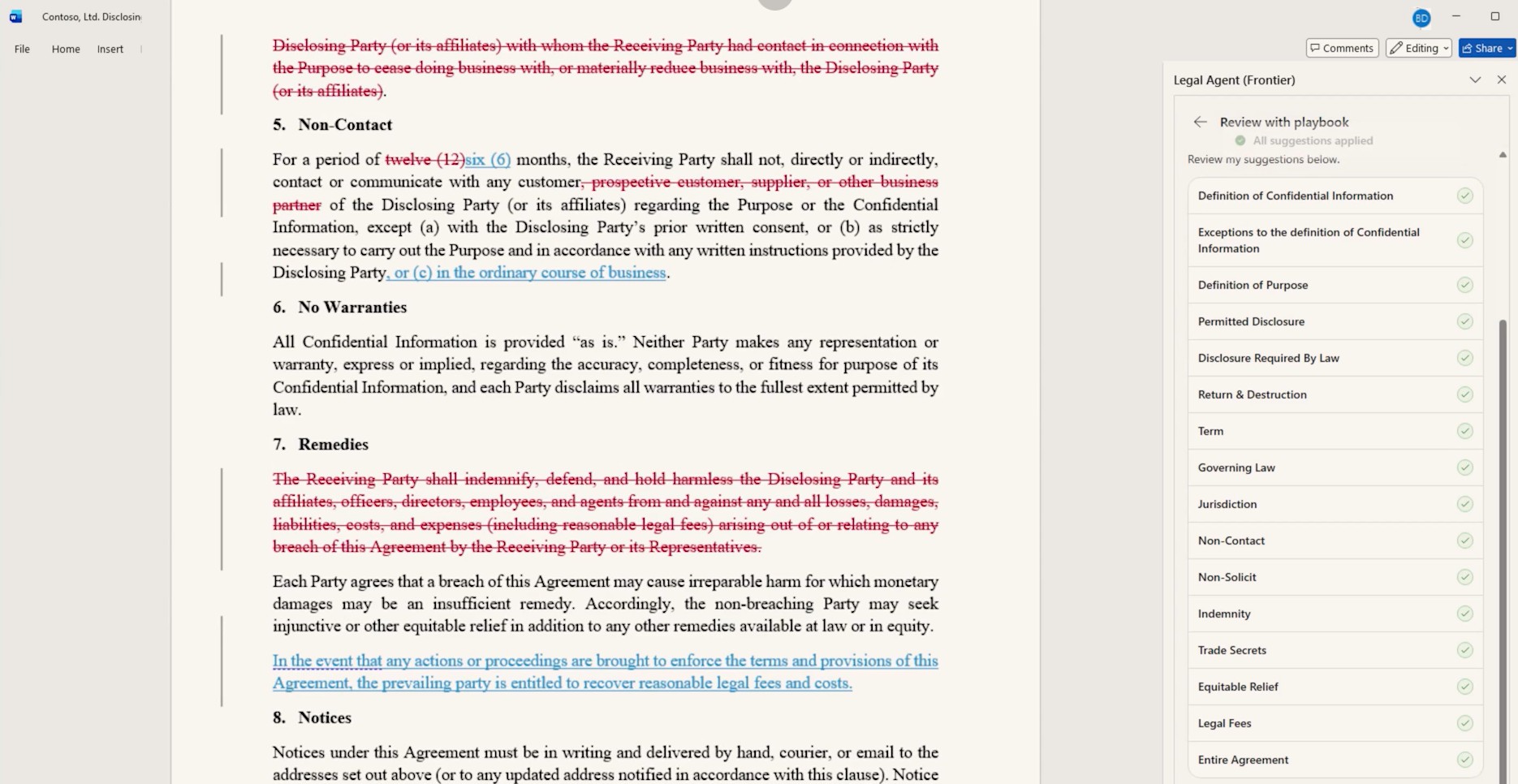
The result is intended to be negotiation-ready redlines, with minimal unnecessary edits and preserved original formatting.
Why the Engineering Underneath Is Worth Understanding
This is where the Legal Agent separates itself from most legal AI on the market, and it comes down to one design choice.
Most tools in this space ask the AI model to generate every edit directly. The model reads the contract, decides what to change, and writes the revision. That is precisely how errors spiral across a long document.
Microsoft went a different way. According to the product announcement, the agent applies a deterministic resolution layer over edits rather than letting the model write each revision freehand.
The agent's redlining engine understands the structure of a Word document, not just the visible text. It structures the document format into a representation that preserves formatting, lists, tables, and tracked changes, then applies a deterministic resolution layer over the edits.
The AI decides what needs to change. A purpose-built algorithm handles how the edits are applied, consistently, regardless of how each change was introduced.
For legal work, where consistency and auditability are non-negotiable, that's a meaningful architectural difference. Cleaner redlines. Fewer surprises.
Working Inside Live Redlines
One practical capability worth calling out: the Legal Agent works inside documents that already contain tracked changes.
It separates prior revisions from new proposals, preserving the full negotiation history as it adds its own suggestions. Author-specific changes are handled through the deterministic resolution layer, so the agent knows whose edits are whose.
Anyone who has untangled a four-party redline at midnight will know why that matters, as Stephen Allen (ex-Global Practice Lead, Legal Service Transformation, PwC ) put it directly. The negotiation record stays intact and nothing gets overwritten.
Early Signals From the Field
One legal professional who received early access shared a detailed breakdown of their experience, and their assessment was measured and specific.
"That translation layer is where quality lives or dies. Validate the skill before you trust the output." - Stephen Allen, ex-Global Practice Lead, Legal Service Transformation, PwC
The playbook-driven review and the handling of tracked changes were highlighted as genuine strengths. The citation-linked suggestions and the preservation of negotiation history addressed real pain points in day-to-day contract work.
But they were equally direct about the current limitations.
The agent does not review against a playbook directly. It first builds a reusable skill from the playbook. That translation step is the quality gate, and it requires validation before the output can be trusted in a live workflow.
Template and precedent review are also not yet supported. For now, the agent is playbook-only.
The Honest Take: Promising, But Narrow
The same early user described the product in three words: Promising. Narrow. Worth piloting now.
The scope is limited compared to what a full legal AI platform might offer. But the foundation, deterministic editing, native Word integration, playbook-driven review, is built on sound principles.
The distribution case is already compelling. For organizations already paying for Microsoft 365 Copilot, the Legal Agent requires no additional cost. That is a meaningful consideration for in-house legal teams or busy private lawyers drowning in third-party paper, where expanding access doesn't require a separate procurement decision.
For teams that have been hesitant to introduce a new AI platform into their legal workflow, the fact that this lives inside a tool they already use and trust changes the conversation considerably.
The Trajectory Argument
The early reviewer made a point worth sitting with. Microsoft Copilot's improvement rate over the last six months has been, in their words, "genuinely remarkable."
If that trajectory continues, this becomes a serious assistant for the busy lawyer, not because of what it does today, but because of what it will do by Q4.
The argument for piloting now is not that the product is fully mature. It's that the teams who build familiarity with it today will be better positioned when it is.
What the Legal Agent Does Not Do
It's worth being explicit about the boundaries, because Microsoft is.
The Legal Agent does not provide legal advice. It does not make professional determinations. It is not a substitute for the judgment of a qualified legal professional.
AI-generated content can be inaccurate. Users remain solely responsible for reviewing, verifying, and deciding whether to rely on any output before taking action.
That framing is not a disclaimer to skip past. It is a practical guide for how to integrate this kind of tool into a legal workflow. The agent handles the tedious, repeatable work. The professional handles the judgment.
Security and Governance
For legal teams, the question of where data goes is rarely optional.
The Legal Agent runs within Microsoft 365's existing security, compliance, and governance controls, the same infrastructure organizations already use for their legal documents and internal standards.
Legal documents carry some of the most sensitive data in any organization. The fact that the agent operates entirely within the M365 security boundary, rather than routing data through a third-party platform, removes a category of risk that legal and compliance teams would otherwise need to assess.
For enterprise legal teams who would otherwise need to evaluate a new platform's security posture from scratch, that continuity matters.
The Legal Agent is a signal worth acting on. If you are exploring how Microsoft AI fits into your legal or business workflows, Precio Fishbone can help you figure out where to start.
Book a consultation
Frequently Asked Questions
Does the Legal Agent work with any version of Microsoft Word?
Currently available in Word on Windows desktop through Microsoft's Frontier program in the US only. No installation required, but users may need to restart Word to see it in the agents dropdown within Copilot.
Does using the Legal Agent cost extra if you already have Microsoft 365 Copilot?
For organizations already paying for M365 Copilot, the Legal Agent adds no incremental cost, making it a straightforward option to put in front of legal teams.
Can the Legal Agent review contracts against any playbook?
It first converts your playbook into a reusable skill. Output quality depends on that translation step, so validating the skill before full deployment is strongly recommended.
Is template or precedent review supported yet?
Not at this stage. The current version is playbook-only. Template and precedent review have not been announced for this release.
Share this on

Pär Johansson
Pär works with international business at Precio Fishbone, project delivery & digital services, helping turn complexity into progress and strategy into long-term value. With many years of experience in international business, He is known for building strong relationships and turning plans into meaningful progress. Driven by people, trust and sustainable growth.