
Microsoft 365 Data Loss Prevention (DLP) keeps working when you turn Copilot on. It still governs how sensitive information is accessed and shared across Teams, SharePoint, Exchange, and OneDrive, and Copilot respects it.
So a Copilot rollout is not a reason to rebuild your DLP estate, and I would push back on anyone selling you that. What changes is the cost of the gaps you already have.
DLP was written for a human who had to open a file, find the sensitive paragraph, and copy it out. Copilot does that in one sentence, across every workload the user can reach, including the ones nobody wrote a policy for.
What Keeps Working After You Enable Copilot
An organization with solid Purview coverage will usually hold up well when Copilot is enabled. Sensitivity labels still apply. A user cannot use Copilot to access or summarize a file they do not have permission to open.
If a DLP policy restricts what can be done with labeled content, those restrictions apply to Copilot interactions as well.
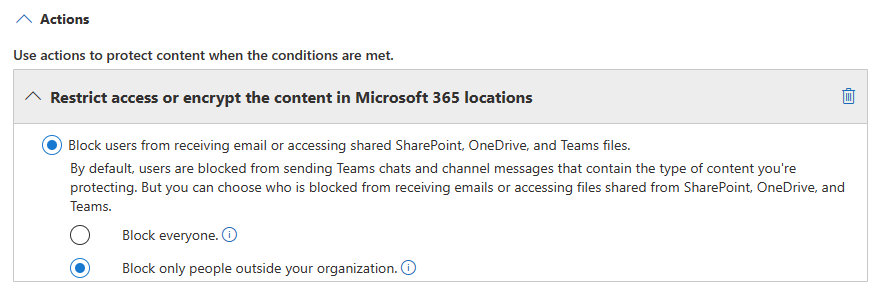
Exchange DLP policies still fire. If Copilot drafts an email containing content that matches a DLP rule like payment card data, health record identifiers, or a custom sensitive information type, the policy can still warn, block, or require justification before the email is sent.
Endpoint DLP still controls device-level actions on managed devices, and it does not care whether a file was written by hand or by Copilot. Be precise about the Copilot-specific coverage though.
For Copilot Chat, Endpoint DLP covers the web version only, and it does two things there:
- Block paste of sensitive content
- Block files carrying a given sensitivity label
Label inheritance works in Word, PowerPoint, and Outlook. When Copilot creates new content from a labeled file in these apps, the source label carries over automatically, including its protection settings. If multiple source files are used, the highest-priority label is applied.
What Your Existing DLP Setup May Not Cover
Permissions are not the same as DLP policy
Copilot only surfaces content a user has permission to access. But having permission to see something is not the same as having a DLP policy that governs what happens to it next.
A user with read access to a sensitive HR document can ask Copilot to summarize it, then paste that summary into a Teams message or a slide deck and send it to someone with no access to the original.
Unless the pasted content matches a configured sensitive information type, no DLP policy fires. The system has no way to know the content came from a Copilot summary of a protected file. That holds for the DLP policies you already have. Purview does have a control that stops this earlier, and almost nobody has switched it on.
Scoping DLP rules by sensitive information type, not by file location alone, closes more of this than any other single change you can make. Troubleshooting Common DLP Issues in Microsoft 365 walks through where the rules break down in practice.
Label Inheritance Has Limits
Two things break it. If the source item is encrypted with user-defined permissions, or encrypted independently of the label, inheritance does not run. Copilot can still read the file when you have it open in the app, but it will not carry the protection into the new content, and the user cannot send that data to the destination item.
And Teams meeting and chat content is not covered: labels applied to meetings or channel chat are invisible to Copilot, so nothing is inherited from them. The exception is meeting invites and calendar events, which keep their label.
The bigger issue is consistency. Inheritance only works if the source content was labeled in the first place. Securing AI with Microsoft Purview goes deeper on the architecture if you want the technical view.
Teams Transcripts Are the Most Commonly Missed Workload
Facilitator Agent (replacing Intelligent Recap) provide meeting summaries and have the ability to query what was discussed in a call all depend on transcripts being available. In many organizations, DLP policy for Teams was configured around chat messages and shared files. Meeting recordings and transcripts were scoped out or simply never revisited.
When those transcripts are ungoverned, every sensitive conversation, including HR discussions, commercial negotiations, or anything with legal or strategic sensitivity, can be accessible to Copilot without any policy applying to it.
Worse, when Copilot references a transcript, that reference is not captured for auditing, so you cannot reconstruct afterwards what it read. Transcript policy belongs to the wider set of Microsoft Teams security practices, and it is usually the piece nobody owns.
Extending DLP policy to cover transcripts involves decisions beyond a single rule: where transcripts are stored, how long they are retained, and which meeting policies control who can initiate transcription. The DLP in Microsoft Teams guide covers the storage, privacy, and compliance controls in detail.
Copilot Has Its Own DLP Location, And Most Tenants Have Not Turned It On
Purview has a policy location called Microsoft 365 Copilot and Copilot Chat. It is not a rule inside your existing policies. It is a separate location, available only in the Custom policy template, and selecting it disables every other location in that policy. That is why nobody stumbles into it.
Blocking Copilot from processing files and emails that carry a given sensitivity label is generally available. Blocking prompts that contain sensitive information types, blocking web search grounding on those prompts, and excluding externally received email from grounding are newer, and two of those are still in preview.
This rewrites the HR example above. With the label condition on, Copilot never summarizes the document, so there is no summary to paste. The item still appears in the citations of the response, but its content is not used.
What to Check Before You Expand Copilot Access
Six things. They are not equally important, and running them as a flat checklist is how the one that matters gets done last.
Start with the permission footprint
This is the one that matters most, and the one nobody wants to open. Copilot accesses whatever the user can access, and in most Microsoft 365 tenants a user can reach far more than they ever touch.
Find the SharePoint sites and OneDrive libraries shared more broadly than their content sensitivity warrants. Everything else on this list is cheaper to fix than this.
That is exactly why it keeps getting deferred. For the admin-side view of what to look at, SharePoint for Copilot readiness covers the tooling.
Turn on the Copilot DLP location
The only item here you can finish this week. Create a Custom DLP policy, set the Microsoft 365 Copilot and Copilot Chat location, and use the sensitivity label condition to keep your most restricted content out of Copilot responses. Allow up to four hours for it to take effect. Everything else on this list is an audit. This one is a switch.
Teams transcripts & recordings
The workload most often missed in the original DLP configuration. If your organization runs sensitive discussions through Teams, confirm that policy reaches this content before you widen access.
Label coverage
Labels are the signal both Copilot and Purview DLP use to judge sensitivity, and inheritance only protects what was labeled to begin with. A gap here silently caps everything the inheritance mechanism can do for you.
If labeling has never had an owner, that is a security and data governance for AI problem before it is a Copilot problem.
Scope the pilot, do not clean up afterwards
Broad enablement followed by governance cleanup sounds faster and is not. Permission problems and labeling gaps are cheap to find at small scale and expensive to find at large scale. This is the part of a Microsoft Copilot deployment where sequencing matters more than speed.
What to Review First
Purview DLP does not stop working when Microsoft 365 Copilot is enabled. It keeps doing exactly what you told it to do, and that is the problem.
If I had to pick one thing to look at first, it would be the permission footprint. It is the only item on that list where the exposure is already live and nobody can see it. Labeling and transcript policy are gaps you close on a schedule. Over-shared SharePoint sites are a gap Copilot will find for your users on day one.
Contact To Our ExpertPrecio Fishbone works with organisations to move from AI and Microsoft strategy to structured, practical implementation. To discuss what this means for your environment, contact our team.
Frequently Asked Questions
Does Purview DLP automatically protect data that Microsoft 365 Copilot accesses?
Not entirely. Label inheritance works in Word, PowerPoint, and Outlook, but not in Teams meetings and chats, and not on files encrypted with user-defined permissions. Verify label coverage before you scale Copilot.
What is the biggest DLP risk when enabling Microsoft 365 Copilot?
Permission sprawl. Users can reach far more data than they ever use, and Copilot queries all of it. Audit permissions before you expand access.
How should organizations approach data loss prevention when rolling out Copilot?
Fix the permission footprint first, then turn on the Copilot DLP location, then close the gaps in labeling and Teams transcript coverage. Pilot with a defined user group and data scope. Gaps are cheaper to find at small scale.
What does data loss prevention cover in the context of AI tools like Copilot?
It has to account for what AI can synthesize, not only what it stores. Summaries, outputs, and cross-workload content that traditional DLP rules were never written to track.
Share this on

Pär Johansson
Pär works with international business at Precio Fishbone, project delivery & digital services, helping turn complexity into progress and strategy into long-term value. With many years of experience in international business, He is known for building strong relationships and turning plans into meaningful progress. Driven by people, trust and sustainable growth.